

Search traffic to product pages no longer comes only from 10 blue links. In 2026, shoppers ask ChatGPT, Perplexity, and Google's AI Overviews for product recommendations, and those systems pull answers directly from the product pages they can read and trust. Product page SEO is the practice of optimizing individual product pages so that both classic search engines and AI answer engines can find, understand, and recommend them. This guide covers keyword research, on-page best practices, AI search (GEO) optimization, and the 5 best Shopify SEO apps.
What Is Product Page SEO?
Product page SEO is the process of optimizing individual product pages on an e-commerce site to improve their visibility in search engine results pages (SERPs) and, increasingly, in AI-generated answers. It combines on-page elements (titles, descriptions, URLs), technical elements (structured data, page speed), and content elements (images, reviews, Q&A).
The goal stays the same in 2026: make every product page easy for crawlers and language models to discover and attractive enough for shoppers to click and buy. The channels have multiplied — Google Search, Google Shopping, AI Overviews, and AI assistants all read the same page. Optimizing once now pays off across all of them.
Why Product Page SEO Matters in 2026
Product page SEO is one of the few acquisition channels that compounds instead of resetting every time you pause ad spend. For Shopify merchants, 4 benefits stand out:
- Drives organic and AI-referral traffic: Optimized pages attract visitors from search results and AI assistant citations without paying per click, lowering customer acquisition costs.
- Enhances user experience: The same work — fast loading, clear structure, descriptive content — that helps rankings also helps conversion rates.
- Attracts high-intent buyers: Someone searching or asking an AI for "genuine wood watch" is far closer to purchase than a cold social media scroller.
- Boosts sales and revenue: Higher visibility plus better UX directly translates into more orders over time.
One channel shift deserves attention: AI Overviews and AI assistants now answer many product questions directly on the results page, so pages that are cited by these systems capture clicks that pages buried in traditional listings do not.
Step 1: Start With Keyword Research
Product page SEO starts with keyword research. As the product owner, you already know the obvious terms shoppers use in your niche — but tools surface the long-tail variations and question-format queries you would miss. Keywordtool.io is a solid starting point, and Google Search Console (free) shows the queries your pages already rank for.

Run your seed term through the tool and export the list. Throughout this guide we will use the example keyword "genuine wood watch" to optimize a Shopify product page step by step.

In 2026, add 1 extra pass: collect question-format keywords — queries phrased as full questions like "are wood watches durable?". AI assistants and Google's "People also ask" both favor pages that answer these directly, so they feed both your product copy and your FAQ content.
Product Page SEO Best Practices
These on-page fundamentals still decide most rankings. Apply each one to every product page before moving on to AI-specific tactics.
Optimize the Product Title, Description, and First Paragraph
Googlebot — and every LLM crawler — needs to know what your Shopify product page is about within the first few hundred words. Place the target keyword in the page title, in the first paragraph of the product description, and in 1 H2 subheading. That is enough — keyword stuffing hurts more than it helps in 2026, because both Google's helpful-content systems and LLMs reward natural, informative writing.
If writing descriptions at scale is the bottleneck, these AI product description generator tools can draft hundreds of unique descriptions you then edit for accuracy.
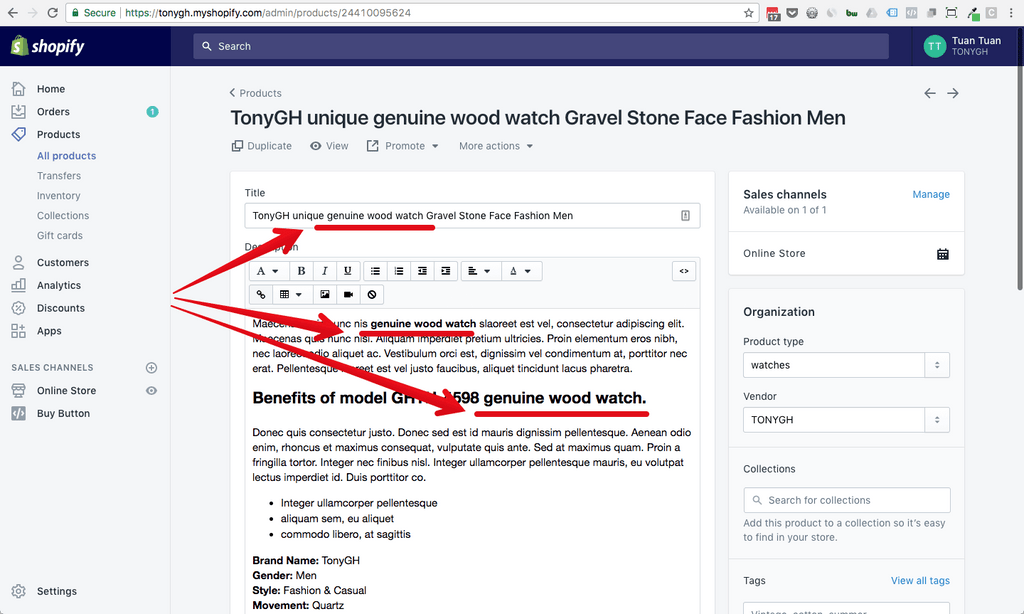
Also add the keyword to the Tags field in Shopify admin. Tags group pages around a shared phrase — when a shopper clicks the "genuine wood watch" tag, Shopify lists every product labeled with it, which strengthens topical relevance.
Organize Collections and Tags for Internal Linking
Every product should live in a logical collection — our wood watch belongs in a "Wooden Watches" collection. Collections create automatic internal links between related products, and internal linking is one of the strongest signals search engines use to understand which pages on your store matter most.

Optimize Image Size and ALT Text
Shopify prompts you to fill in image alt text for a reason: descriptive alt text containing the target keyword helps Googlebot index your images for Google Image Search and improves accessibility. Write alt text that describes the actual image — "men's genuine wood watch with walnut case" — not a keyword list.

Image file size matters just as much, because it drives page load speed and Core Web Vitals. Compress images before upload with TinyPNG or a similar tool, and prefer modern formats like WebP where your theme supports them.

For stores with hundreds of product images, automate this with a Shopify app — the TinyIMG and Booster apps covered later in this guide both handle bulk compression and alt-text generation.
Clean Up the URL and Meta Description
Place the target keyword in the URL handle and the meta description. The URL should be short and readable — /products/genuine-wood-watch, not /products/watch-2024-new-v3-final. The meta description does not directly affect rankings, but it is your 155-character sales pitch in the search results, so write it to earn the click.

Add Structured Data Markup
Structured data is machine-readable code (usually JSON-LD) that explicitly tells search engines what your page contains — product name, price, availability, and review ratings. With Product schema in place, your listing can show star ratings and price directly in Google results, which improves click-through rates. In 2026 it does double duty: AI systems use the same markup to extract accurate facts about your products.

Most modern Shopify themes include basic Product schema, but verify yours with Google's Rich Results Test. The video below explains what structured data (microdata/JSON-LD) is and why it matters:
Collect User-Generated Content
Reviews, ratings, and Q&A on a product page are user-generated content (UGC) — content written by customers rather than the merchant. UGC adds fresh, unique text to pages that would otherwise share boilerplate copy, and it naturally contains the long-tail phrases real shoppers search for.
Set up an automated post-purchase review request email so every order generates a chance at new content. Reviews also feed your Review schema (star ratings in search results) and give AI assistants third-party evidence that your product delivers — a double win for SEO and conversion.
How to Optimize Product Pages for AI Search (GEO)
Generative engine optimization (GEO) — also called answer engine optimization (AEO) — is the practice of structuring page content so AI systems like ChatGPT, Perplexity, and Google's AI Overviews can extract, cite, and recommend it. Classic SEO gets you crawled and ranked; GEO gets you quoted. The 2 disciplines overlap heavily, so most GEO work builds on the best practices above.
AI systems prefer pages with 3 traits: clear factual statements, explicit structure (headings, lists, tables, schema), and verifiable specifics (dimensions, materials, prices). Vague marketing copy — "the ultimate timepiece experience" — gives an LLM nothing to cite.
Follow these 6 steps for each key product page:
- Lead with a definitional sentence. Open the description with a plain "X is Y" statement: "The Walnut Classic is a 42mm men's watch with a genuine walnut wood case and Japanese quartz movement." LLMs lift these sentences verbatim.
- Add a Q&A block. Answer 3–5 real customer questions ("Is this watch waterproof?", "How do I adjust the strap?") in question-heading + short-answer format. This matches how people prompt AI assistants.
- Use complete structured data. Go beyond basic Product schema: include price, availability, GTIN/SKU, aggregateRating, and FAQPage markup where you have a Q&A block.
- State specs as facts, not adjectives. Replace "lightning-fast shipping" with "ships within 24 hours from our US warehouse." Concrete claims are citable; superlatives are not.
- Keep one canonical page per product. Duplicate or thin variant pages dilute the signals AI systems use to pick a source. Consolidate and use canonical tags.
- Monitor AI referrals. Check your analytics for referral traffic from chatgpt.com, perplexity.ai, and similar domains to learn which pages AI systems already cite, then apply the same patterns elsewhere.
None of this replaces classic SEO. A page that loads slowly or lacks keywords will not surface in AI answers either — GEO is a layer on top of the fundamentals, not a substitute.
How to Apply These SEO Practices With PageFly
If you build product pages with PageFly, the page builder used by 230,000+ Shopify merchants, you can implement most of this guide inside the editor:
- SEO-friendly output: PageFly pages render as standard storefront HTML with editable meta titles, meta descriptions, and image alt text, so everything in the best-practices section above applies directly to PageFly-built product pages.
- AI Smart Pages: Generate sales pages aligned with visitor intent, then edit the copy to include your target keyword, a definitional opening sentence, and factual specs — the same AI-building workflow as our guide to building a landing page that converts.
- Section Generator: Create the building blocks for GEO-friendly layouts — Q&A sections, spec tables, and comparison blocks — without coding.
- A/B Testing: Test page variants to confirm that SEO-driven layout changes (longer descriptions, FAQ blocks) also lift add-to-cart rate, not just traffic.
- Dashboard Analytics: Track conversion rate, add-to-cart rate, and engagement per page so you can see whether your newly ranking pages actually convert.
- AI Page Checkup: Get conversion feedback on your layouts — flagged blockers with recommended fixes — so the page that ranks is also the page that sells.
The practical workflow: research keywords first, build or rebuild the page in PageFly with the keyword in the title, first paragraph, and 1 H2, add a Q&A section for GEO, then A/B test the new layout against the old one before rolling it out store-wide.
Top 5 Shopify Apps for Product Page SEO
The right app automates the repetitive parts — image compression, alt text, meta tags, broken links — across hundreds of products. Here is how the 5 top-rated options compare:
| App | Rating | Paid plans from | Best for |
|---|---|---|---|
| Tiny SEO Speed Image Optimizer (TinyIMG) | 5.0/5 (2,298 reviews, Jun 2026) | $14/month (Beginner) | Image-heavy stores |
| SearchPie: SEO, Speed & Schema | 4.9/5 (2,319 reviews, Jun 2026) | $39/month (Premium) | All-in-one SEO + speed |
| SEOWILL: AI SEO (formerly SEOAnt) | 4.8/5 (1,631 reviews, Jun 2026) | $29.99/month (Pro) | AI-driven automation |
| Booster AI SEO Optimizer | 4.8/5 (4,291 reviews, Jun 2026) | $39/month (Pro) | On-page + technical SEO |
| Sherpas: Smart SEO | 4.9/5 (915 reviews, Jun 2026) | $14.99/month (Pro) | Budget-friendly automation |
1. Tiny SEO Speed Image Optimizer (TinyIMG)
Tiny SEO by TinyIMG focuses on the image and speed side of product page SEO. It compresses images without visible quality loss, adds JSON-LD schema and LLMs.txt, and directly improves page load speed and Core Web Vitals.

Key features:
- Image compression: Automatically compresses product images in bulk to speed up page loads.
- Alt text optimization: Generates SEO-friendly alt text at scale, improving image SEO and accessibility.
- Image resizing: Serves optimally sized images across devices.
- Broken link management: Detects and helps fix broken links that hurt crawlability and UX.
Reviews: TinyIMG holds a 5.0/5 rating (2,298 reviews, Jun 2026) on the Shopify App Store, with merchants citing noticeable load-speed improvements after bulk optimization.
Pricing: Free to install (pay-as-you-go, 50 free image optimizations/month); paid plans: Beginner $14/month, Advanced $23/month, Expert $49/month.
Best for: Stores with large product image catalogs that need automated compression and alt-text work.
2. SearchPie: SEO, Speed & Schema
SearchPie combines an on-page SEO toolkit with page-speed optimization and schema markup in 1 app, covering both halves of the technical SEO equation — and in 2026 it added AEO features (LLM.txt, bulk AI SEO tags) for AI search.

Key features:
- SEO audit and optimization: Scans your store and flags issues in meta tags, headings, and content structure with actionable fixes.
- Page speed optimization: Optimizes images, scripts, and other elements that slow pages down.
- Structured data support: Adds schema markup to product pages, enabling rich snippets — and feeding AI search systems accurate product facts.
- Automated SEO tasks: Bulk-generates meta tags and alt text for consistency across the catalog.
Reviews: SearchPie holds a 4.9/5 rating (2,319 reviews, Jun 2026), with merchants valuing the combined SEO-plus-speed coverage.
Pricing: Free Starter plan available; Premium $39/month, Enterprise $99/month — 7-day free trial.
Best for: Merchants who want 1 app to handle both SEO optimization and site speed.
3. SEOWILL: AI SEO & AI Blog Post (formerly SEOAnt)
SEOWILL — rebranded from SEOAnt in 2026 — uses AI to automate SEO management. It analyzes your store and generates data-driven recommendations, auto-generates structured data and llms.txt, and now targets visibility in ChatGPT and Claude as well as Google.

Key features:
- AI-driven optimization: Tailored recommendations for keywords, meta tags, and content.
- Keyword research tool: Identifies high-value keywords and suggests where to place them.
- Automated SEO reports: Tracks progress and highlights remaining issues over time.
- Technical SEO fixes: Automatically detects broken links, duplicate content, and crawl errors.
Reviews: SEOWILL holds a 4.8/5 rating (1,631 reviews, Jun 2026) on the Shopify App Store, with merchants highlighting how much manual SEO work the AI features absorb.
Pricing: Free plan available; Pro $29.99/month, Premium $59.99/month — 7-day free trial.
Best for: Merchants of any size who want AI to handle routine optimization tasks.
4. Booster AI SEO Optimizer
Booster AI SEO Optimizer is an all-in-one tool covering automated audits, image optimization, meta tags, and structured data — a broad on-page plus technical SEO package that now runs its fixes with AI automation.

Key features:
- Automated SEO audits: Scans for common issues and provides actionable fixes.
- Image optimization: Compresses images without quality loss for faster loads.
- Meta tag optimization: Bulk-edits meta titles and descriptions across all product pages.
- Automatic alt text generation: Creates SEO-friendly alt text for every image.
- Structured data markup: Adds schema for rich-snippet eligibility and higher click-through rates.
Reviews: Booster holds a 4.8/5 rating (4,291 reviews, Jun 2026) — the largest review base of the 5 apps here — frequently praised for its user-friendly interface.
Pricing: Free plan available; Pro $39/month, Premium $69/month — 14-day free trial.
Best for: Merchants wanting a single app that combines on-page and technical SEO.
5. Sherpas: Smart SEO
Smart SEO by Sherpas automates the routine on-page work — meta tags with AI, alt text, JSON-LD structured data, broken-link fixes — at the lowest paid entry price of the 5 apps here.

Key features:
- Automated SEO tasks: Generates and optimizes meta tags, alt text, and other elements store-wide.
- SEO audit and recommendations: Detailed audits with clear, actionable next steps.
- Image optimization: Compresses images and optimizes alt text in one pass.
- Structured data support: Adds product schema for rich-result eligibility.
Reviews: Smart SEO holds a 4.9/5 rating (915 reviews, Jun 2026), with merchants praising its ease of use and clear recommendations.
Pricing: Free plan available; Pro $14.99/month, Business $24.99/month, Premium $49.99/month — 7-day free trial.
Best for: Small businesses and larger stores alike that want affordable, automated on-page SEO.
Conclusion
Product page SEO in 2026 is the same discipline as before, plus 1 new audience: AI answer engines. Do keyword research, place keywords naturally, optimize images, add structured data, collect reviews — then layer on GEO tactics like Q&A blocks and factual, citable copy so AI assistants can recommend your products too.
Start with your 5 best-selling products. Optimize them end to end with the steps above, automate the repetitive work with one of the apps reviewed, and measure the result in both organic traffic and conversion rate. SEO compounds — every page you optimize keeps working while your competitors keep paying per click.
Product Page Seo FAQ
Product page SEO is the process of optimizing individual product pages on an e-commerce site so they rank higher in search engine results and get cited in AI-generated answers. It covers titles, descriptions, URLs, images, structured data, and reviews.
Open descriptions with a clear factual X-is-Y sentence, add a Q&A block answering real customer questions, use complete Product and FAQPage structured data, and replace vague adjectives with concrete specs. AI systems cite pages they can extract clear facts from.
It depends on your bottleneck: Tiny SEO by TinyIMG (from $14/month) leads for image optimization, SearchPie combines SEO with page speed and schema, SEOWILL (formerly SEOAnt) automates tasks with AI, Booster AI SEO Optimizer covers on-page plus technical SEO, and Sherpas: Smart SEO is the budget pick from $14.99/month.
Place the target keyword in the page title, the first paragraph of the product description, 1 H2 subheading, the URL handle, the meta description, and the image alt text. Avoid repeating it beyond that — keyword stuffing hurts rankings.
Yes — Product schema (JSON-LD) lets Google show star ratings, price, and availability in search results, which raises click-through rates. In 2026 the same markup also feeds AI search systems accurate product facts they can cite.
There is no single factor — a product page ranks when the basics and the technical health line up together: a unique meta title (about 60 characters), original product copy instead of the manufacturer's text, valid Product structured data, and "good" Core Web Vitals (Largest Contentful Paint under 2.5 seconds, Interaction to Next Paint under 200 milliseconds). Get those right and the page is also in good shape to be surfaced by AI search.
Shopify makes each product reachable at both a clean URL (/products/your-product) and collection-aware URLs (/collections/name/products/your-product). Make sure the page's canonical tag points to the clean /products/ URL and link to that same version in your internal links, so Google consolidates ranking signals onto one URL instead of splitting them across duplicates.
A complete product page SEO checklist covers: a unique title tag (about 50–60 characters), a compelling meta description under 160 characters with a call to action, the target keyword in the H1, original product copy (not the manufacturer's), descriptive image alt text, valid Product structured data, and a canonical tag on the clean /products/ URL. Work through these in order before chasing advanced tactics. (Source: Google Search Central; Shopify Blog.)
Keep the title tag to about 50–60 characters with the primary keyword first so it isn't truncated in search results, and the meta description to roughly 150–160 characters with a clear call to action. Align the title tag with the page's H1 so the topic is consistent for both Google and AI search. (Source: Google Search Central; Shopify Blog.)
Give AI assistants facts they can verify: complete Product schema (price, availability, brand, GTIN, and review ratings) plus full-sentence descriptions that state specs explicitly rather than relying on adjectives. When an assistant cannot confirm a detail, it tends to recommend a competitor whose data it can read. (Source: Google Search Central — generative AI guidance; Shopify Help Center.)