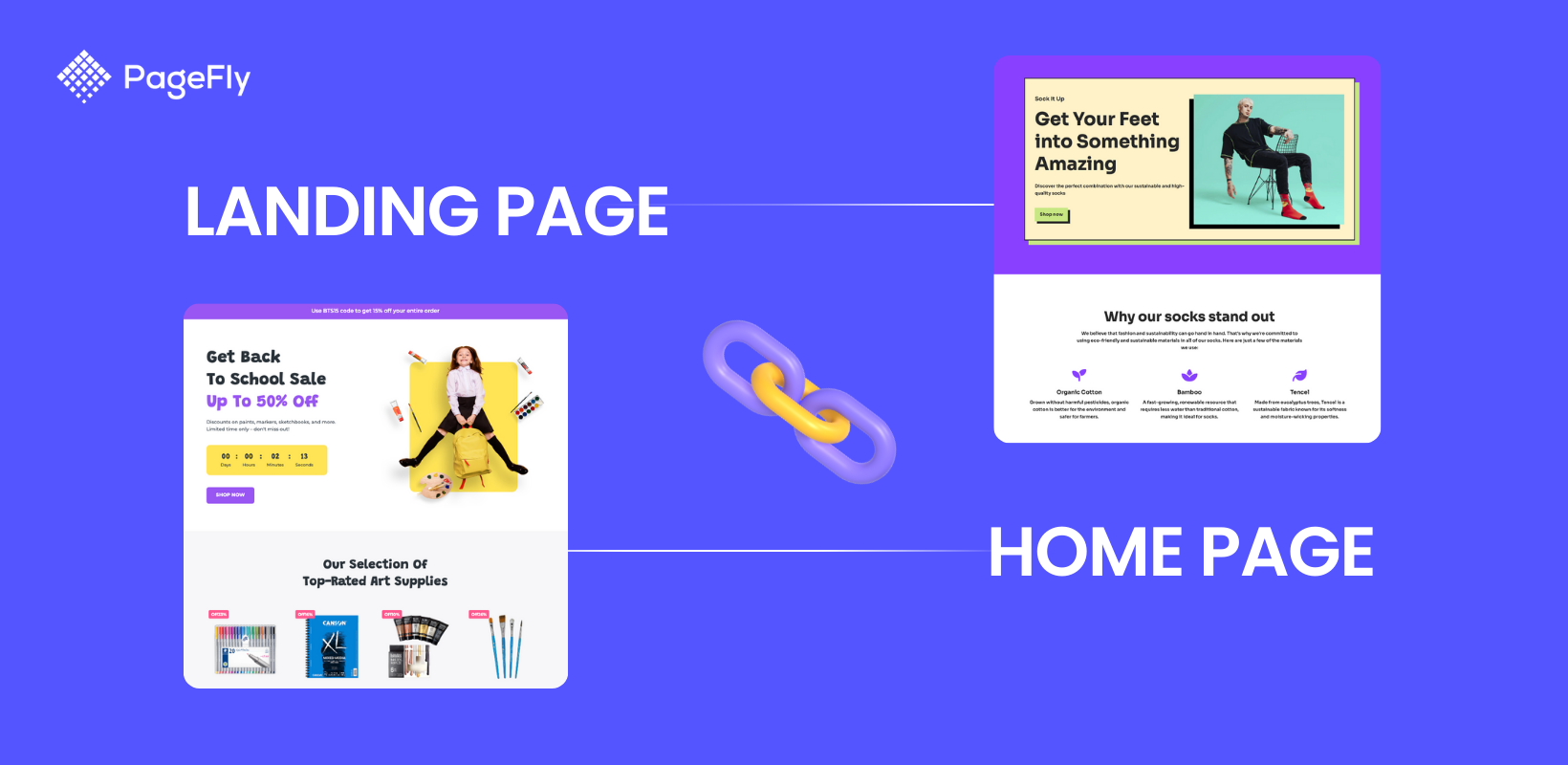
A landing page and a homepage do different jobs on a Shopify store. Which one you need depends on where the traffic comes from — here is how to decide.
Most merchants ask the question the wrong way round. They ask which page is better. The useful question is who is arriving, and did I choose them? Answer that and the page picks itself.
The short version
- Your traffic decides. Traffic you paid for or sent yourself goes to a landing page. Traffic that found you on its own goes to the homepage.
- A homepage routes; a landing page closes. The homepage answers “who are you?” for a stranger. A landing page answers “do this now” for someone you already qualified.
- You have one homepage and as many landing pages as you have offers. One per campaign, audience or product launch.
- The biggest structural difference is the navigation. A homepage gives people every exit on purpose. A landing page removes them on purpose.
- Do not judge them on the same metric. A homepage is measured on where people go next; a landing page on one completed action.
What is a landing page, and what is a homepage?
A landing page is a standalone page built for one action, shown to an audience you chose. It is usually reached from a link you control — a paid ad, an email, an SMS, an affiliate post — and it is trimmed down so the visitor can do that one thing or leave.
Your homepage is the front door of the whole store, at your root domain. It is reached by people who typed your brand, clicked an organic result, or came back from memory. Its job is not to close a sale in one screen; its job is to explain who you are and route each visitor to the right next page.
Those two definitions already contain the rule this article is built on: your traffic decides. If you know who is arriving because you sent them, build a landing page. If you cannot know who is arriving, the homepage has to stay broad on purpose.
One consequence trips people up. A landing page is not a page type Shopify ships with a special badge on it — it is a regular page you deliberately kept narrow. That is why two stores can both have “a landing page” and mean completely different things. If you are weighing a landing page against a full site build instead, that is a different comparison, covered in landing page vs website.
Focused pages shown to a chosen audience convert better than pages that serve everyone
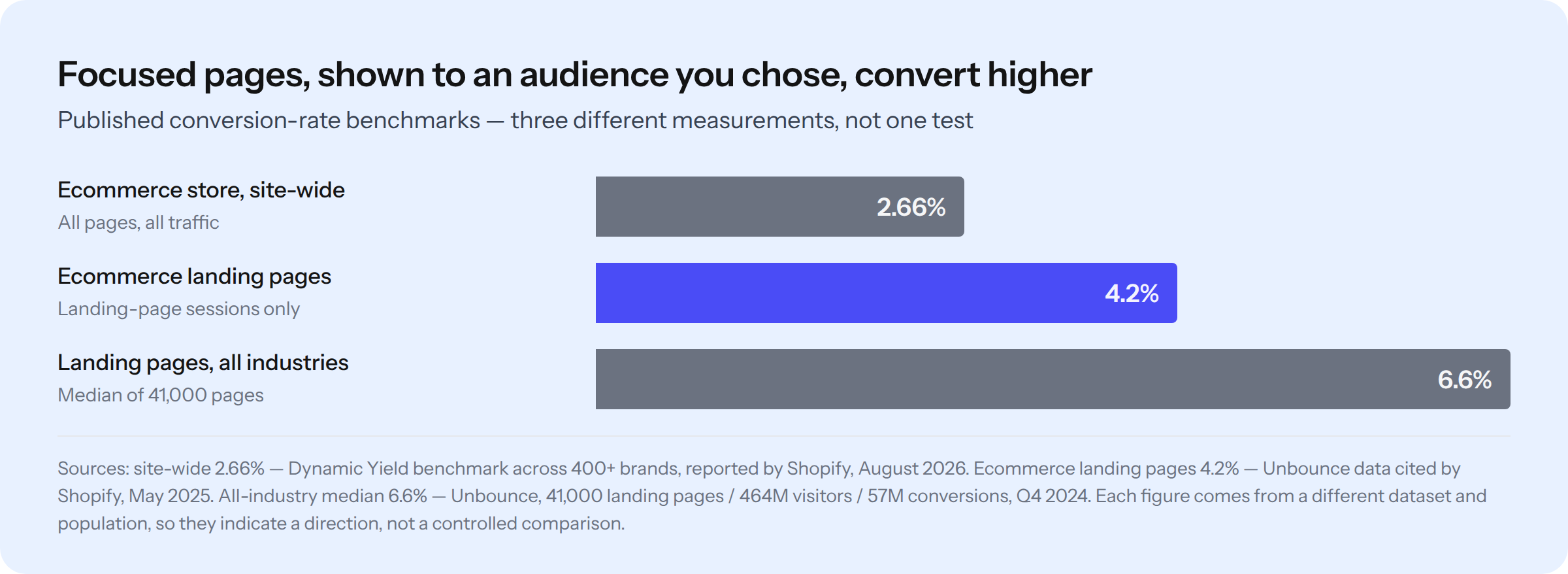
Ecommerce landing pages average 4.2% while whole-store ecommerce conversion averages 2.66% — but the two figures come from different datasets, so read them as a direction, not a verdict. Sources: Shopify’s landing page benchmarks (May 2025) and Shopify’s ecommerce conversion rate benchmarks (August 2026).
That gap is the whole argument for having both page types instead of stretching one to do both jobs. It is not proof that a landing page is “better” — it is a reminder that a page which only has to persuade one kind of person has an easier job. Before you set your own target, read what a realistic Shopify conversion rate looks like.
Landing page vs homepage: the differences that change what you build
Every difference between the two pages traces back to one thing — whether you chose the visitor
| What you are deciding | Homepage | Landing page |
|---|---|---|
| Job to be done | Introduce the brand and route people to the right page | Get one specific action completed |
| Who arrives | Anyone — organic search, direct, brand search, returning customers | A segment you chose and sent (ads, email, SMS, affiliate, QR) |
| How many you need | Exactly one | One per offer, campaign or audience |
| Navigation | Full menu, footer, search and cart — every exit, on purpose | Usually stripped back, to remove exits that are not the goal |
| Calls to action | Many, none dominant | One, repeated down the page |
| URL | yourstore.com/ | yourstore.com/pages/your-offer |
| Built with, on Shopify | Your theme’s home template, in the theme editor | A page template, or a page builder app |
| Shopify plan needed | Any plan, including Basic | Any plan, including Basic |
| Skill level | No code — theme editor sections | No code with a builder; a nav-free layout needs a template edit or an app |
| Lifespan | Permanent — it always has to be current | Often campaign-length; evergreen offers get permanent ones |
| Should Google index it? | Yes — it is usually your strongest page for brand queries | Evergreen ones yes; near-duplicate ad variants are better left out |
| How you judge it | Where people go next — click-through into collections and products | One completed action, per traffic source |
The same comparison, as one picture
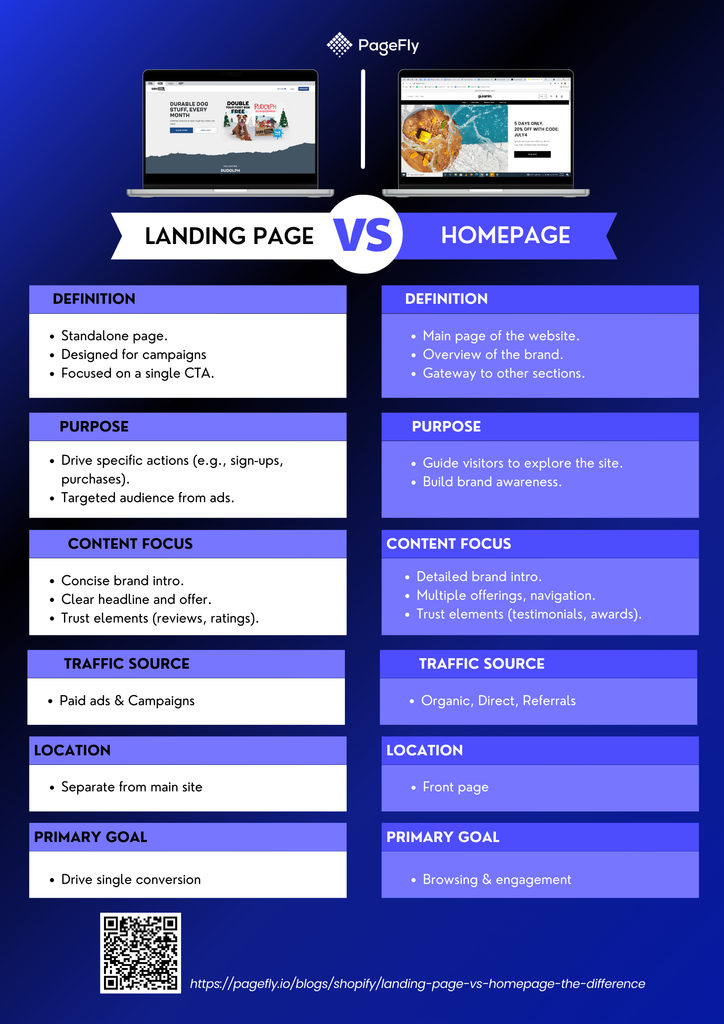
One page has one exit and one action; the other has a dozen of each — and that is the whole difference. Source: PageFly.
Your traffic decides which page to send people to
Split your traffic into two buckets. It is the only segmentation this decision needs — and it is a cheaper first move than picking a new app, which is why we put it ahead of choosing a landing page app.
Traffic you chose — Google Ads, Meta ads, TikTok, an email or SMS campaign, an affiliate link, a QR code on packaging. You know the offer, the audience and the message they just saw. Send it to a landing page whose headline continues that exact message. This is why landing pages built for Google Ads outperform sending paid clicks to the homepage: the promise in the ad and the promise on the page match.
Traffic that chose you — organic search for your brand, direct visits, a returning customer, someone who saw you mentioned somewhere. You have no idea which of your products they want. Give them the homepage and let them route themselves.
A homepage earns its clutter — every one of those exits is a visitor going somewhere useful
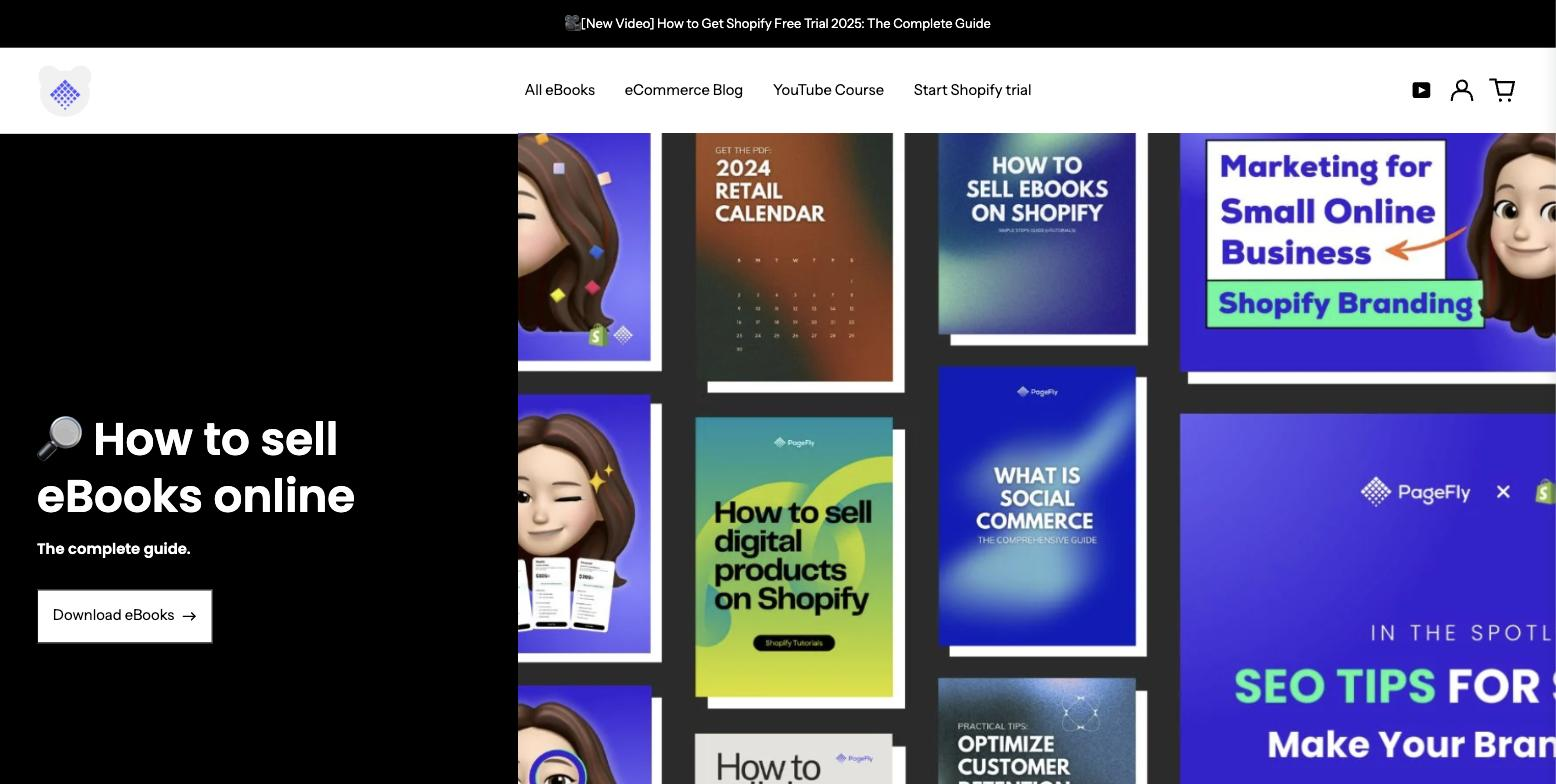
The homepage of our own demo store hands one visitor 4 menu links, an announcement bar, a cart, an account link and a wall of products — roughly a dozen ways out, none of them wrong. Tested first-hand by PageFly on beariestore.com, captured 3 September 2026.
Now imagine paying for a click and landing that person here. They saw an ad about one ebook; this page offers them everything. That mismatch is the leak a landing page exists to close.
The reverse mistake is just as costly: stripping your homepage down to a single offer, so the visitors who wanted something else have nowhere to go. If you want to see how far a homepage can be pushed while still routing well, we broke down 15 of them in Shopify homepage examples.
Where each page type fits in the rest of your store
Landing pages and homepages are two of the five page types most Shopify stores actually need. The other three do specific jobs the first two should not be stretched to cover. A product page sells one SKU to someone already interested; a collection page helps people browse a range.
And an about page carries the brand story a homepage only has room to hint at. Stores selling a narrow catalogue often find the about page does more persuading than the homepage does.
Getting that map right is what stops you building a landing page to solve a problem that was really a product-page problem. If paid traffic converts badly on one product, the fix is often product page customization rather than a new page — and if the problem is organic rather than paid, it is usually product page SEO.
How to decide, in 4 steps
- Name the traffic source. Write down exactly where the click is coming from. If you can name the campaign, you chose the visitor — that is a landing page.
- Name the single action. One sentence, one verb: “buy this bundle”, “book a fitting”, “download the size guide”. If you cannot get it down to one action, you want the homepage or a collection page instead.
- Decide what to remove. List every link on the page that is not that action. On a landing page, most of them go. On a homepage, they stay.
- Pick the metric before you build. A landing page is judged on completion of its one action, per source. A homepage is judged on onward clicks into products and collections. Wire it up in Shopify conversion tracking before launch, not after.
Two things commonly fall out of this exercise. A seasonal offer turns out to deserve its own page — we keep layouts for that in Black Friday landing page templates. Or a “launch” idea turns out to be a coming soon page instead.
The decision, restated. You need both pages, and you need them to stop competing. The homepage takes everyone you did not choose and sends them somewhere useful. A landing page takes the people you did choose and asks them for one thing. When you catch yourself arguing about which page an offer belongs on, go back to the traffic — it always decided.
What Shopify does natively, and where it stops
Your homepage is a theme template. In the theme editor you add, reorder and configure sections on it, and Shopify’s theme architecture keeps that home template as its own file, separate from the page template that renders everything under /pages/ — Shopify’s templates documentation sets out how those files are organised. Reusable blocks work across both, which is what Shopify sections are for.
Every other page you create in Shopify admin becomes /pages/<handle> and renders through the page template your theme provides. That is enough for an about page or a policy page, and it is how most of the layouts in these product landing page examples are served.
Stock Shopify has no per-page switch for hiding the navigation — which is the one feature that defines a landing page
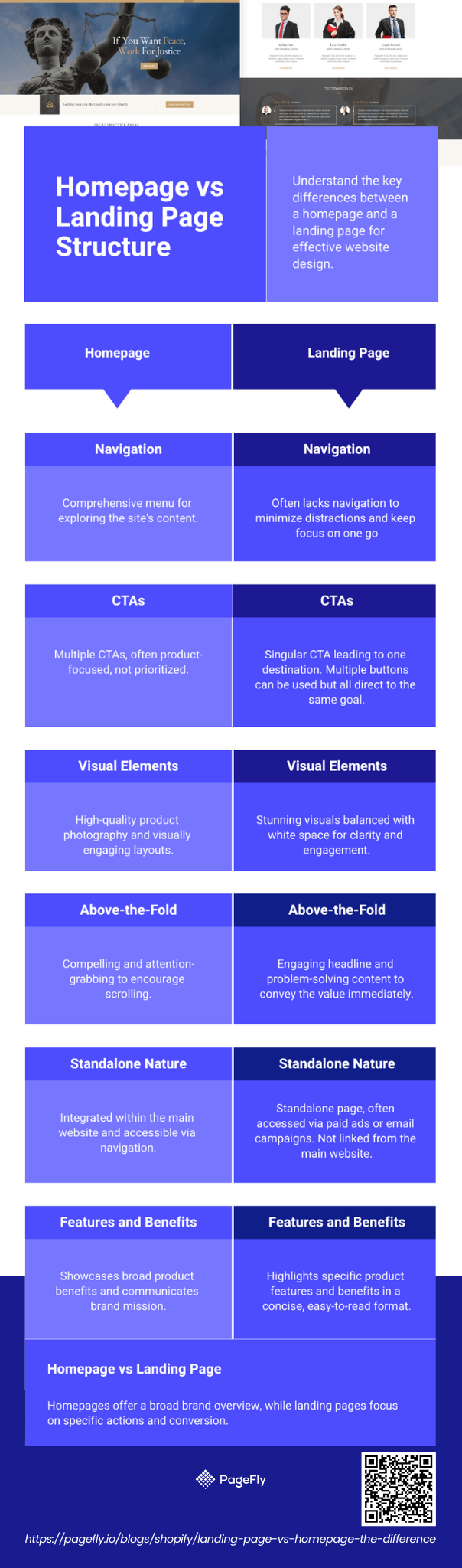
The two structures differ by more than content: the homepage keeps the theme’s header and footer, the landing page drops them. Source: PageFly.
Here is the honest limit. Shopify’s admin page editor gives you a rich-text field, not a layout canvas, and it has no per-page toggle to hide the header and footer. So the one structural feature that most defines a landing page — a stripped navigation — is not a checkbox in stock Shopify. Getting it needs either a custom Liquid template added to the theme, or a page builder that can render a page without the theme’s chrome. That is the real reason merchants reach for an app here, and it is worth saying plainly rather than pretending the native tools cover it. The same limit shows up elsewhere: there is a fixed list of what you can and cannot customize on checkout.
How to build both page types in PageFly
PageFly is a Shopify page builder, and the part that matters for this comparison is that it treats page type as a first-class choice rather than an afterthought. Open the Pages list and pages are filed by type — Regular, Home, Product, Collection, Blog post, Password — with each type rendering through its matching template.
- Step 1 — open the Pages list and pick the type. Home builds a replacement homepage; Regular is what you use for a landing page. Getting this right at creation time saves a rebuild later, because the type decides which template the page renders through.
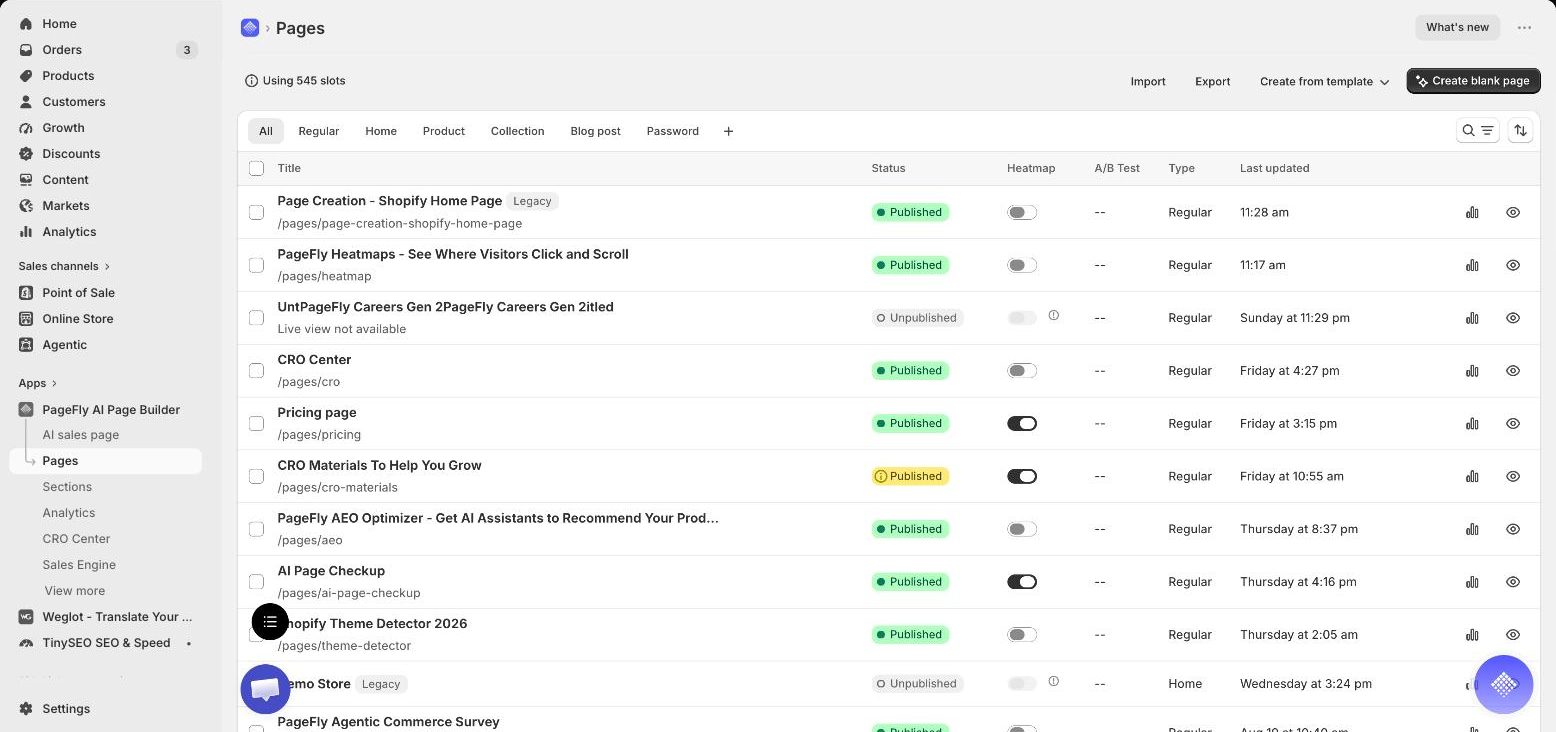
Step 1 — the page-type tabs and the Type column are where “homepage” and “landing page” stop being a naming argument and become two different objects. Tested first-hand by PageFly in our own Shopify admin, captured 3 September 2026.
- Step 2 — start from a template, not a blank canvas. Pick a layout that already has the shape your offer needs, then replace the copy and images. Browse the PageFly template library before you build anything from scratch.
- Step 3 — for a landing page, remove the exits. Turn off the theme header and footer for that page, then delete every link that is not your one action. This is the step that makes it a landing page rather than a page that merely happens to be new.
- Step 4 — for a homepage, do the opposite. Keep the navigation, make the top section state what you sell within one screen, and give each major collection a clear route in.
- Step 5 — publish, then open it on a phone. Most Shopify traffic is mobile, and a stripped-back landing page is where a broken mobile layout costs the most.
Building in a page builder rather than editing theme code is also what makes the “one homepage, many landing pages” pattern practical day to day. Syosaku-Japan, a Japanese kitchenware brand, runs 68 pages built and managed in PageFly. Its founder is direct about which one carries the brand:
“Our motto is 'We don’t make products. We make a piece of art.' We couldn’t display it in our online store without PageFly. It has contributed to our growth tremendously. The homepage built with PageFly helped us stand out, and it has become the most visited part of our store.”
— Toshi Sekiya, Founder of Syosaku-Japan (read the case study)
That is the pattern in one sentence: the homepage became the most-visited page in the store, and 67 other pages did the specific jobs it could not.
If you want the build walkthrough rather than the comparison, see how to build a Shopify landing page. For finished examples to copy the shape of, there is Shopify landing pages with examples and templates.
Two practical notes on choice and cost. Page builders differ mainly in how they handle templates and page speed, which we measured across 15 apps in the best Shopify page builders. And if you are budgeting, the plan tiers sit on the PageFly pricing page — there is a free tier, so a landing-page experiment does not have to start as a purchase.
How to tell whether it worked
Judge each page on its own metric, or you will draw the wrong conclusion twice.
For a landing page, measure the completion rate of its one action, split by traffic source. A page at 6% from email and 1.5% from a cold ad audience is not one page performing inconsistently — it is two audiences, and only the second one needs work. Unbounce’s benchmark of 41,000 landing pages puts the median across industries at 6.6% for Q4 2024, which is a useful ceiling to aim at rather than a number to expect in month one.
For your homepage, conversion rate is close to meaningless — it averages over every kind of visitor you have. Measure onward clicks instead: what share of homepage sessions reach a collection or product page, and which nav item does the work. If that number is weak, the problem is routing, not persuasion.
One naming trap worth clearing up, because it causes real reporting mistakes: in Google Analytics, “landing page” means whichever page a session started on — a report row, not a page type. A product page can be the landing page of a session. Your purpose-built landing pages are a subset of that report, and the two meanings are unrelated.
Once tracking is in place, the ongoing work is testing rather than redesigning, which is what a structured CRO process exists for. If you would rather start from what already works, these Shopify store examples are worth studying for how they make a homepage route instead of sell.
And if your next job is the campaign page itself, the PageFly landing page builder is where the page-type choice and the nav-free layout both live, on a free plan you can test the idea on.
Landing Page Vs Homepage The Difference FAQ
No. A homepage is the single front door of your store at your root domain, built to introduce the brand and route every kind of visitor. A landing page is a standalone page built for one action and shown to an audience you chose and sent.
The homepage serves visitors you did not choose, so it keeps full navigation and many calls to action. A landing page serves visitors you did choose, so it strips the navigation and repeats one call to action. You have one homepage and as many landing pages as you have offers.
They usually mean the same page from two points of view. “Destination page” is Google Ads terminology for the page an ad sends someone to; “landing page” is the marketing term for a page built to receive that traffic. If your ad’s destination page is your homepage, you have a destination page but not a landing page.
Send ads to a product page when the ad is about that exact product and the page already answers the objections. Send them to a landing page when the offer is a bundle, a promotion, a quiz or anything that spans more than one SKU, or when you need to remove navigation to protect the conversion.
It can act as one for brand-name search, where the visitor already wants you specifically. It is a poor landing page for paid traffic, because it cannot match the promise of one ad and it gives the visitor every exit instead of one action.
No — they are the same thing, written two ways. “Homepage” as one word is the more common spelling in ecommerce writing, and Shopify themes call the template that renders it the home template.
In GA4, “landing page” is the first page of a session, whichever page that happens to be — so a product page or a blog post can appear as a landing page. It is a report dimension, not a page type. Your purpose-built landing pages are just one subset of that report.
One headline that continues the message the visitor just clicked, one primary action repeated down the page, proof (reviews, ratings or results), the specifics of the offer, and answers to the objections that stop that particular audience. Everything that is not the one action is a candidate for removal.
Not necessarily. You can create a page in Shopify admin on any plan, but stock Shopify has no per-page switch to hide the header and footer, so a nav-free layout needs either a custom Liquid template in your theme or a page builder app. PageFly has a free plan, so you can test the approach before paying for one.