Black Friday 2026 lands on Friday, November 27, and Cyber Monday on November 30. If your sale traffic still arrives on your homepage, shoppers have to hunt for the deal, and many won't. A dedicated Black Friday landing page puts the offer, the deadline and the buy button on one screen.
We opened every Black Friday template in the PageFly library on 24 September 2026, checked each one on desktop and mobile, and wrote down what it is actually built for. Below you'll find the 7 templates, what each one is good at, a step-by-step way to launch one, and the design rules that matter most now that most BFCM spending happens on a phone.
Key takeaways
- A Black Friday landing page is one campaign page with one offer, one deadline and one call to action.
- BFCM 2026 runs from Black Friday on November 27 to Cyber Monday on November 30. Build the page in October so you can test it before traffic arrives.
- 57.5% of Cyber Monday 2025 online sales came from mobile devices (Adobe), so the offer and the button must fit in the first mobile screen.
- PageFly has 7 free BFCM templates: 4 campaign or collection pages, 1 pre-launch teaser and 2 single-product pages.
- Swap every placeholder date and price before you publish. Two of the templates we tested still show demo dates.
What Is a Black Friday Landing Page?
A Black Friday landing page is a standalone page built only for your Black Friday or BFCM sale. It gathers the discounted products, states the offer and the end time, and sends every visitor toward a single action, such as shopping the sale or joining an early-access list.
It is different from your homepage, which has to serve returning customers, new visitors and every product line at once. A campaign page can drop the navigation clutter, repeat the offer in the headline and match exactly what your ad or email promised. If you're new to the format, our guide on how to build a Shopify landing page covers the basics.
Why a Dedicated Page Matters More in 2026
BFCM is the weekend when a small conversion gain is worth the most. Here is what last year looked like, from the two sources most merchants benchmark against:
| BFCM 2025 metric | Result | Source |
|---|---|---|
| Shopify merchant sales, Black Friday to Cyber Monday | $14.6 billion, up 27% on 2024 | Shopify |
| Peak sales per minute on Shopify | $5.1 million at 12:01 PM EST on Black Friday | Shopify |
| Average cart on Shopify | $114.70 | Shopify |
| US online spend, Black Friday / Cyber Monday | $11.8 billion / $14.25 billion | Adobe |
| Share of Cyber Monday online sales on mobile | 57.5% | Adobe |
| Buy Now, Pay Later spend on Cyber Monday | $1.03 billion | Adobe |
| AI-assistant traffic to US retail sites on Cyber Monday | Up 670% year over year | Adobe |
Sources: Shopify BFCM 2025 data; Adobe Digital Insights, Cyber Monday 2025.
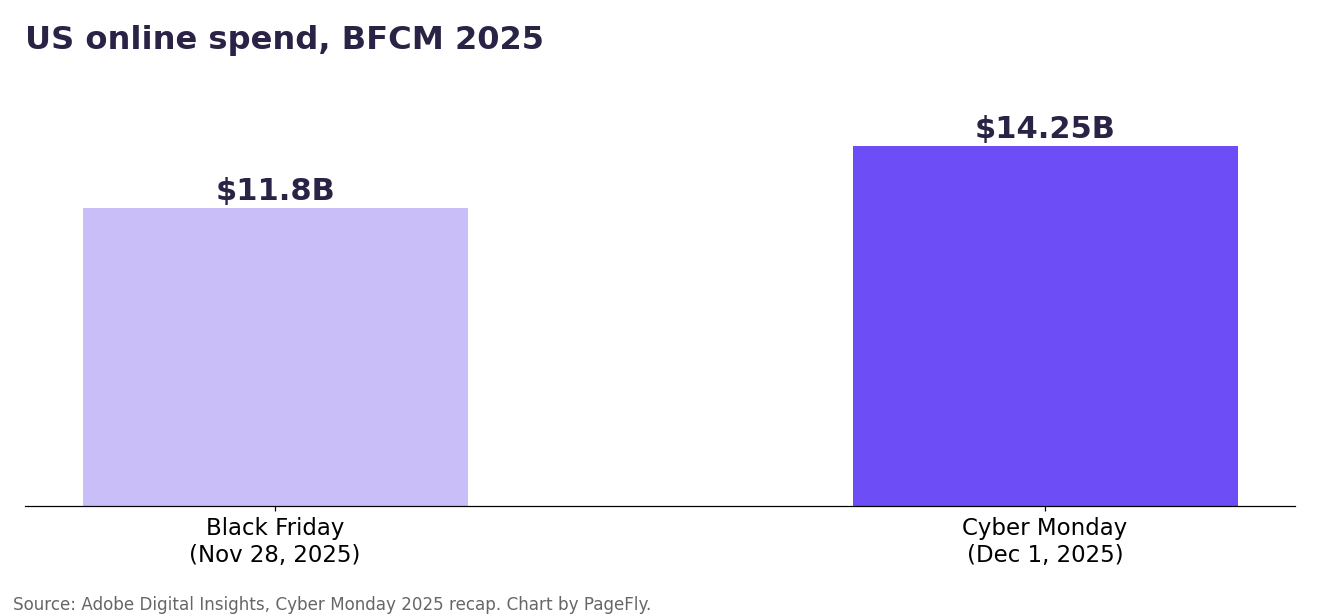
US online spend on Black Friday and Cyber Monday 2025. Data: Adobe Digital Insights; chart by PageFly.
Three of those numbers should shape your page. Mobile is the majority, so a layout that only works on desktop loses most of the audience. BNPL spending passed $1 billion in a single day, so the payment options belong on the page, not just at checkout. And shoppers increasingly arrive through AI assistants, which read your page text, not your banner images.
7 Free Black Friday Landing Page Templates, Tested
All seven live in the PageFly template library. PageFly is a Shopify page builder, and every template below can be edited block by block. We sorted them by the job they do, because a pre-launch teaser and a single-product deal page solve different problems.
| Template | Page type | Countdown built in | Best for |
|---|---|---|---|
| Teaser BFCM | Pre-launch / waitlist | Yes | Building an early-access list before November 27 |
| Fashion Home BFCM | Campaign hub | Yes | Apparel stores with several categories on sale |
| Fashion Collection BFCM | Campaign page | No | Collecting emails with a voucher offer |
| Canvas Collection BFCM | Collection page | Yes | Small catalogs that need to explain delivery |
| Teki BFCM | Campaign hub | Yes | Electronics or any catalog grouped by category |
| Everywear BFCM | Product page | No | One hero product with variants |
| Curve BFCM | Product page | No | One hero product sold on reviews and features |
1. Teaser BFCM
This is the only template in the set built for the weeks before the sale. The hero reads "Black Friday, sale up to 88%" over a live countdown, and the page then lays out three dated sale phases (Early Bird, BFCM Flash Sale, Clearance) and a side-by-side list of perks for waitlist subscribers versus the public.
Use it from October to early November to grow a list you can email on November 27. The phase dates in the demo are placeholders, so replace them with your real schedule before the page goes live.
2. Fashion Home BFCM
A full campaign hub. A countdown bar runs across the top ("Don't miss out on our biggest sale of the year"), followed by a split hero, category tiles for T-shirts, pants, footwear and accessories, a "Winter Essentials" bundle block and product cards that show the old and new price.
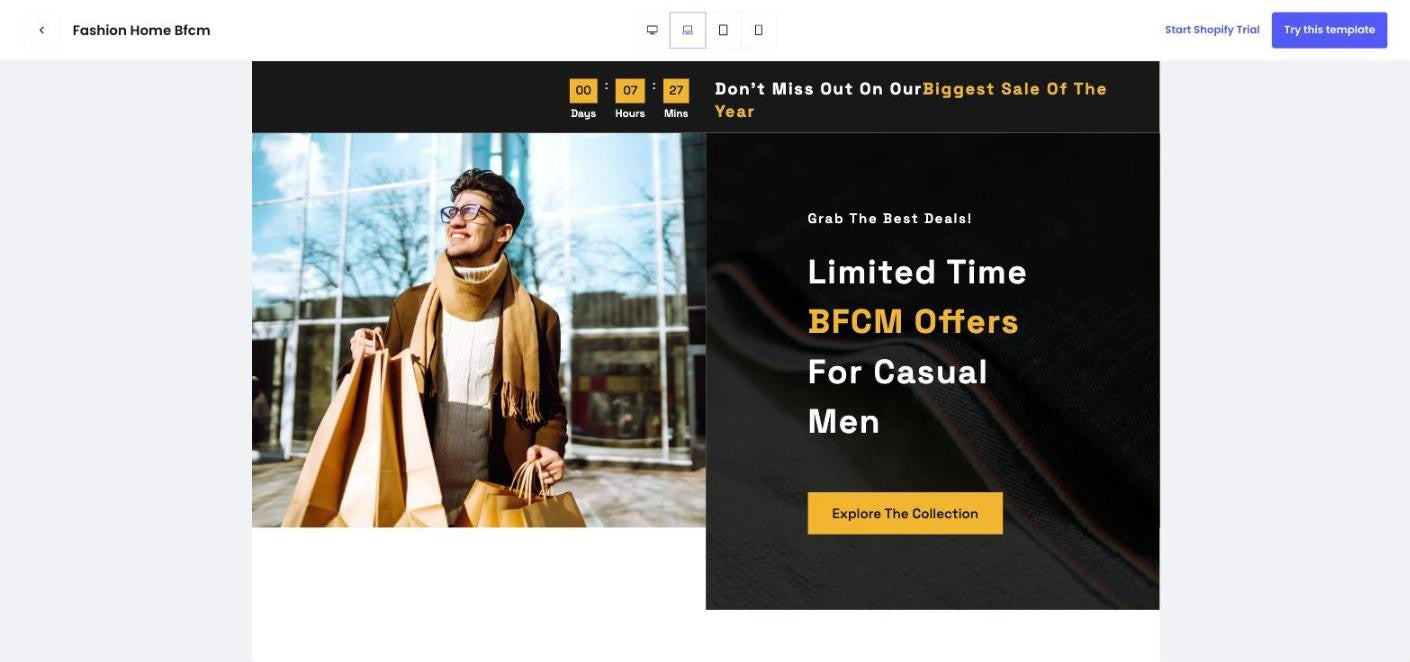
Fashion Home BFCM, laptop view. Tested first-hand by PageFly, 24 September 2026.
It suits apparel stores with several categories discounted at once. If you sell bundles, the Winter Essentials block is a ready-made place for them; our guide to Shopify automatic discounts shows how to apply the bundle price without a code.
3. Fashion Collection BFCM
Built around list growth and scarcity. It pairs a bold "Black Friday" hero with a trust row (free shipping, payment security, get voucher), an "Only 5 left" stock badge on the best seller, a subscribe block that offers a 50% voucher and a "Top deal of the day" section.
Pick it if email capture is your main goal for the weekend. Keep the stock badge honest: tie it to real inventory or remove it. For form design ideas, see our landing page email capture guide.
4. Canvas Collection BFCM
A compact collection page: a "BFCM Sale Holiday" hero with an "Ends in" countdown, a trending-products row, a three-step "How it works" strip and a delivery-policy block. It works well for small catalogs where shoppers need reassurance about shipping before they buy.
One thing we noticed: the library thumbnail still reads "BFCM Sale 2019" and the demo offer says "Nov 10 to Nov 15". Change both before publishing, because a stale year on a sale page undercuts trust fast.
5. Teki BFCM
An electronics campaign hub with a "Get 50% off" hero, a countdown and product rows grouped by category (phones, laptops, smart watches), each row carrying its own discount badge. The category rows make it the best pick for larger catalogs where shoppers browse by type rather than by product.
6. Everywear BFCM
A single-product sale page, not a collection. It opens with a free-shipping bar, a "Best seller" badge, a strike-through price ($39.99 to $29.99 in the demo), color swatches, size buttons and accordions for product details, size guide and shipping and returns.
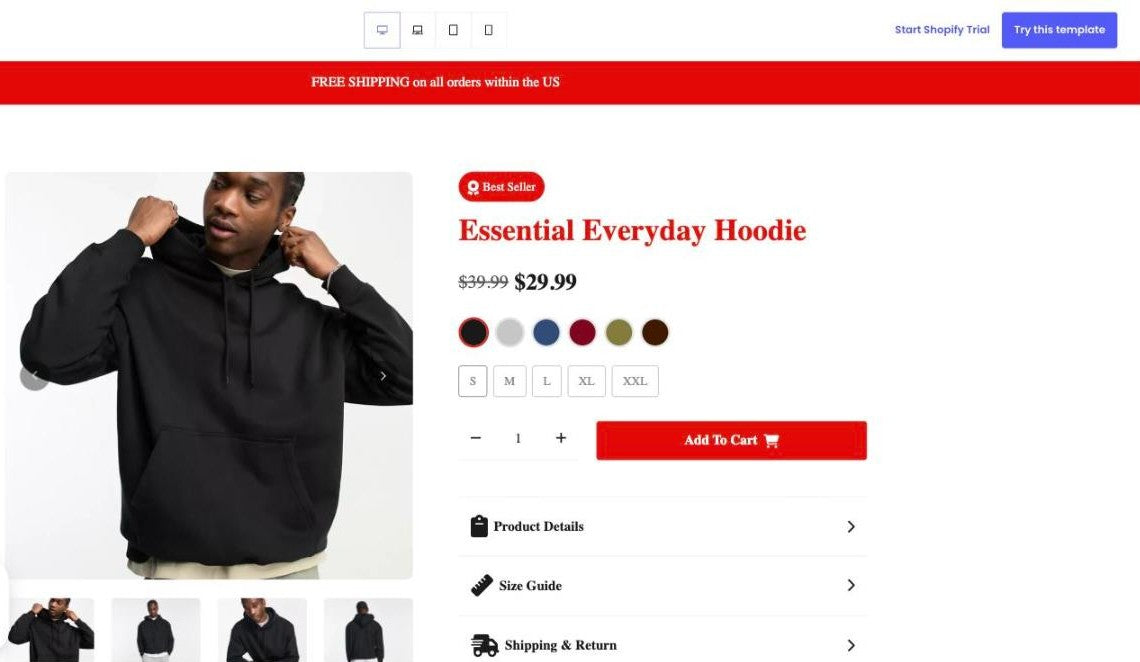
Everywear BFCM, desktop view. Tested first-hand by PageFly, 24 September 2026.
Use it when one product drives most of your Black Friday revenue and you want ad traffic to land straight on it. There is no countdown in this layout, so add one if your deal has an end time. Pair it with a sticky add-to-cart bar so the button stays visible on long mobile scrolls.
7. Curve BFCM
Another single-product layout, this time for activewear. It leads with a 50% badge, a review count, color and size pickers and an "Unbeatable BFCM Deals" headline, then sells the product through three feature blocks. Choose it when your hero product wins on reviews and specs rather than on price alone.
How to Launch a BFCM Template in PageFly
Here's the route we followed when testing, from picking a template to a page that's ready for traffic.
- Open the template library. Go to pagefly.io/pages/templates. There is no Black Friday filter, so use the Page Type filter (Landing page, Collection page or Product page) and look for templates with "BFCM" in the name.
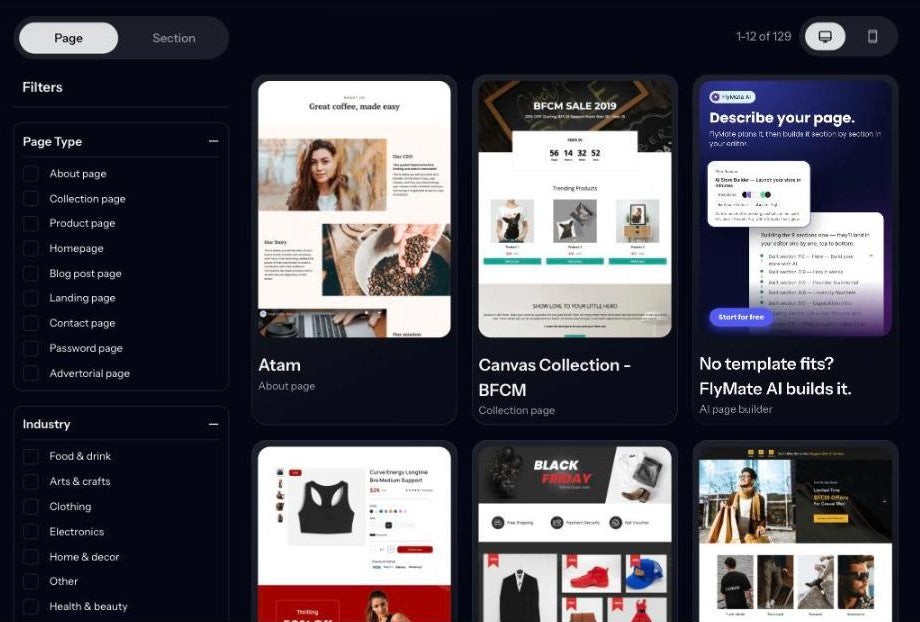
Step 1: the template library, with the Page Type filter on the left. Tested first-hand by PageFly, 24 September 2026.
- Preview on every device. Open a template and use the device icons at the top of the preview (desktop, laptop, tablet, mobile) to check the layout at each size.
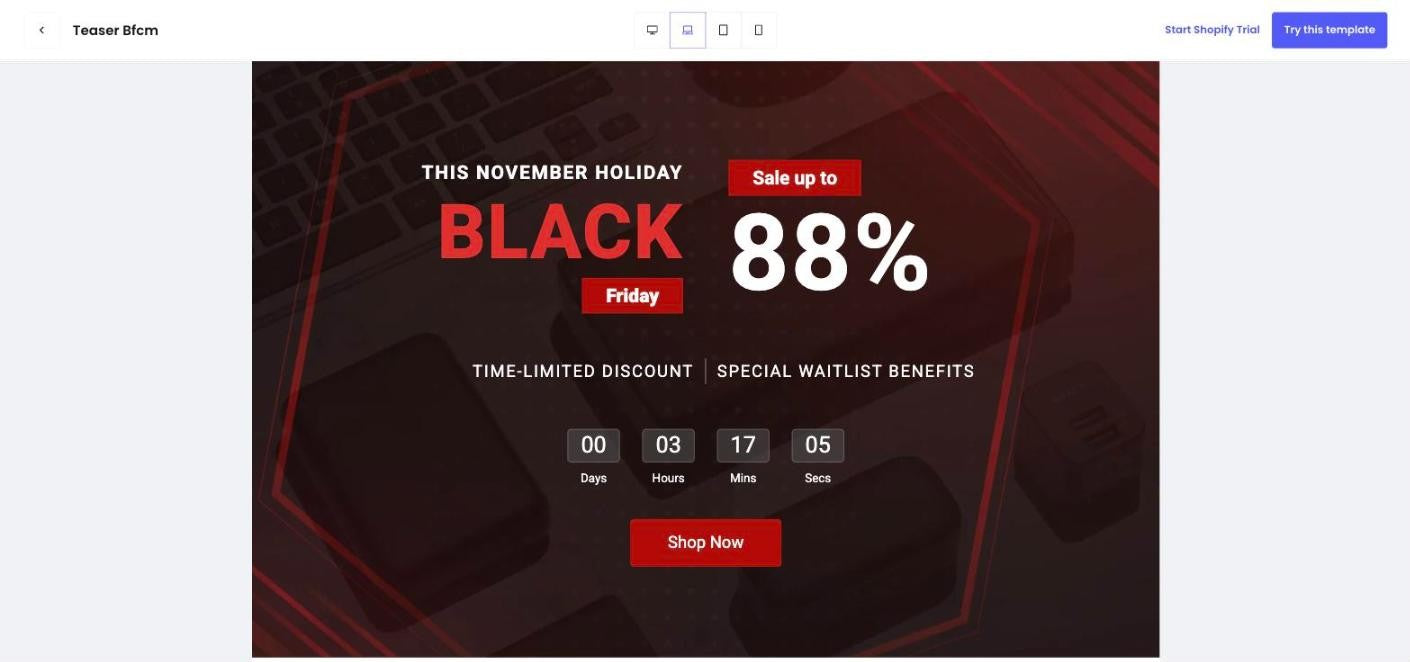
Step 2: Teaser BFCM in the preview, laptop view. The device icons sit at the top center and Try this template at the top right. Tested first-hand by PageFly, 24 September 2026.
- Check the first mobile screen. On the Teaser BFCM template, the large "88%" headline fills the whole first screen on mobile and pushes the countdown and the Shop Now button below the fold. Move the button up, or shorten the headline, when you customize.
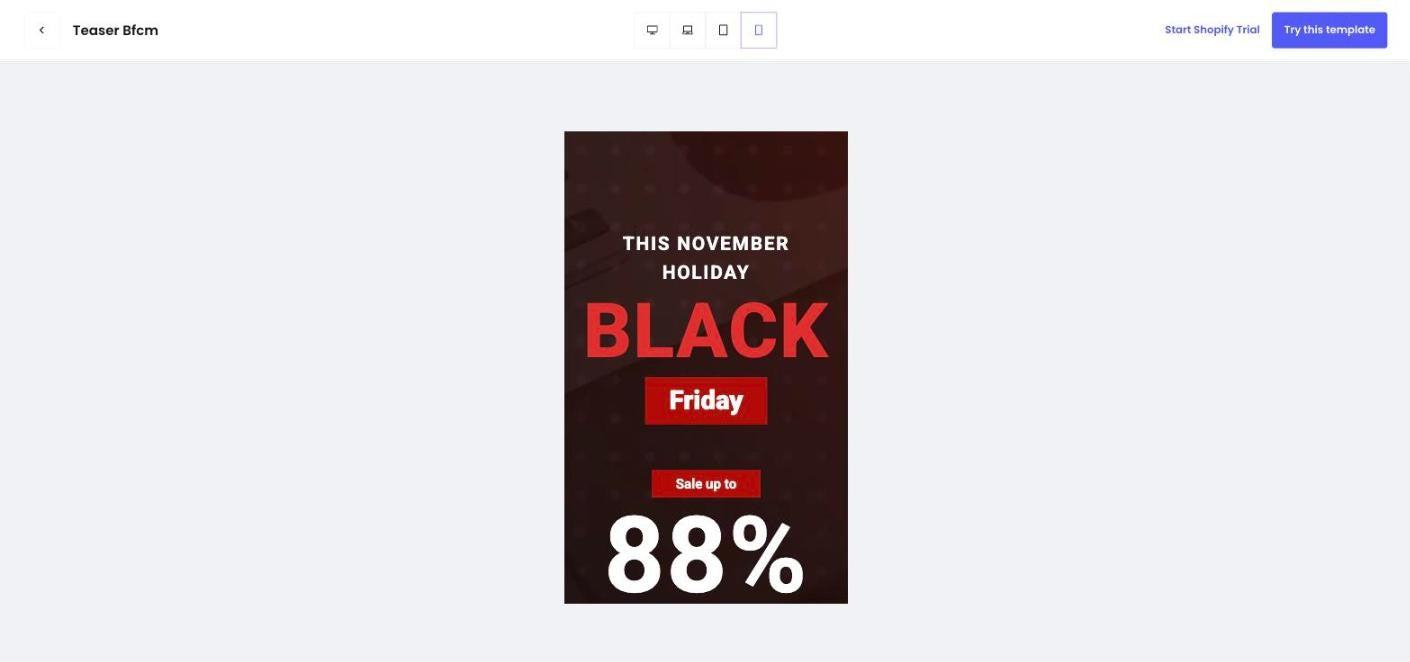
Step 3: Teaser BFCM in mobile preview. The countdown and button sit below the first screen. Tested first-hand by PageFly, 24 September 2026.
- Start from the template. Click Try this template in the top-right corner of the preview to begin your page from that layout.
- Replace every placeholder. Swap in your products, real prices, real phase dates and your brand colors. Search the page for any year or date that isn't 2026.
- Set the countdown to your real deadline. Point it at the actual end of your sale, for example 11:59 PM on November 30 in your store's time zone. Never use a timer that resets.
- Publish and connect traffic. Publish the page, link it from your announcement bar and homepage hero, and use its URL in your ads and emails. Our week-by-week BFCM checklist covers the rest of the prep.
Your BFCM 2026 Landing Page Timeline
| When | What the page should do |
|---|---|
| Now to October 31 | Build and test the sale page. Publish a teaser page to collect early-access sign-ups. |
| November 1 to 26 | Keep the teaser live and email the list. Run a final mobile and speed check. |
| Friday, November 27 (Black Friday) | Swap the teaser for the sale page and point every banner and ad at it. |
| Saturday, November 28 (Small Business Saturday) | Refresh the hero with the best sellers from Friday. |
| Monday, November 30 (Cyber Monday) | Last-day messaging and a countdown to your real cut-off. |
| After the sale | Unpublish the page or redirect its URL to a live collection so old links don't dead-end. |
Starting early matters here. The template is the fast part; replacing products, prices and dates and then testing on real phones is what takes time.
9 Design Rules for a Black Friday Landing Page That Converts
- One offer, one goal. Decide whether the page sells a collection, one product or a waitlist, and cut anything that competes with that action. Our sales landing page guide goes deeper on this.
- Put the button in the first mobile screen. With 57.5% of Cyber Monday 2025 sales on mobile, the offer and the call to action must be visible without scrolling. See our mobile landing page tips.
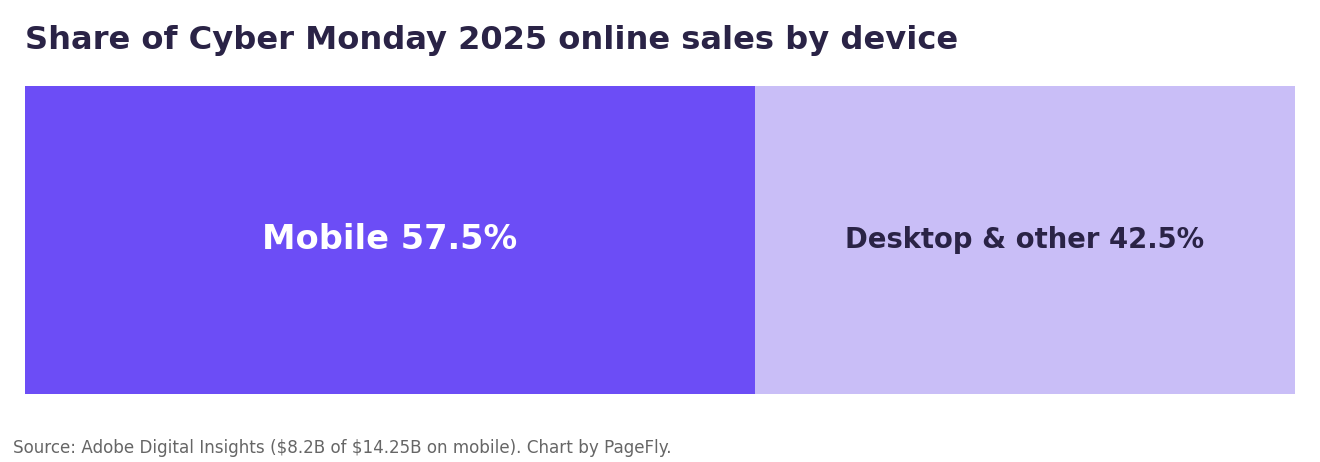
Most Cyber Monday 2025 online sales happened on a phone. Data: Adobe Digital Insights; chart by PageFly.
- Use a real deadline. A countdown works because the end time is true. A timer that restarts on refresh is misleading, and shoppers notice.
- Show the math. Display the original price next to the sale price, or the exact percentage off. "Up to 70% off" with no examples is weaker than one clear before-and-after price.
- Surface payment options early. BNPL passed $1 billion in US spend on Cyber Monday 2025. If you offer installments, say so near the price. Our comparison of Shop Pay vs Afterpay explains the options.
- Keep checkout one tap away. Shopify reports that 32% of BFCM 2025 orders used Shop Pay. Make sure the path from your page to an express checkout is short; what Shop Pay is and how it works covers setup.
- Keep it fast. Compress hero images and use the right banner dimensions; our Shopify banner size cheat sheet lists them.
- Match the ad to the page. The headline on the page should repeat the promise in the ad or email that sent the click. The same logic applies to Google Ads landing pages.
- Write the offer in text, not only in images. AI assistants and search engines read HTML. Put the discount, the dates and the terms in real text so an assistant answering "who has a Black Friday deal on X" can find them.
Common Mistakes to Avoid
- Publishing demo content. Placeholder dates, sample products and old year stamps are the most common problems we saw in the templates themselves.
- Baking dates into images. If the end date lives inside a banner image, you have to redesign the image to extend the sale. Keep dates in editable text.
- Leaving the page live after the sale. An expired offer on a page that still ranks sends shoppers away. Redirect the URL to a live collection instead.
- Skipping the phone test. Preview tools are a start; open the published page on a real phone before you send any traffic.
Build Your Page Before the Rush
A good Black Friday landing page is mostly decisions: which offer, which deadline, which single action. Pick the template that matches that job, replace every placeholder, and test it on a phone while there is still time to fix it. You can browse all seven in the PageFly template library, and if you want more seasonal ideas, our Halloween landing page examples show the same principles on a smaller holiday.
Black Friday Landing Page FAQ
A Black Friday landing page is a standalone page built only for your Black Friday or BFCM sale. It shows the discounted products, the offer and the end time, and sends every visitor toward one action, such as shopping the sale or joining an early-access list.
Black Friday 2026 is Friday, November 27, the day after US Thanksgiving on Thursday, November 26. Small Business Saturday is November 28 and Cyber Monday is Monday, November 30, 2026.
Build and test it in October, then publish a teaser or early-access page in early November to collect sign-ups. Switch to the full sale page on November 27 and keep it live until your Cyber Monday cut-off.
Yes, if your sale has a real end time. Point the timer at the actual deadline in your store's time zone, and never use a timer that resets when the page reloads. Four of PageFly's seven BFCM templates include a countdown block.
Yes. The template library, including the seven BFCM templates, is available on PageFly's Free plan, which lets you publish one page. Paid plans add more published pages and AI credits.