The best Shopify page builder is the one that measurably lifts your conversion rate, so pick the builder by what it can test, not by what it can style. Any of the 15 apps below can produce a good-looking page. Only a handful can tell you which version of that page actually sells more, and that difference is the one that shows up in revenue.
This guide compares 15 Shopify page builder apps ranked by conversion impact: pricing, free plans, A/B testing, and which one fits your store size and skill level. Every rating, review count and free-plan status below was re-read on each app's own Shopify App Store listing on 23 September 2026, and each builder was assessed against our review process and methodology. Five weeks of listing changes moved more than we expected — three apps were renamed, one left the page-builder category, and one added A/B testing.
If you landed here looking for alternatives to a specific builder — Instant, Shogun, GemPages — skip to what to use instead of Instant, which is the comparison most people in this category are actually running.
If you are building an entire store rather than individual pages, our Shopify website builder guide is the better starting point. If you first need to understand how Shopify's native page types work, start with what Shopify pages are and how to add them.
Key takeaways (re-verified 23 September 2026)
- Five of the 15 now state built-in A/B testing on their own App Store listing: PageFly, Shogun, Zipify, Omnise and — new since August — Instant. If testing matters, your shortlist is still short, but it is one longer than it was.
- PageFly rates 4.9/5 from 5,900 reviews and works with 130+ Shopify apps; its free plan covers 1 published slot, 10 AI credits a month and 320+ page and section templates.
- PageFly's plan ladder changed. It is now Free, Builder $24, Accelerate $99 and Enterprise $299. A/B testing, heatmaps and AI Page Checkup sit on Accelerate, not on Builder — an earlier version of this guide said Builder, and that was wrong.
- Free plans are still near-universal: 14 of the 15 list one, and paid tiers mostly gate published pages rather than features. Hypervisual is free-trial only, and Instant's free "Developer" tier is limited to development stores.
- Tapita has left this category. It now lists as Tapita SEO AI Blog Builder at 4.9/5 (484 reviews) and is free — so the "cheapest paid tier" title in this list has moved.
- Choose on the page type you actually need: a Shopify landing page has different structural requirements from a homepage or a collection page.
What is a Shopify page builder?
A Shopify page builder is an app that adds a visual, drag-and-drop editor to your Shopify admin so you can build and edit storefront pages — home, product, collection, landing and blog pages — without writing Liquid, HTML or CSS. It works alongside your theme rather than replacing it: you keep your theme's header, footer and checkout, and the builder controls the page content in between. Pages you build are published to normal Shopify URLs, so search engines and shoppers treat them like any other page on your store.
PageFly, a Shopify page builder, works this way too: you pick a template or a blank layout, drag in sections and elements, then publish the page to a Shopify URL. What separates apps in this category is not the editor — nearly all of them are competent drag-and-drop canvases — but whether the app can run an A/B test on the page you just built. If you want to see what an editor of this kind looks like before installing anything, the visual editor overview walks through it.
One thing that has changed in 2026: the editor is increasingly not the only entry point. PageFly now answers inside Shopify Sidekick and Claude — you can ask Sidekick to find a template or list your pages, or have Claude build a page in PageFly — and Instant lets you paste a Figma design straight onto its canvas. The category is drifting from "drag things" toward "describe what you want, then edit it".
What a Shopify page builder should actually do for your store
Most stores do not have a design problem; they have a "this page does not answer the buyer's question" problem. Baymard Institute's benchmark of 344 top-grossing US and European e-commerce sites found that 76% of sites perform at a level of "mediocre" or worse on homepage and category navigation UX. A page builder is how a non-technical merchant fixes that without waiting in a developer queue, whether the page in question is a homepage, a campaign page or one of your standard Shopify pages. Concretely, it should cover three jobs.
Conversion & sales:
- Build pages with CRO elements: countdown timers, trust badges, upsells and unambiguous CTAs
- A/B test layouts so you learn what converts instead of guessing
- Keep page weight under control, because speed feeds both SEO and your Shopify conversion rate
Customization & control:
- Create pages that match your brand without developer costs, whatever Shopify theme you run
- Build mobile-responsive product, landing and collection pages — our best Shopify product pages teardown shows what "good" looks like
- Work with the theme you already have; a Shopify theme detector tells you what a competitor is building on
Efficiency & budget:
- Start on a free plan and scale as revenue grows
- Reduce dependency on expensive developers
- Manage every page type — landing, product, collection and standard pages — from one platform instead of five apps
Best Shopify page builder apps at a glance: 15 tools compared
Ratings, review counts, app names and free-plan status were re-read on each app's own Shopify App Store listing on 23 September 2026. Full pricing ladders were re-read in detail for PageFly and Instant this round; the other entry prices were last read on 18 August 2026, so confirm the current figure on the listing before you buy — prices in this category move. "Best for", "skill level needed" and "time to first page live" are our editorial judgments from hands-on testing, not vendor claims. If you only care about campaign pages, our narrower list of Shopify landing page apps is the faster read.
| Page builder | Best for | Skill level needed | Free plan | Entry paid plan | Time to first page live | Built-in A/B testing | Rating (reviews, 23 Sep 2026) |
|---|---|---|---|---|---|---|---|
| PageFly ✦ AI Page Builder | Conversion optimization across every page type | Beginner to advanced | Yes — 1 published slot, 320+ templates | $24/mo (Builder) | Under an hour from a template | Yes — Accelerate plan ($99) | 4.9 (5,900) |
| GemPages Landing Page Builder | Landing pages plus post-purchase upsell | Beginner to intermediate | Yes | $29/mo | Under an hour from a template | Not stated on listing | 4.9 (4,242) |
| EComposer Landing Page Builder | Beginners who want built-in sales extensions | Beginner | Yes | $25/mo | Under an hour from a template | Not stated on listing | 4.9 (3,473) |
| Shogun ‑ Landing Page Builder | Established teams that want page analytics | Intermediate | Yes — "Draft Mode" | $39/mo | Half a day | Yes (listed; tier not specified) | 4.8 (1,969) |
| LayoutHub ‑ Easy Page Builder | Fastest route to a finished layout | Beginner | Yes | $14.99/mo | Minutes from a prebuilt layout | Not stated on listing | 5.0 (1,373) |
| Omnise ✧ AI Page Builder (formerly Beae) | AI-generated pages with testing built in | Beginner | Yes — 1 published slot, watermarked | $19.99/mo | Under an hour | Yes (built-in) | 4.9 (887) |
| AfterShip Page Builder | Stores already on AfterShip's stack | Beginner | Yes | $35/mo | Under an hour | Not stated on listing | 4.8 (547) |
| Tapita SEO AI Blog Builder (no longer a page builder) | Blog-heavy stores; SEO content, not page building | Beginner | Listing now shows "Free" | — | n/a | Not stated on listing | 4.9 (484) |
| Zipify Landing Page Builder | Split-testing sales funnels | Intermediate | Yes | $19/mo | Half a day | Yes (split tests from Starter) | 4.7 (422) |
| Instant AI Page Builder | Figma-to-Shopify and prompt-to-page drafting | Beginner | Development stores only | $39/mo (Starter) | Minutes with an AI prompt | Yes — Pro plan ($99) | 4.9 (336) |
| Foxify AI Store Builder | Niche-specific AI layouts on a small budget | Beginner | Yes | $19/mo | Under an hour | Not stated on listing | 4.8 (327) |
| Replo Landing Page Builder | In-house design and growth teams | Advanced | Yes | $119/mo | One to two days for a designed page | Not stated on listing | 4.7 (189) |
| Zeno Landing Page Builder | Quick AI drafts of pages and sections | Beginner | Yes | $19/mo | Minutes with an AI prompt | Not stated on listing | 4.8 (104) |
| Hypervisual Page Builder | Mobile-first, edge-to-edge layouts | Beginner to intermediate | No — free trial only | $9.95/mo | Under an hour | Not stated on listing | 5.0 (56) |
| Buildify Drag and Drop Builder | Multilingual stores on a tight budget | Beginner | Yes | $9.99/mo | Under an hour | Not stated on listing | 3.9 (36) |
What changed between 18 August and 23 September 2026 — and why it matters:
- Testing is still the real filter, but the list grew to five. Instant now states A/B testing on its listing (Pro plan, 10K test sessions), joining PageFly, Shogun, Zipify and Omnise. If you plan to run structured experiments, read our guide to Shopify A/B testing before you commit to an app.
- Three apps were renamed. Beae → Omnise ✧ AI Page Builder, Foxify AI Landing Page Builder → Foxify AI Store Builder, Zeno AI Landing PageBuilder → Zeno Landing Page Builder. If you shortlisted from an older article, you may be searching for a name that no longer exists.
- One app left the category. Tapita now lists as Tapita SEO AI Blog Builder and is free. Treat it as an SEO/blog tool, not a page builder.
- Ratings barely moved; review counts did. Twelve of the 15 held their star rating to the decimal. Zipify rose 4.6 → 4.7 and Buildify 3.8 → 3.9; Foxify slipped 4.9 → 4.8. Review volume grew across the board — a five-week window is long enough to change the denominator, not the verdict.
- Review volume varies by more than 160x — from 5,900 (PageFly) down to 36 (Buildify). A 5.0 rating on 56 reviews is not the same signal as 4.9 on 5,900.
Instant alternatives: what to use instead of Instant on Shopify
The short answer: if you are leaving Instant because the free tier only works on development stores, look at PageFly, EComposer or GemPages, all of which let you publish a real page at $0. If you are leaving because $39/month buys you landing pages but only 3 product/collection templates, look at PageFly or Shogun. If you are leaving because you want A/B testing without paying $99, look at Zipify, whose split tests start on the $19 Starter plan.
This is the comparison the category actually runs, and it is worth being precise about it, because Instant's own App Store listing names its competitors outright: it describes itself as an "Alternative to Shogun, PageFly, and Gempages."
What Instant is genuinely good at, read from its listing on 23 September 2026: an AI-first canvas that drafts the first version, 800+ CRO templates, a Figma plugin that lets you paste designs straight in, a custom cart drawer with upsells and rewards, and A/B testing with revenue/CTR/AOV tracking and automatic winner selection on the Pro plan. It is built by Instant Commerce B.V. in Amsterdam, launched August 2023, and rates 4.9/5 from 336 reviews. If Figma is where your design work already lives, that import path is a real reason to stay.
Where merchants hit the wall, based on how the plans are structured:
- The free tier does not cover a live store. Instant's "Developer" plan is free for development stores with unlimited previews and email support — useful for evaluating, useless for publishing. Every other app in the top ten here lets you publish at least one page for free.
- Template slots are capped by plan, not just page count. Starter ($39) gives 10 theme sections and 3 product/collection templates; Pro ($99) gives 20 and 5; Business ($249) gives 50 and 10. If you run many collections, that ceiling arrives before the price does.
- A/B testing starts at $99. Pro includes 10K test sessions, Business 100K. That is a fair price for what it does, but it is not the cheapest route into testing.
| If you are leaving Instant because… | Look at | Why it answers that specific problem |
|---|---|---|
| You cannot publish on the free tier | PageFly, EComposer, GemPages | All three publish a real page on a live store at $0. PageFly's free slot includes the full 320+ template library. |
| You want A/B testing under $99/mo | Zipify, Omnise | Zipify lists split tests from its $19 Starter plan; Omnise lists testing built in from $19.99. |
| You need every page type, not just landings | PageFly, EComposer | Home, product, collection, blog, FAQ, about and contact pages in one editor, with no per-type template cap. |
| You want page analytics and a bigger support org | Shogun | Built-in page analytics and A/B testing, 4.8/5 from 1,969 reviews, aimed at established teams. |
| Your design team lives in Figma | Stay on Instant, or move to Replo | Instant's Figma plugin is a real differentiator. Replo ($119/mo, 4.7/5 from 189 reviews) is the other tool built for in-house design teams. |
The honest version of this comparison: Instant and PageFly are not the same shape of product. Instant is the stronger pure design-import story; PageFly is the broader page-type and testing story with a free tier you can actually publish from. If you want to try the swap without committing, install PageFly free, rebuild one page you already have in Instant, and compare the two live. That is a two-hour test and it settles the question better than any table, including this one.
The same method works for the other head-to-heads in this category: see PageFly vs GemPages for the closest like-for-like comparison, and the pricing page for where the ladder actually steps.
Detailed reviews: best Shopify page builders for conversions
How we evaluated the tools on this list: free-plan availability, Shopify App Store rating and review count (re-read 23 September 2026), pricing where re-read this round, feature depth for the use case, ease of use for non-technical merchants, and support quality. "Best for", skill level and time-to-live are editorial judgments from hands-on testing.
Disclosure: PageFly is our own product. We include it because it competes in this category; we have kept the comparison factual (ratings, pricing, features as listed) so you can judge every option — including ours — on the same terms. Where our own earlier numbers were wrong, we say so rather than quietly editing them: the previous version of this guide put PageFly's A/B testing on the $24 Builder plan. It is on Accelerate, at $99.
1. PageFly — best overall for conversion optimization

Rating: 4.9/5 (5,900 reviews, 23 Sep 2026) | Pricing: Free plan, then Builder $24/month, Accelerate $99/month, Enterprise $299/month
PageFly is a CRO-focused page builder for Shopify that goes beyond page creation to help merchants find conversion friction and fix it. It ships 320+ page and section templates, works with 130+ Shopify apps, and is used by 230,000+ Shopify merchants from solo stores to Shopify Plus. Our collection of PageFly product page examples shows the range in practice.
What the plan ladder actually buys, as listed on 23 September 2026:
- Free: 1 published slot (one page or one section), 10 AI credits a month, the full 320+ template library, third-party app integrations, 24/7 live chat support
- Builder, $24/month: from 5 published pages or sections, from 80 AI credits a month, dashboard analytics, AI Translator, 24/7 live chat. Extra slots are $5 per 5
- Accelerate, $99/month: unlimited published pages and sections, 400 AI credits, and the measurement layer — A/B testing and sales funnel, AI Page Checkup, click heatmaps, the AEO optimizer, cart drawer and Markets localization (both beta)
- Enterprise, $299/month: 1,600 AI credits for one store, priority support at the front of the queue, a Tech Lead ASAP queue and the PageFly Page Health Monitor
Why PageFly ranks first for conversions:
- A real measurement stack, not just an editor: A/B tests, funnel analytics, heatmaps and an AI page audit sit in the same tool that built the page
- 130+ app integrations: works with Loox, Judge.me, Yotpo, Okendo, Klaviyo, Omnisend and more
- 320+ templates: page and section templates across niches, browsable in the template library
- Full code access: advanced users can fine-tune with custom HTML, CSS and JavaScript
- Works where you already are: ask for templates and your published pages from inside Shopify Sidekick or Claude
- Markets localization (beta): different page content and design per Shopify Market, which no other builder on this list lists
- Every page type: build and edit your Shopify homepage in the same editor you use for product pages
- Collections included: the same canvas covers collection page design, which most builders treat as an afterthought
The trade-off, stated plainly: the testing and measurement features are on Accelerate at $99/month. If A/B testing is the only reason you are choosing a builder and $99 is out of range, Zipify at $19 is the cheaper route and we would rather you know that now.
Real merchant result:
Craig Hume, Managing Director of Utopia Computers (testimonial published on pagefly.io): “PageFly has been a game changer for our online presence. A big thank you to the Pagefly team for the incredible support — you've helped Utopia shine online and reach more customers.”
2. EComposer — strong free plan for new merchants

Rating: 4.9/5 (3,473 reviews, 23 Sep 2026) | Pricing: Free plan, then from $25/month
EComposer offers a beginner-friendly interface with built-in conversion extensions including sticky add-to-cart, stock notifications, frequently-bought-together and cross-selling elements. It supports every Shopify page type and integrates with Judge.me, Loox, Yotpo, Klaviyo and Omnisend. It carries Shopify's Built for Shopify badge.
Conversion-relevant features:
- Built-in extensions: sticky ATC, AJAX cart, stock notifications, cross-selling
- All page types supported (landing, product, collection, blog)
- Compatible with Shopify themes, including the ones in our best Shopify themes roundup
- Image compression for faster load times
- Integrations with major review and email marketing apps
Its free tier is one of the more generous in the category, which makes it a sensible sandbox — especially if you are still deciding between an app and native Shopify product page customization.
3. GemPages — versatile theme customization

Rating: 4.9/5 (4,242 reviews, 23 Sep 2026) | Pricing: Free plan, then from $29/month
GemPages combines a drag-and-drop editor with conversion boosters such as countdown timers and marketing toolkits, plus page scheduling for campaign-timed launches. It is a strong all-rounder if your main need is restyling theme sections rather than running structured tests.
Conversion-relevant features:
- Conversion boosters and marketing toolkits built in
- A large element library for custom layouts
- Page scheduling for time-sensitive promotions
- Shopify app integrations for reviews and email marketing
- Post-purchase upsell blocks, per its App Store listing
Learn how GemPages compares to PageFly side by side in our detailed comparison, which covers editor behavior, template depth and pricing.
Whichever builder you choose, pair it with a real search pass: our Shopify SEO guide and product page SEO walkthrough cover the parts no page builder does for you. Shopify's own ecommerce SEO best practices is a useful cross-check.
4. LayoutHub — template-rich option for quick setup

Rating: 5.0/5 (1,373 reviews, 23 Sep 2026) | Pricing: Free plan, then from $14.99/month
LayoutHub builds pages from prebuilt blocks, which makes it the fastest way to get a presentable page live if you are willing to work inside someone else's layout. Its library spans fashion, food, furniture and seasonal niches — our gallery of best Shopify store examples is a good sanity check on whether a stock layout suits your category.
Conversion-relevant features:
- A large library of niche-specific block layouts
- Block-based building for fast page creation
- Straightforward Shopify store integration
- Affordable entry paid tier at $14.99 a month
Trade-off: the speed comes from constraint. If you need a bespoke campaign page, the step-by-step in how to build a Shopify landing page that converts will show you why a freeform editor fits better.
5. Shogun — advanced analytics for established stores

Rating: 4.8/5 (1,969 reviews, 23 Sep 2026) | Pricing: Free "Draft Mode" plan, then from $39/month
Shogun targets established businesses with built-in page analytics, and its listing names A/B testing among its page-management capabilities. The listing does not specify which tier unlocks testing, so confirm that with Shogun before you buy if testing is the reason you are choosing it.
Conversion-relevant features:
- Built-in page analytics
- A/B testing listed as a page-management capability
- Image compression and lazy loading for page speed
- SEO tools and a marketing toolkit (discount tags, countdown timers)
- Custom elements via HTML/Liquid, CSS and JavaScript
Trade-off: Shogun's tiers step up steeply after the $39 entry plan. If page speed is your real bottleneck rather than layout, start with image weight — our Shopify banner size cheat sheet covers the most common culprit.
6. Instant — Figma import and AI drafting
Rating: 4.9/5 (336 reviews, 23 Sep 2026) | Pricing: Free for development stores, then Starter $39/month, Pro $99/month, Business $249/month
Instant, from Instant Commerce B.V. in Amsterdam, is the Figma-native option. Its canvas accepts pasted Figma designs, its AI drafts a first version from a prompt, and it ships 800+ CRO templates plus a custom cart drawer with upsells, rewards and countdowns. A/B testing arrives on Pro with 10K test sessions, revenue/CTR/AOV tracking and automatic winner selection.
Conversion-relevant features:
- Figma plugin — paste a design in rather than rebuilding it
- 800+ CRO templates for landings, product pages and sections
- A/B testing with auto-pick winners (Pro and above)
- Cart drawer with upsells, rewards, countdowns and add-ons
- Subscriptions and bundles via built-in tools or one-click integrations
Trade-off: the free "Developer" tier is limited to development stores, so there is no way to publish a live page without paying. Per-plan caps on theme sections and product/collection templates are the other thing to check against your catalogue before you commit — see the alternatives comparison above if either is a blocker.
7. AfterShip Page Builder — analytics-focused

Rating: 4.8/5 (547 reviews, 23 Sep 2026) | Pricing: Free plan, then from $35/month
AfterShip Page Builder includes an analytics dashboard tracking visitors, add-to-cart percentage and subscriber counts, and its templates are built around the same conversion patterns you will see in our product page teardowns. It makes the most sense if you already run other AfterShip apps.
Conversion-relevant features:
- Analytics dashboard: visitors, add-to-cart rate, subscriber tracking
- Templates designed around common conversion patterns
- Product recommendation pages for cross-selling — useful alongside a Shopify cart drawer
- Works with Online Store 2.0 themes
Note: support is email-first, so expect a slower turnaround than the live-chat builders on this list.
8. Zipify — split-testing sales funnels

Rating: 4.7/5 (422 reviews, 23 Sep 2026) | Pricing: Free plan, then from $19/month
Zipify — now listed as Zipify Landing Page Builder, formerly Zipify Pages — is built around funnels and split testing. Its $19 Starter plan already includes one split-test page campaign and one split-test section campaign, and the top tier offers unlimited split tests, which makes it the cheapest verified route into structured page testing on this list — cheaper than Instant's $99 Pro and PageFly's $99 Accelerate. Its rating ticked up from 4.6 to 4.7 over the last five weeks.
Conversion-relevant features:
- Split tests from the entry paid plan, unlimited on Advanced
- Buy boxes for product bundle comparisons
- Countdown timers and urgency elements
- Funnel-oriented templates for Shopify landing pages
9. Buildify — affordable multilingual option

Rating: 3.9/5 (36 reviews, 23 Sep 2026) | Pricing: Free plan, then from $9.99/month
Buildify — listed as Buildify Drag and Drop Builder, by Aheadworks — is a low-cost builder aimed at multilingual stores, with SEO-friendly page structures and basic performance analytics. Its review base is the smallest here and has not grown in five weeks, so treat the rating as an early signal rather than a verdict. If budget is the binding constraint, weigh it against the free tier of a more established app — our roundup of the best Shopify landing page apps is a useful cross-check.
10. Foxify — niche AI layouts on a small budget

Rating: 4.8/5 (327 reviews, 23 Sep 2026) | Pricing: Free plan, then from $19/month
Foxify — now listed as Foxify AI Store Builder, renamed from Foxify AI Landing Page Builder — generates drag-and-drop pages from niche-tailored layouts, with upsell elements and multilingual support. Its rating slipped from 4.9 to 4.8 over the last five weeks as its review base grew from 292 to 327. It does not list A/B testing, so do not pick it for that. Its niche layouts are a decent shortcut, though a careful look at your own homepage structure will teach you more than any template pack.
11. Hypervisual — mobile-first page design

Rating: 5.0/5 (56 reviews, 23 Sep 2026) | Pricing: From $9.95/month (free trial; no free plan)
Hypervisual specializes in mobile-first pages with edge-to-edge layouts, customizable CTA blocks and built-in performance tracking. It suits merchants whose traffic is overwhelmingly mobile and who want a lean editor rather than a platform. It is the one app here without a free plan, so budget for the trial window. Mobile-first also means getting image weight right, which our banner size cheat sheet covers in detail.
Other page builders worth knowing
- Omnise ✧ AI Page Builder (formerly Beae) — 4.9/5 (887 reviews). The free plan gives one published slot with a watermark plus 10 draft pages, and the listing states built-in A/B testing, which is rare at $19.99.
- Replo Landing Page Builder — 4.7/5 (189 reviews). Built for in-house design and growth teams: a free plan, then $119 a month, the highest entry price on this list.
- Zeno Landing Page Builder — 4.8/5 (104 reviews), renamed from Zeno AI Landing PageBuilder. AI drafting for pages and theme sections, free plan, then $19 a month.
- Tapita SEO AI Blog Builder — 4.9/5 (484 reviews), and now free. Worth knowing precisely because it is no longer a page builder: if an older roundup sent you here for a $9 page builder, that plan no longer exists.
Best Shopify landing page builder: which of these to pick
If your job is campaign pages rather than permanent store pages, the shortlist narrows fast. The best Shopify landing page builder for most merchants is PageFly or GemPages for breadth, Zipify if split testing is the priority, and Replo or Instant if you have an in-house design team. Four things separate a good landing page builder from a good page builder.
- Campaign speed. You should be able to duplicate last month's winner and swap the offer in minutes, not rebuild from scratch. Template-based builders like LayoutHub win here; code-led tools like Replo do not.
- Template library depth. Landing pages are disposable by design, so you want dozens of credible starting points rather than five you will reuse until they go stale.
- A/B testing. A campaign page with one version is a guess. Five apps state built-in testing on their listings: PageFly, Shogun, Zipify, Omnise and Instant.
- No-nav layouts. A landing page should be able to hide the header, footer and menu so the only exit is your CTA. That is the single biggest structural difference from a regular page, and not every builder supports it cleanly.
That last point is why a landing page is not simply "a page with a nicer hero". Our explainer on the difference between a landing page and a homepage covers the structural rules, and the walkthrough in how to build a Shopify landing page shows the build order that keeps you out of trouble.
One more filter worth applying before you commit: a builder that supports every Shopify page type lets one tool cover the campaign landing page and the homepage, product and collection pages that feed it, instead of one app for campaigns and a second one for the permanent store.
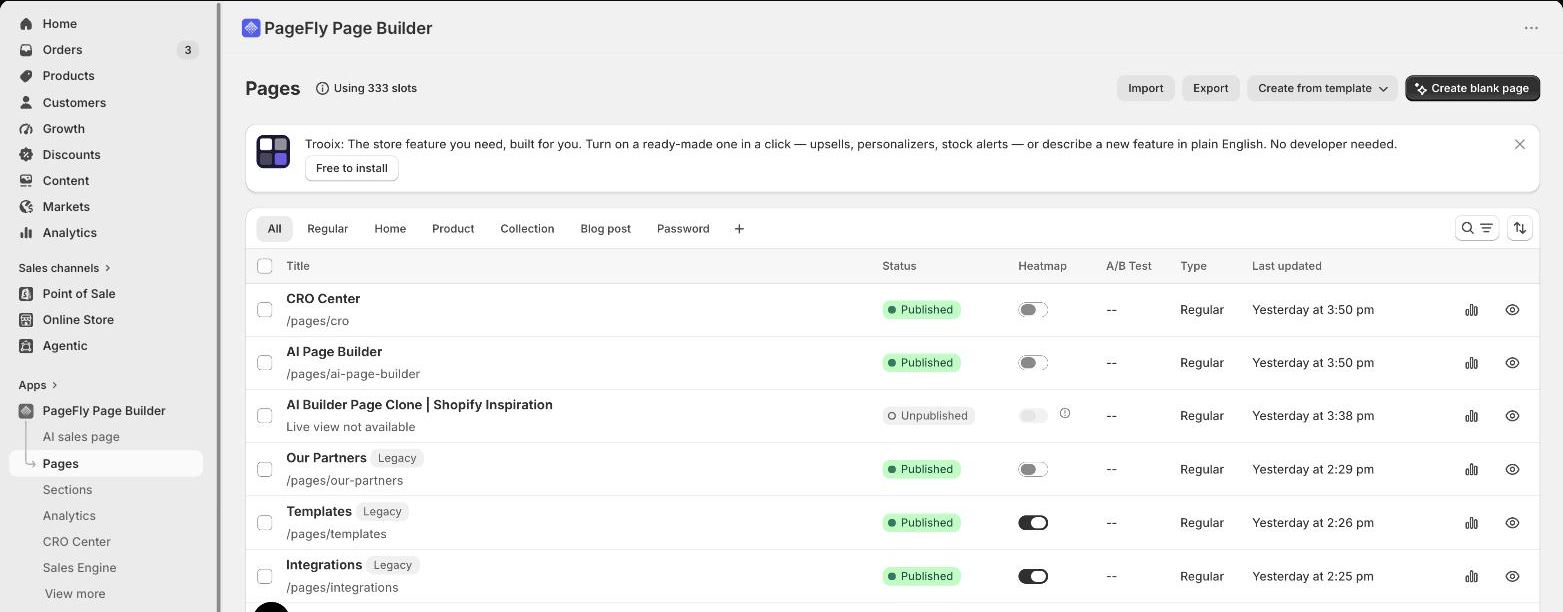
If you want a shortlist scoped only to campaign pages rather than the whole page-builder category, our roundup of the 10 best Shopify landing page apps compares tools on that single job. Whichever you pick, define the success metric before you build: average Shopify conversion rate gives you a realistic baseline to beat.
Free Shopify page builders: what you actually get on a free plan

Free Shopify page builder apps are the norm — 14 of the 15 apps here list a free plan — but "free" almost always means a cap on published pages, not a cap on features, which is why the jump to a paid tier usually buys volume rather than capability. Here is what each free tier includes as listed on the App Store on 23 September 2026. Where a listing does not spell out the free tier's contents, we describe it qualitatively rather than guess.
| Page builder | What the free plan includes | Lowest paid plan |
|---|---|---|
| PageFly | 1 published slot (1 page or 1 section), 10 AI credits per month, 320+ page and section templates, third-party app integrations, 24/7 live chat support | $24/mo |
| Omnise (formerly Beae) | 1 published slot with a watermark, 10 draft pages | $19.99/mo |
| Shogun | "Draft Mode" — build and preview pages; publishing tiers start higher | $39/mo |
| GemPages | Free tier with editor and template access; published-page cap applies | $29/mo |
| EComposer | Free tier with editor and template access; published-page cap applies | $25/mo |
| LayoutHub | Free tier available; published-layout cap applies | $14.99/mo |
| Zipify | Free tier available; split tests begin on the paid Starter plan | $19/mo |
| Foxify | Free tier available; niche layout library included | $19/mo |
| Zeno | Free tier available for AI-drafted pages and sections | $19/mo |
| Replo | Free plan available | $119/mo |
| Buildify | Free tier available; paid tiers add a trial | $9.99/mo |
| AfterShip Page Builder | Free tier available; support is email-first | $35/mo |
| Tapita | Listing now shows "Free" — but it is an SEO/blog tool, not a page builder | — |
| Instant | Free "Developer" tier: development stores only, unlimited previews, Figma plugin, email support. You cannot publish to a live store on it. | $39/mo |
| Hypervisual | No free plan — free trial only | $9.95/mo |
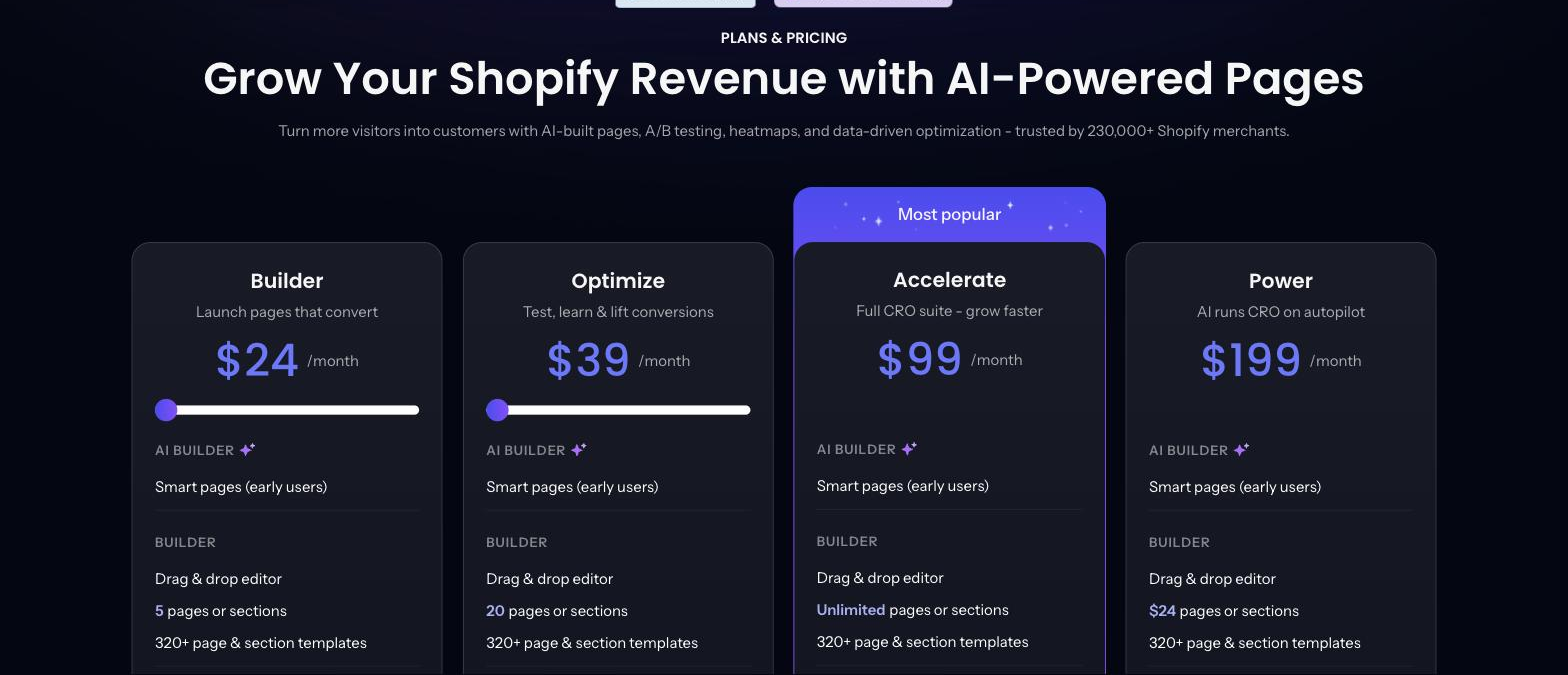
On PageFly's own free plan that cap works out to one published slot — a single page or a single section — with 10 AI credits a month, plus full access to the 320+ page and section template library and 24/7 live chat. The screenshot below shows the paid tiers, not the free plan. Note that the ladder has been restructured since that capture: as listed on 23 September 2026, the PageFly pricing page runs Builder $24/mo (from 5 published pages or sections, from 80 AI credits), Accelerate $99/mo (unlimited pages or sections, 400 credits, plus A/B testing, heatmaps, AI Page Checkup and the AEO optimizer) and Enterprise $299/mo (1,600 credits, priority support), with the 320+ template library included on every tier.
What to actually do with a free plan: build the one page that matters — usually your highest-traffic product page or your next campaign page — publish it, and measure it. One real page tells you more about a builder than an afternoon of clicking around in a demo. If you are not sure which page to start with, our teardown of high-performing Shopify product pages is a good brief to work from.
The catch to watch for: a published-page cap is fine while you are testing, but it is exactly what forces an upgrade mid-campaign. Check the cap and the watermark policy before you build something that has to be live on a deadline. And check whether the free plan publishes to a live store at all — Instant's does not. If you are already on a free plan, start from a proven layout rather than a blank canvas.
How to choose the right Shopify page builder for your business
New merchants (under $100K revenue)
- Start on a free plan that publishes to a live store and ship one page before you pay anything
- Prioritize responsive support and tutorials — you will need help in week one
- Favor template quality over template count; a solid Shopify theme plus one strong page beats fifty mediocre ones
- Budget: $0–$25 a month
Growing D2C brands ($100K–$500K revenue)
- Invest in measurement: A/B testing and page analytics, not more elements. The cheapest listed route is Zipify at $19; the deepest is PageFly Accelerate or Instant Pro at $99
- Check integrations with your email, review and analytics stack
- Watch page weight — correctly sized banners are the cheapest speed win available
- Fix your collection pages too; they carry more category traffic than most merchants expect
- Budget: $24–$99 a month
Scaling businesses ($500K+ revenue)
- Demand unlimited published pages and real code access inside the visual editor
- Run a systematic loop: find friction, test a variant, validate the result
- Pair the builder with on-site merchandising such as Shopify Search & Discovery
- Keep product page SEO in the build spec instead of treating it as post-launch cleanup
- Budget: $99+ a month
What separates a page builder from a CRO platform
Most Shopify page builders help you create pages. A CRO platform helps you create pages that convert, which is a different discipline — you can see it in the way real merchant pages get iterated rather than launched once. The difference is the feedback loop:
| Capability | Basic page builder | CRO-focused builder (e.g. PageFly Accelerate) |
|---|---|---|
| Page creation | Yes | Yes |
| Templates | Yes | Yes — 320+ page and section templates |
| A/B testing | Limited or none | Built in on Accelerate ($99) |
| Click heatmaps | No | Accelerate and up |
| AI page audit | No | AI Page Checkup, Accelerate and up |
| AI-answer readiness | No | AEO optimizer, Accelerate and up |
| Improvement loop | Manual and unmeasured | Find friction, test, validate |
PageFly sits on the CRO side of that line: it lets you build variants, run the test and keep the version that wins rather than the version the loudest person in the room preferred. That is the whole argument for choosing on testability — and it is also why a disciplined A/B testing process matters more than the app you run it in. The AEO optimizer is the newer half of the same idea: pages now have to be readable by AI assistants, not just by shoppers.
Final verdict: best Shopify page builders by use case
Based on hands-on testing plus App Store data re-read on 23 September 2026:
- Best overall for conversion optimization: PageFly — 4.9/5 from 5,900 reviews, 320+ templates, 130+ integrations, 24/7 support listed on every plan, and the full measurement stack (A/B testing, heatmaps, AI Page Checkup) on Accelerate
- Best free plan to start on: EComposer or PageFly — both let you publish a real page on a live store at $0, starting from a ready-made template
- Cheapest route into A/B testing: Zipify at $19/month — not the deepest testing on this list, but by far the lowest price of entry
- Best for data-driven teams: Shogun — page analytics plus A/B testing, from $39 a month
- Best if your designs live in Figma: Instant — the Figma plugin is the thing no one else on this list offers
- Best for in-house design teams: Replo — $119 a month, and priced that way for a reason
Page builders are now standard equipment on Shopify, and the merchants getting the best results are not the ones with the prettiest pages — they are the ones running the most tests. Start on a free plan that lets you publish, ship one page, measure it, then pay for the builder that moves your conversion rate. Install PageFly free if you want to run that test today, or browse our collection of best Shopify store examples for a broader design brief first.
Last reviewed and re-verified against Shopify App Store listings: 23 September 2026.
Shopify Page Builder FAQ
PageFly leads our ranking: 4.9/5 from 5,900 reviews on the Shopify App Store (re-read 23 September 2026), 130+ app integrations, 320+ templates, and a measurement stack — A/B testing, click heatmaps and AI Page Checkup — on the Accelerate plan at $99/month. Choose it, or any builder, on whether it can test the page rather than just style it.
Yes. 14 of the 15 apps in this guide list a free plan, including PageFly, GemPages, EComposer, LayoutHub, Omnise (formerly Beae), Foxify, Zeno and Replo. PageFly's free plan covers 1 published slot, 10 AI credits per month and 320+ page and section templates. One caveat worth checking: Instant's free Developer tier only works on development stores, so you cannot publish to a live store on it.
Five of the 15 state built-in A/B testing on their own Shopify App Store listings as of 23 September 2026: PageFly (Accelerate plan, $99), Shogun (tier not specified), Zipify (split tests from the $19 Starter plan), Omnise (formerly Beae, from $19.99) and Instant (Pro plan, $99). Instant is the new addition since our August check.
It depends on why you are leaving. If the blocker is that Instant's free tier only works on development stores, PageFly, EComposer and GemPages all publish a real page on a live store at $0. If it is the per-plan cap on theme sections and product templates, PageFly or Shogun remove that ceiling. If it is the $99 price of A/B testing, Zipify lists split tests from $19. If your design work lives in Figma, Instant's Figma plugin is genuinely hard to replace — Replo is the nearest equivalent.
Entry paid plans in this guide run from $9.95/month (Hypervisual) up to $119/month (Replo), with most clustered between $19 and $39. PageFly runs Free, Builder $24, Accelerate $99 and Enterprise $299. Instant runs free for development stores, then Starter $39, Pro $99 and Business $249. Verify current pricing on each app's own listing before you buy — prices in this category change often, and three apps in this list were renamed within the last five weeks.
A page builder helps you create pages. A CRO-focused builder adds the feedback loop: page analytics, A/B testing and, on PageFly's Accelerate plan, click heatmaps, AI Page Checkup and an AEO optimizer — so you can find friction, test a fix, and validate whether it actually worked.
For most merchants: PageFly or GemPages for breadth, Zipify if split testing is the priority, and Replo or Instant if you have an in-house design team. A good landing page builder needs four things — campaign speed, a deep template library, A/B testing, and layouts that can hide the header, footer and menu so the only exit is your CTA.
They can, but the app is rarely the main cause. Page builders add their own scripts and styles, and a heavy page built with any tool — oversized hero images, many third-party embeds, long sliders — will load slowly. The practical fix is the same whichever builder you use: compress and correctly size images, limit third-party apps on the page, and measure the page before and after you publish. We have not run a controlled speed benchmark across these 15 apps, so we will not put a number on the difference.