Shoppers are asking AI assistants to do their shopping. They open ChatGPT, Gemini or Copilot and type "a waterproof hiking jacket under $150 that ships to Canada" — and the assistant returns a short list of real products, with real prices, from real stores.
If you sell on Shopify, your products are almost certainly already in that list. Not because you switched something on, but because Shopify agentic storefronts is active by default for eligible stores. And this is no longer a thought experiment about where retail might go: Shopify reports that AI searches powered by Shopify Catalog convert at 2x the rate of those using scraped data. The decision in front of you is not whether to join. It is whether you understand what is already being shared, where the money actually changes hands, and which of your listings are good enough to get named.
The short version
- It is on by default. Shopify: agentic storefronts "is active by default for eligible stores." Opting out is the deliberate act, not opting in.
- It is already producing revenue for real brands. Omnilux saw AI channels drive 3.2% of total revenue in March; Cozy Earth reports AI-channel revenue up 20x year over year.
- Checkout location is set per channel — you do not choose it. ChatGPT is discovery only. Google AI Mode and Gemini, Copilot, Meta and Shop can complete the sale in-channel.
- Everything lives in one place: Sales channels › Agentic in your Shopify admin.
- One master toggle controls three things — catalog access, direct checkout, and auto-enrollment in channels that have not launched yet.
- Opting out takes up to 7 days and does not stop crawlers from finding you anyway.
- The admin now tells you which searches you lose. Search intelligence lists the top AI queries in your category and flags the ones you do not rank for.
- The real competition is listing quality — description, images, reviews, variant names, policies. Shopify grades all five and shows you the score.
What agentic commerce actually is
Agentic commerce is when an AI agent — not a person browsing a website — discovers, compares and recommends products on a shopper's behalf, and sometimes completes the purchase inside the conversation. The shopper describes what they want in plain language; the agent does the searching and filtering, then hands back a short list.
The shift that matters is who you are writing for. For twenty years the job was to rank a page so a human would click it. Now a second reader sits between you and the shopper: an agent reading your structured product data and deciding whether you are worth mentioning at all.
A skincare brand used to compete for the search "best vitamin C serum." Today a shopper asks "a good vitamin C serum for sensitive skin under $40" and gets three products back. If your data is complete, you are one of the three. If it is not, you are invisible — and there is no page two in a chat answer.
Two pieces of plumbing make this work, and both are switched on for you. Shopify Catalog is the structured dataset agents search — Shopify describes it as spanning "billions of products from brands all over the world," syndicated to ChatGPT, Copilot, the Shop app and others "with no extra apps or manual feeds." The Universal Commerce Protocol (UCP), co-developed with Google, is the shared language agents and stores use to actually transact, and Shopify merchants are "UCP-enabled by default." If you want the standard itself explained properly, we covered what UCP means for Shopify merchants separately.
Worth separating two things that often get merged: using AI to run your store is a different project from being found by one. If it is the first you are after, our guide to using ChatGPT for your Shopify store covers that ground. This article is about the second.
Agentic commerce vs traditional SEO
You are not replacing SEO. You are adding a reader with different habits.
| Traditional SEO | Agentic commerce | |
|---|---|---|
| Audience | A human scanning results | An agent reading structured data |
| What "ranking" means | Position on a results page | Whether you get named at all |
| What wins | Keywords, backlinks, authority | Complete product data, reviews, clear variant names |
| Second chance | Page 2 of Google | None — the list is short |
| Where you influence it | Your pages | Your product records, then your pages |
The overlap is larger than it looks. Complete, honest, well-structured product information is what earns a Google ranking and what an agent needs to recommend you confidently. If you want the search-side companion to this, we wrote separately about getting recommended by AI search and about what AI agents actually do with a storefront.
Does agentic commerce actually sell anything yet?
Fair question, and the honest answer for most stores is "a small but fast-growing share." It is worth being precise here, because this is the part of agentic commerce most often argued with vibes. Shopify has published three numbers, and they are the ones worth planning against:
| What Shopify reports | The number | What it tells you |
|---|---|---|
| Conversion rate of AI searches powered by Shopify Catalog, vs AI searches built on scraped data | 2x | Structured, first-party data is not a tidiness exercise — it doubles the conversion of the same search |
| Share of total revenue from AI channels at Omnilux, a red light therapy mask brand, in March | 3.2% | A real, current share for a real brand — small, but larger than most merchants assume |
| Growth in AI-channel revenue at Cozy Earth, a luxury bedding brand, year over year | 20x | The trajectory, not the base, is the argument for doing the work now |
Read those together and the shape is clear. Three percent of revenue does not justify reorganising your business around AI channels. A 20x year, on a channel you are already enrolled in and cannot be billed for, does justify a morning of product-data hygiene — which is the entire ask of this article.
The 2x figure is the one that should change what you do on Monday. It says the gap between a store that is in Catalog with complete data and a store an agent has to scrape is not a rounding error; the same shopper, asking the same question, converts at twice the rate. Everything in the listing-signals section below is how you land on the right side of that multiple.
One caveat worth keeping: these are Shopify's own published figures for named brands, not an independent study, and two of them are single-brand results. Treat them as evidence that the channel works, not as a forecast for your category.
Where the checkout actually happens, channel by channel
This is the single most misunderstood part of agentic commerce, and the part most guides get wrong: checkout location is a property of the channel, not a setting you pick.

Shopify documents ChatGPT as "a discovery-focused referrer platform." ChatGPT users "complete their purchase on your online store checkout in a ChatGPT in-app browser, or in a new tab when customers use ChatGPT web." There is no toggle to find: Shopify states that "there's no option to activate or deactivate a ChatGPT direct checkout setting in your Shopify admin."
For Google AI Mode and Gemini, Microsoft Copilot and Meta, it is the opposite — if direct checkout is activated, the shopper can complete the purchase without leaving the channel. Shop, which is Shopify's own channel, also completes in-app.
Where a channel does complete the sale in-channel, it is UCP doing the work underneath, which is why Shopify says a surface built on it "incorporates a merchant's specific checkout rules, discounts, and customizations" rather than a generic buy button. Your rules travel with the sale even when the sale does not happen on your domain — the mechanics are in our UCP explainer.
For most merchants the ChatGPT arrangement is the better one, not the worse one. A shopper who lands on your checkout is a shopper whose email, discount logic, upsells and post-purchase flow are still yours. If you came here looking specifically for the retired in-chat buying feature, the full story is in our piece on what replaced Shopify Instant Checkout. And because the sale now closes on your side, what each Shopify plan lets you change at checkout matters more than it did a year ago.
It is opt-out, not opt-in
Because agentic storefronts is on by default, the useful question is not "how do I enable this" but "what is already being shared, and do I agree with it."

Everything is in Sales channels › Agentic. While Allow Shopify to manage for me is on, every supported channel has catalog access, direct checkout is active wherever the channel supports it, and you are auto-enrolled in new channels as they arrive. Turning it off is what reveals the per-channel switches.
Three things are worth knowing before you touch any of it:
- Turning catalog access off is slow. Shopify warns it "can take up to 7 days before your product data is no longer being shared through Shopify Catalog."
- It is not a cloaking device. With catalog access off, "your products can still be discovered through web crawling and indexing." To genuinely hide a product from every AI channel including Shop, you need Unlisted status or the
seo.hiddenmetafield — which also hides it from Google. - Shop is a special case. It is a Shopify-owned channel, so it has no catalog-access switch in the Agentic section; you manage it from the Shop sales channel settings instead.
There is also an Other channels group covering "independent developers and startups that are building niche or experimental shopping agents" and newer partners in testing. It is one switch for the whole group. That group is worth a second look rather than a shrug: Shopify has opened Catalog and UCP to any developer, so the number of surfaces in it is designed to grow without you doing anything.
What eligibility actually requires
Shopify publishes the requirements, and they are mostly housekeeping rather than budget:
- You must sell to customers in the United States. Your business can be based anywhere; the selling market is what matters.
- Your products must be eligible for Shopify Catalog — which rules out B2B-only products entirely.
- You must read and agree to the Shopify Agentic Storefronts Supplemental Terms of Service.
- Your Terms of service, Privacy policy, and Return and refund policy must be completed under Settings › Policies.
That fourth one does double duty. Policies are a legal requirement and one of the five signals Shopify grades your listings on, which we come to below. Filling them in is the cheapest thing on this page.
One mechanical detail that catches people out: any legal disclosure needs to appear in the first 6,000 characters of the product description, or it may not be picked up. And there are no fees — Shopify states plainly that "there are no fees associated with selling in ChatGPT," beyond your normal payment processing rates.
How to check what your store is doing right now
Here is the audit, in the order that surfaces problems fastest. You need to be the store owner, or hold the Products › View and App and sales channel › Agentic permissions.
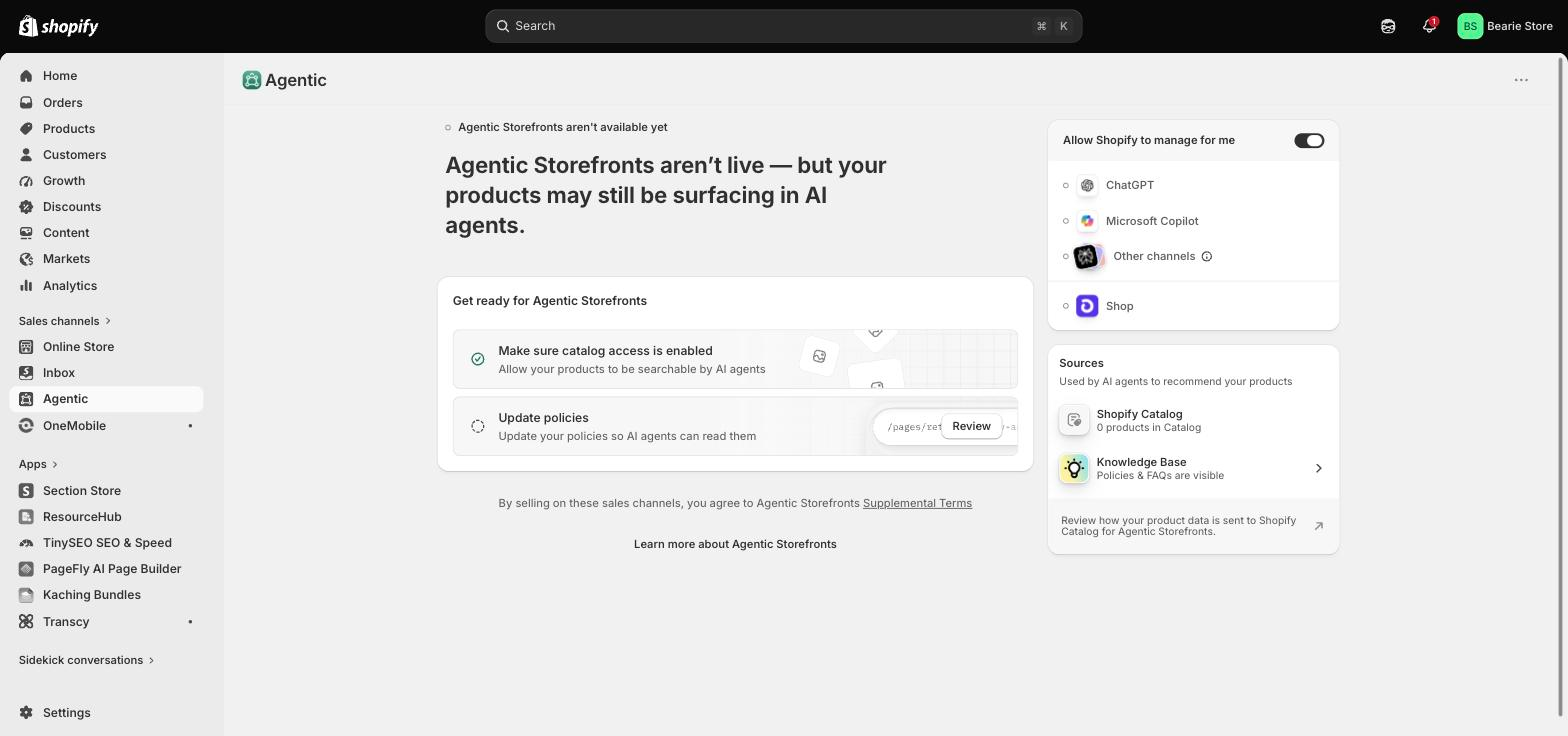
- Open Sales channels › Agentic. Read the status line before you change anything — it tells you whether your store is live or still pending.
- Check your product count in Shopify Catalog. Zero products in Catalog is the most common reason a store is invisible to AI channels, and it is invisible in every other report you look at.
- Decide about the master toggle — knowing that leaving it on opts you into future channels automatically.
- Fill in any missing store policy. It is a requirement and a ranking signal at once.
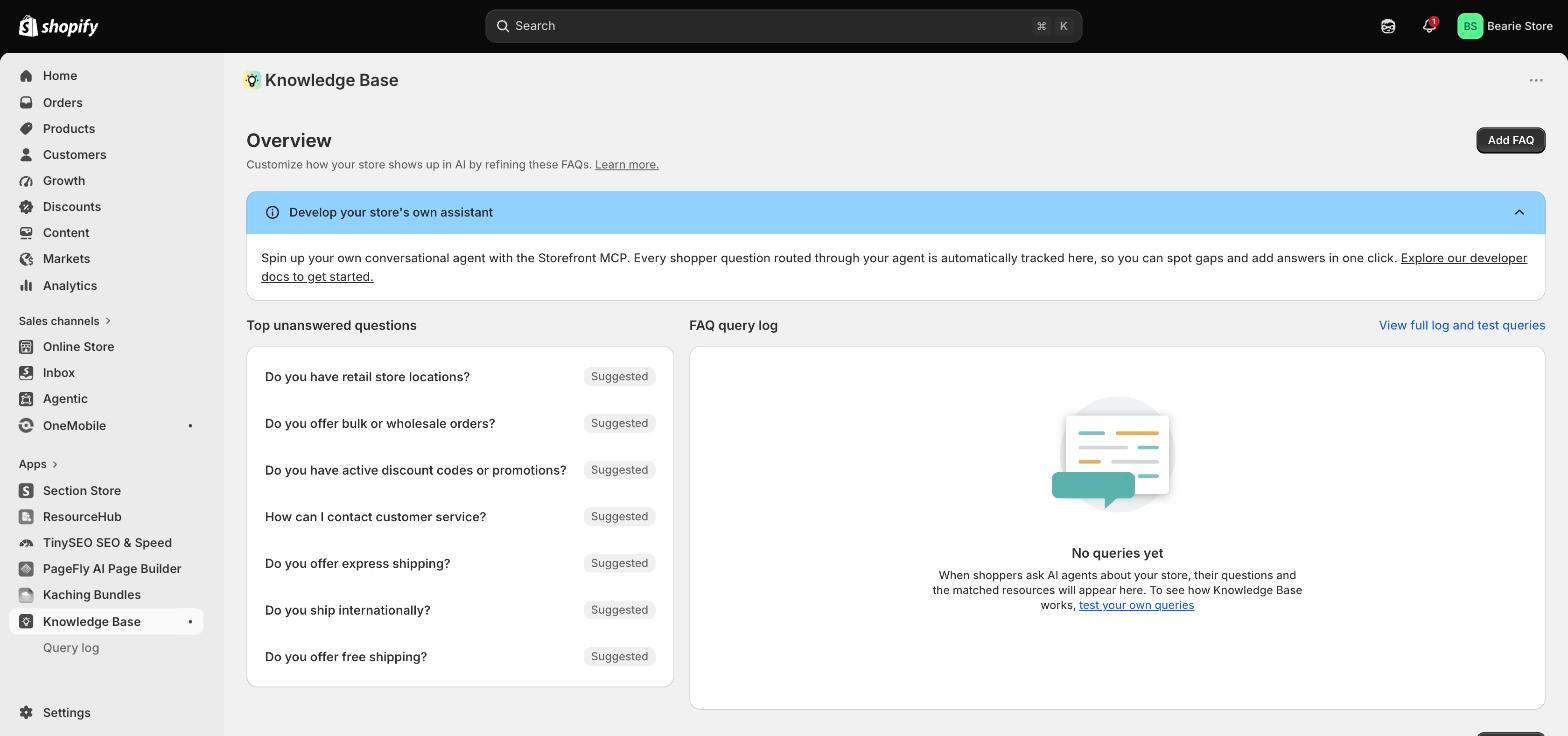
- Read the search intelligence list — the queries in your category you are not showing up for.
- Run a search in the preview tool — covered next, and it is the only part of this that tells you something you could not have guessed.
Shopify also reports per-channel performance here: sales, orders, online store sessions, and online store conversion, with sales aggregating both referral-based and direct-checkout revenue. Note that this reporting is not yet available for headless stores.
Find the searches you do not rank for
The reporting in the Agentic section answers "how am I doing"; search intelligence answers the more useful question, which is "what am I missing." Shopify describes it as showing "the top AI queries in your category, which ones you rank for, and where you're not showing up yet."
That is a materially different artefact from a keyword tool. These are queries agents are actually being asked in your category, scored against your actual catalog — so the gap list is a to-do list, not a research project. Work it the way you would work a Search Console query report: take the queries with obvious intent, find the product that should have answered them, and ask why it did not.
Shopify pairs this with a fix-it path. When products "surface in AI conversations but aren't turning into sales," Sidekick will tell you what to change — "adding specifications to product titles, improving descriptions, or filling in missing product details." It is the same advice as the listing-quality meter below, delivered against a specific product instead of a general score, and it is free.
The preview tool is the part worth your time
The search preview in Sales channels › Agentic lets you type a query and see how your products rank in Shopify Catalog's raw results — before an AI channel re-ranks them. If your products place, you get a confirmation like "10 of your products are in the top ranking search." If they do not, you see which of your products were closest, and why they fell short.
Shopify is explicit about the limits: channels "often re-rank results based on their own logic," so treat this as "a directional signal, not an exact prediction." It is still the only honest feedback loop available, and it is free. It is the agentic equivalent of tuning search and discovery inside your own store.
The five listing signals that decide whether you get recommended
Once your catalog is flowing, the competition is not for a checkout button. It is for being the product the assistant names. Shopify grades each listing with a Listing quality meter built from five specific signals:
- Description completeness — measured on word count. Agents "rely on descriptions to match products to natural-language customer queries," so thin descriptions lose.
- Image coverage — the number of product images, which lets channels "visually represent your product across different contexts."
- Product reviews — average rating and review count, counted "only from reviews that are verified by trusted sources."
- Variant and option completeness — including whether option names "contain acronyms or numbers that are hard for agents to understand or recommend."
- Shop policy completeness — shipping, returns, refunds and the rest.
The fourth is the quiet killer, and the cheapest to fix. A variant called CLR-02 / SZ-M is perfectly readable to a human looking at a swatch, and meaningless to an assistant trying to say "the medium in sage green." Read your twenty best sellers' option names out loud; if you cannot say one as a sentence, an agent cannot either.
Notice that four of the five signals are just product-record hygiene, and the fifth is reviews. None of them is a marketing campaign. This is the same discipline as answer engine optimization applied to your catalog instead of your content — be complete, be unambiguous, be verifiable. And this is precisely where that 2x conversion multiple is won or lost: the difference between structured data and scraped data is, in practice, the difference between a listing that scores well on these five and one that does not.
Shopify is careful to scope what this score covers: listing quality is "about what you can directly control with your products," while relevance also depends on popularity, engagement and brand recognition — things you accumulate rather than edit. That is a useful boundary to keep, because it tells you which hours are worth spending. For a sense of how differently assistants read the same store, our comparison of Sidekick, ChatGPT and Claude is a decent calibration, and Shopify Magic can do the first pass on thin descriptions.
What this means for your product page
The boundary first, because it is the part that gets oversold: a page builder does not get you recommended. Catalog data does that, and none of it lives in your page template.
But look at what the ChatGPT arrangement actually produces. The agent does the discovery, then drops a motivated, pre-qualified shopper onto your product page — frequently inside a mobile in-app browser, arriving cold, with no session history and no browsing context. That page now carries the entire conversion job the conversation used to share.
Three things are worth auditing on the pages agentic traffic is most likely to hit:
- Does the page restate what the assistant just promised — the material, the fit, the compatibility — in the first screen, so the shopper does not have to re-verify it?
- Does it survive a mobile in-app browser, which is narrower and slower than the phone browser you test in?
- Does it answer the objection the assistant could not — returns, delivery window, sizing?
This is where PageFly is genuinely useful and where it is not. It does not toggle agentic storefronts for you and it does not touch your catalog data. What it helps with is the landing surface: structured, answer-rich pages that hold up when a stranger arrives mid-decision. Our roundup of product pages that convert has concrete patterns for all three questions above, and product page SEO covers the structured-data side.
If you would rather start from something proven than a blank canvas, the PageFly template library covers the common product-page shapes. For the measurement side, our CRO resources are the practical starting point, and if you are rebuilding at volume rather than one page at a time, the AI page builder is the faster route.
What to do this week
Open Sales channels › Agentic and confirm your Catalog product count is not zero — that single check is the difference between being in the 2x cohort and being scraped. Fill in any missing store policy. Read the search intelligence list and write down the three highest-intent queries you do not rank for. Run those same three through the preview tool and see how close your products came. Then rewrite the variant option names on your twenty best sellers. That is the whole job this week — and if you are heading into peak season, fold it into your BFCM preparation rather than running it as a separate project.
Shopify agentic commerce FAQ
Do I need to turn on Shopify agentic commerce?
No. Shopify states that agentic storefronts "is active by default for eligible stores." Your products are shared with AI channels through Shopify Catalog unless you deliberately opt out in Sales channels › Agentic.
Is anyone actually making money from AI channels yet?
Yes, though the share is still small for most stores. Shopify reports that Omnilux saw AI channels drive 3.2% of total revenue in March, and that Cozy Earth's AI-channel revenue was up 20x year over year. Shopify also reports that AI searches powered by Shopify Catalog convert at 2x the rate of searches built on scraped data. These are Shopify's published figures for named brands rather than an independent study, so read them as evidence the channel works, not as a forecast for your category.
Can customers buy my products inside ChatGPT?
Not inside the chat itself. Shopify describes ChatGPT as "a discovery-focused referrer platform" — shoppers complete the purchase on your own online store checkout, shown in a ChatGPT in-app browser or a new tab. Google AI Mode and Gemini, Microsoft Copilot and Meta do support direct checkout where it is activated.
What is UCP, and do I have to do anything about it?
The Universal Commerce Protocol is the open standard, co-developed by Shopify and Google, that lets AI agents and stores transact in a shared language. Shopify merchants are "UCP-enabled by default," so there is nothing to install — its practical effect is that when a channel completes a sale in-channel, your checkout rules, discounts and customizations travel with it.
How do I stop my products appearing in AI channels?
Turn off "Allow Shopify to manage for me" in Sales channels › Agentic, then turn off Shopify Catalog access for the channels you want to exclude. Shopify warns it can take up to 7 days to take effect, and your products can still be found through ordinary web crawling. To hide a product from every channel including Shop, use Unlisted status or the seo.hidden metafield.
What does it cost to sell through AI channels?
Shopify states there "are no fees associated with selling in ChatGPT" — you pay only your standard payment processing fees.
Do I still own the customer?
Yes. Shopify confirms you "retain full ownership of the customer relationship and post-purchase experience," and orders arrive in your admin with channel or referrer attribution so you can see which agent sent them.
Which AI channels does Shopify support?
Shopify's documentation covers ChatGPT, Google AI Mode and Gemini, Microsoft Copilot, and Meta, plus Shop as a Shopify-owned channel and a grouped "Other channels" option for smaller and emerging agents. What appears in your admin depends on what has rolled out to your store.
How do I find out which AI searches I am losing?
Use the search intelligence view in Sales channels › Agentic. Shopify describes it as showing "the top AI queries in your category, which ones you rank for, and where you're not showing up yet" — so it gives you a gap list rather than a general score. Pair it with the search preview tool to see how close your products came on the queries that matter.
Why are my products not showing up in AI answers?
Check three things in order: whether your product count in Shopify Catalog is zero, whether your store meets the eligibility requirements (US selling market, completed policies, agreed terms), and what the search preview tool says about your listing quality. Thin descriptions, too few images and cryptic variant names are the most common reasons a product is in the catalog but never named.
Is agentic commerce replacing SEO?
No — it adds a second reader. The same complete, well-structured product information that earns a Google ranking is what an agent needs to recommend you, so the work compounds rather than competing.
Revenue and conversion figures cited in this article are from Shopify's newsroom post "Selling everything, everywhere, all at once: The Spring '26 Edition" (17 June 2026). Product behaviour was verified against Shopify Help Center documentation and tested first-hand in the Shopify admin on 15 September 2026. Last reviewed 18 September 2026.
Shopify Agentic Commerce FAQ
No. Shopify states that agentic storefronts is active by default for eligible stores. Your products are shared with AI channels through Shopify Catalog unless you deliberately opt out in Sales channels › Agentic.
Not inside the chat itself. Shopify describes ChatGPT as a discovery-focused referrer platform — shoppers complete the purchase on your own online store checkout, shown in a ChatGPT in-app browser or a new tab. Google AI Mode and Gemini, Microsoft Copilot and Meta do support direct checkout where it is activated.
Turn off Allow Shopify to manage for me in Sales channels › Agentic, then turn off Shopify Catalog access for the channels you want to exclude. Shopify warns it can take up to 7 days to take effect, and your products can still be found through ordinary web crawling. To hide a product from every channel including Shop, use Unlisted status or the seo.hidden metafield.
Shopify states there are no fees associated with selling in ChatGPT — you pay only your standard payment processing fees.
Yes. Shopify confirms you retain full ownership of the customer relationship and post-purchase experience, and orders arrive in your admin with channel or referrer attribution so you can see which agent sent them.
Shopify's documentation covers ChatGPT, Google AI Mode and Gemini, Microsoft Copilot, and Meta, plus Shop as a Shopify-owned channel and a grouped Other channels option for smaller and emerging agents. What appears in your admin depends on what has rolled out to your store.
Check three things in order: whether your product count in Shopify Catalog is zero, whether your store meets the eligibility requirements (US selling market, completed policies, agreed terms), and what the search preview tool says about your listing quality. Thin descriptions, too few images and cryptic variant names are the most common reasons a product is in the catalog but never named.
No — it adds a second reader. The same complete, well-structured product information that earns a Google ranking is what an agent needs to recommend you, so the work compounds rather than competing.