On 17 August 2026 we opened the product page for Asphalte's Fisherman's Jacket and counted the number under the buy button: 1,664 pre-orders, on a garment that has not been manufactured. The button says PREORDER, not Add to cart. The price says 169€ for pre-order against 219€ in stock. And directly under it sits the line that makes the whole thing work — Delivery: 1st – 15th March.
Shopify has no native pre-order button. Here's the app-free route, where it breaks, and how to set up pre-orders that don't oversell or miss the FTC 30-day shipping rule.
That distinction matters more than any setting in this guide, so here is the rule the rest of the article is built on: a pre-order is a dated promise, not a product. Everything that goes wrong with Shopify pre-orders — captured payments that expire, carts that oversell, refund waves at week six — traces back to merchants treating the date as marketing copy instead of the thing they actually sold.
The short version
- Shopify has no built-in pre-order feature. Its own documentation says you must install a pre-order app from the App Store to sell one.
- The app-free workaround has a hard 7-day ceiling. Shopify Payments authorises a card for 7 days, so "set capture to Manual and charge them later" cannot survive a 6-week production run.
- Pre-orders disable Shop Pay, Apple Pay and Google Pay — plus Klarna and other local payment methods, and any customised checkout.
- Mixed carts follow Shopify's rules, not yours: the earliest due date wins, due-on-fulfillment beats a fixed date, and deposits are combined at checkout.
- The ship date is a legal commitment in the US. With no date stated, the FTC gives you 30 days — then a delay notice, then a cancellation and refund.
- Most pre-order apps have a free plan. Of the six we checked on 17 August 2026, five offer one and one is trial-only; ratings run 4.5–5.0 across 83 to 3,544 reviews.
What is a Shopify pre-order?
A Shopify pre-order is a purchase option that lets a customer buy a product that is out of stock or not yet manufactured, with the shipment scheduled for a later date. Shopify's Help Center describes the payment side plainly: "you can collect full, partial, or no payment at the time the customer places their order", and the stored payment method is charged when you fulfil.
Two things surprise most merchants. First, this is a purchase option, the same family of mechanics behind Shopify subscriptions and try-before-you-buy — not a product setting you flip. Second, Shopify does not ship it. The same doc states: "To use pre-orders, you need to install a pre-order app from the Shopify App Store and then manage pre-orders in the Shopify admin."
Sequencing matters here in a way it does not for other features: the purchase option is created by the app and only reflected in your admin, so the app is the source of truth for the date, the deposit and the cap. Getting that backwards is the most common setup error we see, and it is the same trap as assuming a theme controls a price it is only displaying. If you already run wholesale purchase options, the mental model is the one from Shopify B2B: the terms live on the order, not on the product.
There is also a payment-provider gate that stops a lot of stores before they start. Pre-orders are only available to merchants using Shopify Payments or PayPal Express. If your store runs on a third-party gateway, this feature does not exist for you, and no amount of theme work in your store design will change that.
Merchants use several words for the same mechanic — pre-order, preorder, presale, backorder, "coming soon". They differ in why the stock is missing, not in how Shopify handles them, so pick one label and keep it consistent everywhere from the collection page to the confirmation email.
That consistency has a second payoff: shoppers filtering your catalogue can only find a pre-order group if the label is a real value, which is a search and discovery setup question as much as a copy one.
The rest of this guide assumes you are working on a standard Shopify product page, because that is where every pre-order decision eventually renders.
The app-free route, and the 7-day wall it hits
Almost every "no app required" guide gives the same two steps, and both are real Shopify settings. They are also, together, a trap — so it is worth walking them first-hand before you commit a launch to them.
Step 1 — let the product sell past zero. Open the product, turn Track quantity on, expand More details under Inventory, and tick Continue selling when out of stock.
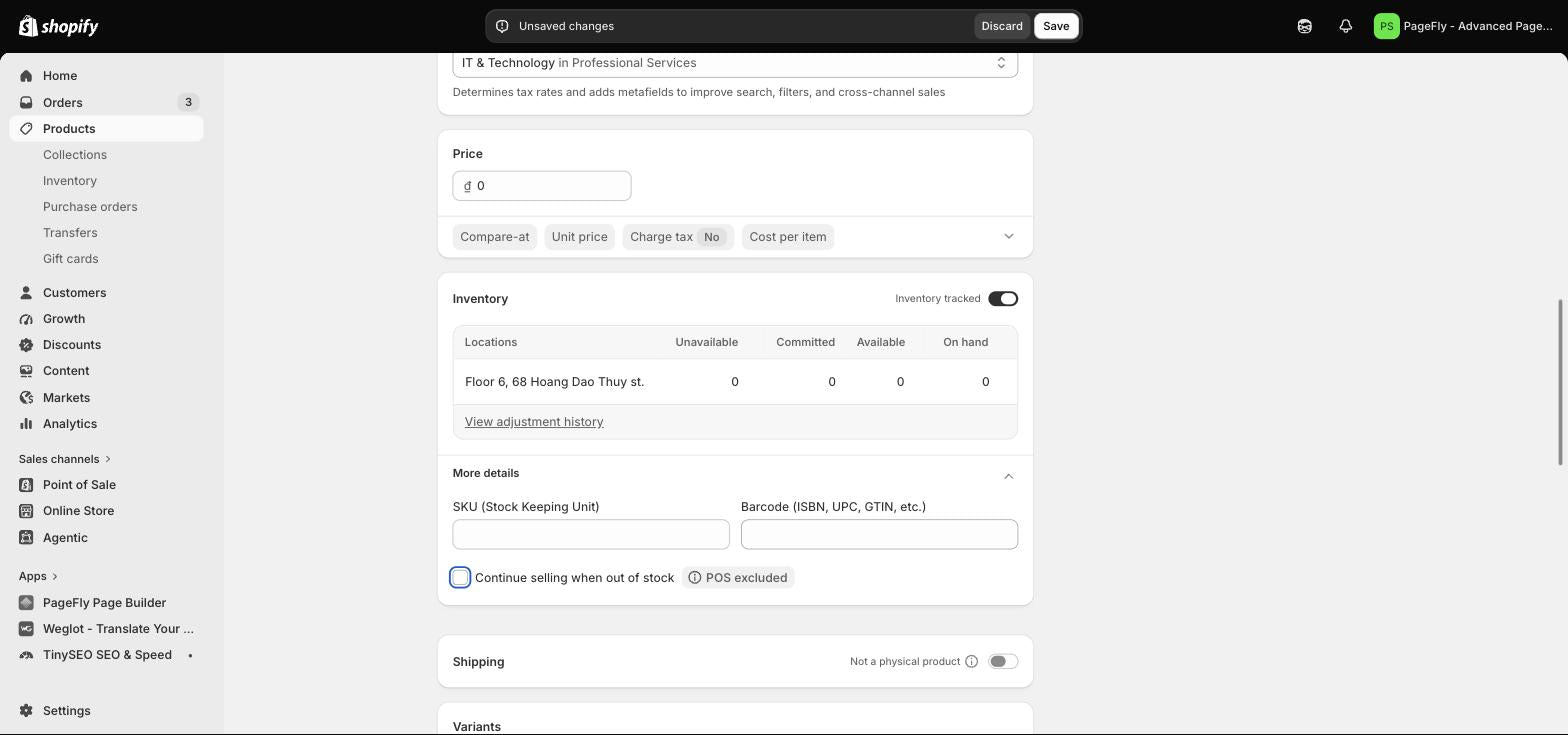
Step 1 — the Continue selling when out of stock checkbox lives under More details in the Inventory card, and only appears once Track quantity is on. Note the POS excluded badge: it does not apply in-store. Tested first-hand by PageFly, 17 August 2026.
Step 2 — stop charging cards at checkout. Go to Settings > Payments > Payment capture method and switch from Automatically at checkout to Manually.
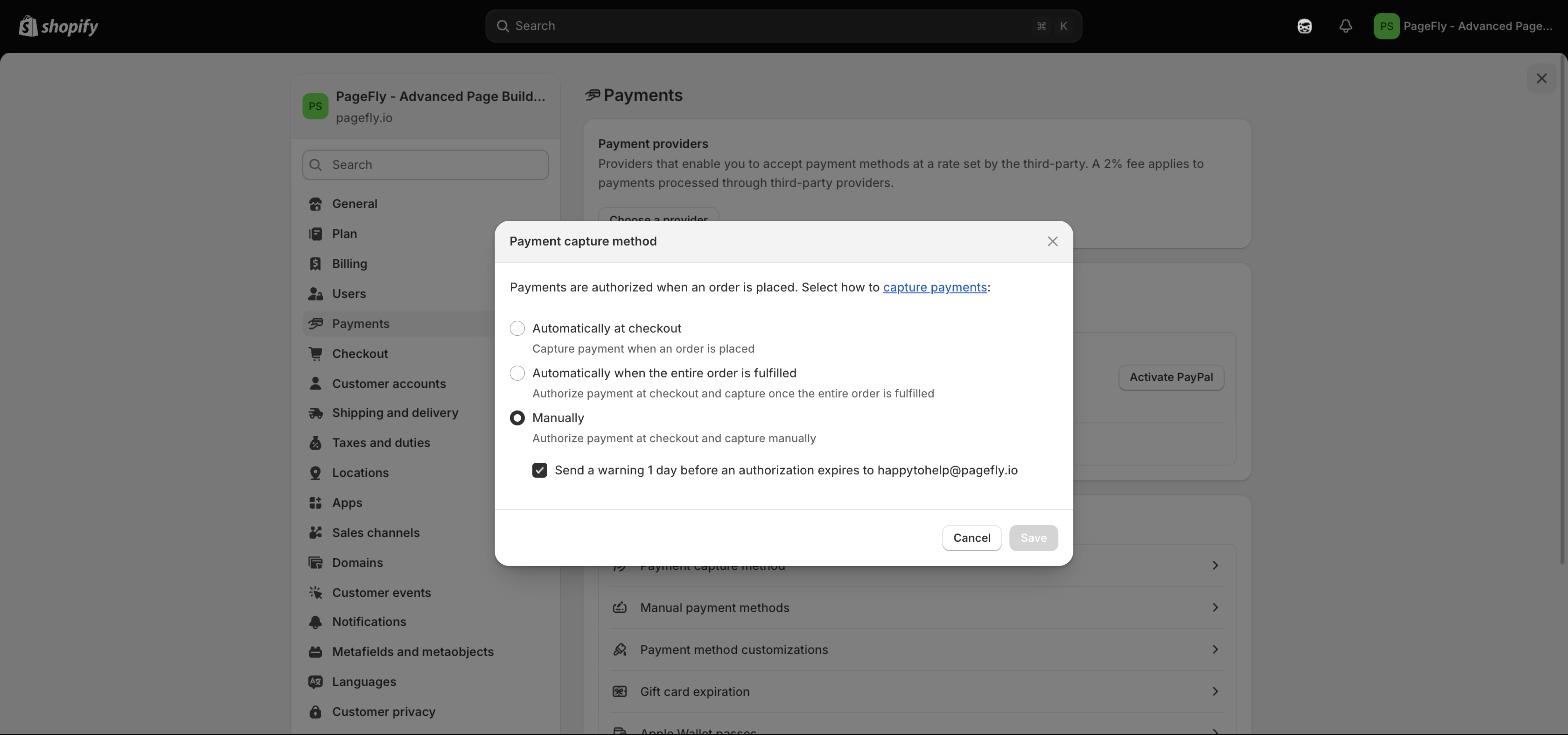
Step 2 — the Payment capture method dialog on our own store, set to Manually. The checkbox at the bottom, "Send a warning 1 day before an authorization expires", is Shopify quietly telling you that authorisations expire. Tested first-hand by PageFly, 17 August 2026.
That last checkbox is the tell. Shopify Payments authorises a credit card for 7 days. Miss the window and, in Shopify's own words, "after the authorization period ends, you might be unable to collect any money for the order".
Shopify Plus stores get extended authorisation periods, and they are not a fix either — they are a fee. Visa, Mastercard and American Express stretch to 30 days, Discover and JCB to 10, and Diners Club and China Union Pay stay at 7. Capture after the standard 7-day mark and a 1.75% charge applies on top of standard credit card fees. If your production run is 8 weeks, none of those numbers reach it, whatever Shopify plan you are on.
What the app-free route actually gets you. A working "buy now, ships later" button with normal Add-to-cart wording, no deposit support, no per-order limit, and payment that must be captured inside 7 days or abandoned. It is a legitimate answer for a 5-day restock. It is not an answer for a manufacturing run — and it silently switches every online-store order to manual capture, not just the pre-order. Shopify notes that capture settings apply to online store orders only, so POS is unaffected. Take a backup before you touch it.
How to set up pre-orders on Shopify in 6 steps
The supported route runs through an app plus a handful of admin settings. Here is the whole sequence, in order.
- Confirm your payment provider. Shopify Payments or PayPal Express only. Check Settings > Payments first, because everything below depends on it.
- Install a pre-order app. Open the Pre-orders category in the App Store and pick one — the comparison table below has the current ratings.
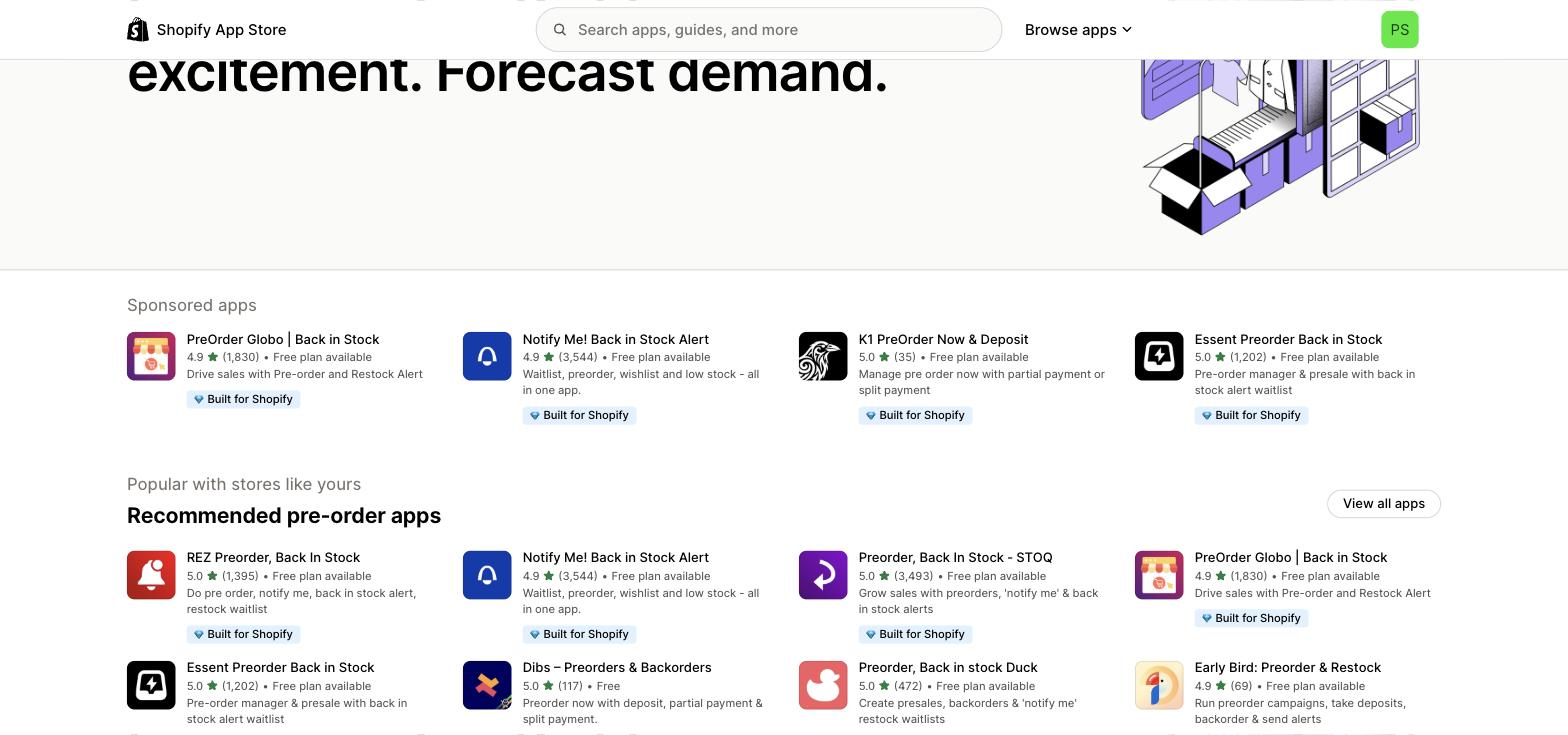
Step 2 — the Pre-orders category in the Shopify App Store. Every app in the recommended row carries the Built for Shopify badge and a free plan. Source: apps.shopify.com, captured 17 August 2026.
- Build the purchase option inside the app. This is where you set the deposit or full charge, the ship date, and any per-customer limit. Shopify's admin only reflects what the app created.
- Decide whether the product is pre-order only. On the product page, choose Only display this product with these purchase options, or leave it deselected so the item can also be bought outright once stock lands.
- Write the ship date into the page, not just the app. Put the date beside the button, in the cart, and in the confirmation email. Section-based themes make this a one-block edit in the theme editor; if you are on a 2.0 theme you can reuse the same block across templates.
- Place a real test order. Buy one yourself, then check the order shows the deposit and the balance due. Nothing else tells you whether the app, the theme and the checkout agree.
One clean-up detail nobody mentions until it bites: if you uninstall the app, pre-order data is deleted after 48 hours unless that app has its own backup mechanism. Customer payment information is held by Shopify and survives, but the purchase options do not — so treat app migration the way you would treat a catalog migration, not a plugin swap.
See how a full product page is assembled →
Pre-order apps compared
Every figure below was read from the live Shopify App Store on 17 August 2026. All of these carry the Built for Shopify badge, and all offer a free plan except where noted.
Before you install any of them, decide where the pre-order badge and date will actually render — a theme block, or a page you control. If it is the latter, start from a product page template rather than a blank canvas.
| App | Rating | Reviews | Free plan | Listing angle |
|---|---|---|---|---|
| Preorder, Back In Stock — STOQ | 5.0 | 3,493 | Yes | Pre-orders + "notify me" + back-in-stock alerts |
| Notify Me! Back in Stock Alert | 4.9 | 3,544 | Yes | Waitlist, pre-order, wishlist, low stock |
| REZ Preorder, Back In Stock | 5.0 | 1,395 | Yes | Pre-order, notify me, restock waitlist |
| PreOrder Now Back in Stock WOD | 4.5 | 981 | Yes (1 product) | Deposits, partial payments, pre-order discounts |
| Dibs — Preorders & Backorders | 5.0 | 117 | Free | Deposit, partial payment, split payment |
| Downpay: Partial Pay & Deposit | 5.0 | 83 | Free trial only | Deposit and partial payment for custom orders |
How to read that table. Review count is a proxy for install base, not for fit. The two questions that actually decide it are whether you need deposits (a partial charge now, balance later) and whether you need per-customer order limits. If you only need "sell past zero and email me", the free tier of any of these is enough — and the same logic applies as when you pick a landing page app: pick for the one job you cannot do without.
PreOrder Now's own listing names PageFly among the apps it works with, which is worth knowing if your product template is custom-built rather than theme-default.
One thing no app writes for you is the copy. A pre-order description has to sell a prototype, so it needs more specificity than a normal listing — our guide to writing product descriptions covers how to get there without inventing features that do not exist yet.
What actually breaks: checkout methods, mixed carts and overselling
This is the section most guides skip, and it is where launches fail. Shopify publishes an explicit list of pre-order restrictions, and each one is a conversion problem in disguise.
- Accelerated checkouts are gone. Customers cannot buy a pre-order with Shop Pay, Apple Pay or Google Pay. On a mobile-heavy store this is the single biggest hit you will take — the fast-checkout buttons your conversion rate depends on simply do not appear.
- Local payment methods are gone too, including Klarna, mollie iDEAL | Wero and Sofort. If you sell into Europe, model that before you launch.
- Customised checkouts are not supported at all, and pre-orders only work on the Online Store and Custom Storefront channels — so nothing on POS, and nothing in the Shop app flow.
- Buy X get Y discounts do not work with pre-orders, and Shop Promise is not supported either.
- Purchase options cannot be combined on one product in a single checkout. Shopify's example is exact: a customer cannot pre-order a subscription product, and a t-shirt on pre-order cannot also be bought try-before-you-buy.
Mixed carts — one pre-order item plus one in-stock item — follow rules you do not set. Shopify resolves them like this:
| Situation | What Shopify does | Shopify's example |
|---|---|---|
| Two items, two specific due dates | The earliest due date applies to both | Shirt due June 3, book due June 7 → both due June 3 |
| One fixed date, one due on fulfillment | Due on fulfillment takes priority | Shirt due June 3, book due on fulfillment → both on fulfillment |
| Two deposits | Deposits are combined and charged at checkout | $50 table + $30 chair → $80 taken at checkout |
There is one more trap in that scenario. Payment Customization Functions only affect the non-pre-order products in a mixed cart — so any checkout logic you have built to hide or reorder payment methods silently stops applying to the pre-order line. If your checkout page relies on those rules, test a mixed cart specifically.
Label the line item in the cart itself, too. A shopper who opens a cart drawer and sees two identical-looking items with one shared due date has been given no way to tell which one is the pre-order.
Overselling is the other half. "Continue selling when out of stock" removes the brake entirely: it will sell 900 units of a 300-unit run without complaint. A proper pre-order app sets a cap on the purchase option itself, which is the only place a cap belongs.
Whatever you use, keep inventory tracking on — a pre-order with tracking switched off has no number to cap, and no number to report against in your conversion reporting afterwards.
The checkout does give you one genuine protection. During the Payment step, the customer must confirm they understand they are buying a product with a purchase option, and cannot complete the order without agreeing. That consent is your evidence later.
The ship date is a promise, not marketing copy
US merchants are governed by the FTC's Mail, Internet, or Telephone Order Merchandise Rule. Shopify restates it in its own pre-order documentation, which tells you how seriously to take it. The Rule's own summary of the default is blunt: "If you make no shipment statement, you must have a reasonable basis for believing that you can ship within 30 days. That is why direct marketers sometimes call this the '30-day Rule.'"
Four consequences you can act on today:
- State a date, and have a reason for it. The Rule requires a "reasonable basis" for any shipment claim. A date invented to look good is the violation, not the delay.
- A date on the product page beats the 30-day default. Shipment information given at order time supersedes what your advertising said — and you need a reasonable basis for that too.
- Send a delay notice before the date passes. If the revised date is 30 days or less out, silence counts as consent. If it is longer or unknown, you must tell customers the order cancels automatically at the original date plus 30 days.
- Refund fast when you cancel. Seven working days for most payment methods; one billing cycle where you are the creditor. Store credit does not count.
Steps 3 and 4 are the ones that get missed, because they only fire when something has already gone wrong. Automate them: a Shopify Flow triggered on the ship date is more reliable than a calendar reminder nobody owns.
It also helps to have your shipping setup finalised before the pre-order opens, so the delivery estimate the customer sees at checkout does not contradict the date on the product page.
This is exactly why the dated promise framing is more than a slogan. Sarah Resnick, founder of Gist Yarn, put the upside on a Shopify Masters episode:
"It's hard to make the cash flow that you need to launch something new. It's expensive. Preorders have let us do that. It's our customers investing in us and getting yarn back."
Customers investing in you is the accurate description — and it is also why a slipped date reads as a broken deal rather than a late parcel.
Put the cancellation and refund terms on a real store page and link to it from the buy box, so the promise is in one place you can update rather than scattered across product descriptions.
If you need to draft that page and the delay email quickly, Shopify Magic will produce a first pass — just check every date and figure it writes, because this is the one place a hallucinated number is a legal problem.
How to build a pre-order page that converts
A pre-order page has a job an ordinary product page does not: it has to sell a thing the shopper cannot receive today. Asphalte, a Shopify merchant profiled in Shopify's own case studies, runs its entire catalogue this way. Benjamin Mateo, its chief revenue officer, described the constraint precisely: "the sale did not generate stock withdrawal and that the customer would receive their garment months later."

Asphalte's live pre-order page: dual pricing (169€ PREORDER vs 219€ IN STOCK), a button that says PREORDER, an explicit Delivery: 1st – 15th March window, a running 1664 preorders counter, and an accordion titled "Stock or preorder — what's the difference?". Source: asphalte.com, captured 17 August 2026.
Count what that one buy box does. Six elements, each answering an objection a pre-order shopper actually has:
- The button names the transaction. "Preorder", not "Add to cart" — no shopper reaches the confirmation email surprised.
- The date is beside the price, not in a policy page. Asphalte gives a two-week window rather than a single day, which is honest and still specific.
- The discount is the compensation. 169€ now against 219€ later prices the wait instead of pretending it doesn't exist.
- The counter is social proof that only pre-orders can show. 1,664 people already committed is a stronger signal than any review count.
- The mechanic is explained inline. Their accordion answers "how does preordering work?" in six steps, ending with: "We make a few extra pieces for exchanges. The rest goes into stock for those who missed the pre-order." An accordion block keeps that explanation on the page without pushing the button below the fold.
- Returns are addressed twice, with "Satisfied or money-back" and "Easy peasy returns and exchanges" — because the risk a shopper feels is refund risk.
One production problem sits underneath all six: on a pre-order you often have no finished product to photograph, only a prototype or a factory sample. Retouched samples and AI product images are the usual bridge, provided the final item genuinely matches.
Point 6 is the one merchants under-invest in. The objection on a pre-order is never "is this good?" — it is "what happens if you don't deliver?", which is the same job trust badges do on an ordinary page, only louder.
None of that requires a custom build. Theme sections will carry most of it, and metafields can hold a per-product ship date so the page and the app never disagree.
Most current themes already ship the blocks you need — our best Shopify themes roundup flags which ones handle badges and countdowns natively, and Horizon is the free default worth checking first.
For campaign pages that sit outside the product template, the pattern is the same one used to build a landing page for any launch — a dated drop is, structurally, a sales landing page with a delivery promise bolted on.
Announce the window rather than assuming people will find it: a dated announcement bar is the cheapest way to tell every visitor the pre-order closes on a specific day.
Where a theme runs out of room, a Shopify page builder is the usual next step. PageFly, a Shopify page builder, is one option there, and its visual editor is where the buy-box layout gets rearranged without touching Liquid.
For inspiration on how launch-led brands lay these pages out, our roundups of best Shopify product pages and Shopify clothing stores are full of dated-drop examples.
Two measurement habits are worth building in from day one. Run an A/B test on the ship-date wording before you test anything cosmetic — "ships 1–15 March" and "ships in 6 weeks" do not perform the same, and one of them will win by a margin worth knowing.
Then tag the campaign properly so the pre-order revenue is separable from the rest, using the same setup as any other conversion tracking work.
Keep the date in the page HTML rather than injecting it after load, so it survives into product page SEO and stays readable by the assistants covered in our GEO guide.
That last point is becoming load-bearing. An AI shopping assistant filtering "in stock, ships before March" needs your date as extractable text; the mechanics of that are covered in Shopify agentic commerce, and the tooling side in Shopify AI agents.
Finally, watch the pre-order cohort separately in Shopify Analytics. Blended into normal orders, a 40% pre-order refund rate looks like a rounding error until the quarter closes.
No app or an app? A straight comparison
| App-free (continue selling + manual capture) | Pre-order app | |
|---|---|---|
| Cost | Free | Free tier on every app in the category |
| Payment timing | Must capture inside 7 days | Deposit now, balance on fulfillment |
| Deposits / partial payment | No | Yes |
| Cap on units sold | No — sells indefinitely | Yes, on the purchase option |
| Button wording | Stays "Add to cart" unless you edit the theme | App-controlled, plus badges |
| Blast radius | Manual capture applies store-wide | Scoped to the product |
| Best for | A restock landing in under a week | Anything with a production lead time |
The honest summary: the app-free route is a bridge, not a system. It is genuinely useful when stock is already on a truck, and it is the wrong tool the moment a factory is involved.
If the store does not exist yet, start with the $1 trial and set the purchase option up before you have a catalogue to retrofit — the free trial page is the shortest way in.
If you need help wiring a custom flow, our development services directory lists agencies and costs, and the wider question of what to build in-house is covered in our guide to choosing a Shopify website builder.
A 20-minute pre-launch checklist
- Minutes 0–5: confirm Shopify Payments or PayPal Express is live, and place one test pre-order end to end.
- Minutes 5–10: add a second, in-stock item to that same cart and read what the checkout says about the due date. That is your mixed-cart behaviour, verified rather than assumed.
- Minutes 10–15: write the ship date into the buy box, the cart and the confirmation email. Not sure which theme you are on? A theme detector answers it in seconds.
- Minutes 15–20: draft the delay email now, while nothing is wrong. Give it a revised date, a cancel link and a refund promise.
Then check the page still loads fast enough to keep your speed score intact — pre-order pages accumulate app embeds faster than ordinary ones.
Get those four right and a pre-order stops being a gamble on your supply chain and becomes what Asphalte's counter shows it can be: 1,664 customers funding a production run before it starts. Sell the date, keep the date, and the product takes care of itself.
Shopify Pre Order FAQ
No. Shopify's own documentation states that to use pre-orders you need to install a pre-order app from the Shopify App Store and then manage the orders in your Shopify admin. Pre-orders are also only available to merchants using Shopify Payments or PayPal Express.
Only partly. Turning on Track quantity plus Continue selling when out of stock lets a product sell past zero, and switching Payment capture method to Manually delays the charge. But Shopify Payments authorises a card for just 7 days, so this workaround cannot cover a long production run.
Yes, with a pre-order app. Shopify supports collecting full, partial or no payment at the time the customer places the order, then charging the stored payment method later. Deposits are configured inside the app, not in the Shopify admin.
Shopify does not support accelerated checkouts for pre-orders. Shop Pay, Apple Pay and Google Pay are all unavailable, as are local payment methods such as Klarna, mollie iDEAL | Wero and Sofort. Stores with customised checkouts cannot use pre-orders at all.
Under the FTC's Mail, Internet, or Telephone Order Merchandise Rule you must send a delay notice with a revised shipment date and the customer's right to cancel. If the revised date is 30 days or less away, non-response counts as consent; if it is longer or unknown, the order cancels automatically at the original date plus 30 days.
Yes, but Shopify sets the terms. In a mixed cart the earliest payment due date applies to every item, a due-on-fulfillment term takes priority over a fixed date, and multiple deposits are combined and charged together at checkout.