Shopify now writes your return and refund policy from your return rules. Here is how to set the rules, turn the policy on, and add the terms it leaves out.
On 8 October 2026 Shopify added automatically generated policies for return and refund, shipping, contact information, terms of service and legal notice. For returns, the generated text takes its terms from the return rules you set in the admin. So the policy is only as good as those rules.
Returns are not a side issue. The NRF and Happy Returns 2025 Retail Returns Landscape projected $849.9 billion in US retail returns for 2025, with 19.3% of online sales sent back, and 82% of consumers said free returns matter when they shop online. We opened Settings > Policies on our Bearie demo store on 20 October 2026 to check each step below.
Key takeaways
- Rules first, text second. The automated return policy reads your return rules, so set the window, shipping fee, restocking fee and final sale items before you switch it on.
- Turning automation on replaces your text. Copy your current policy and any translations before you switch, because custom wording may not carry over.
- Rule changes only affect new orders. Orders placed before you change a rule keep the old terms.
- EU sellers need a 14-day electronic withdrawal route. Shopify's recommended setup is a window of at least 14 days from last-item delivery, plus self-serve requests.
- Shoppers decide on the product page, not the policy page. Repeat the 3 terms that matter (window, who pays shipping, final sale) where people buy.
On this page
- What is a Shopify return policy?
- How the automated return policy works
- How to set up your return policy from return rules
- Every return rule option, and what it means for shoppers
- What to add before you call your policy done
- Show return terms where shoppers decide
What is a Shopify return policy?
A Shopify return policy is the written return and refund policy your store publishes at /policies/refund-policy, plus the return rules in your admin that decide which items a customer can send back, for how long and at what cost. Shopify adds the policy link to the checkout footer, and by default it also appears on the order review page, according to the Shopify Help Center.
This matters because those are two different things that used to drift apart. You could set a 30-day window in your return rules while the policy text still said 14 days. With automation on, the text follows the rules. The return policy sits next to your shipping policy, and processing the money back is a separate job covered in our guide to Shopify refunds.
How the automated return policy works
The automated policy is a Shopify-written policy text that stays in sync with your store settings and Shopify's latest templates. You switch it on with the Use automated policy toggle inside the Return and refund policy editor.
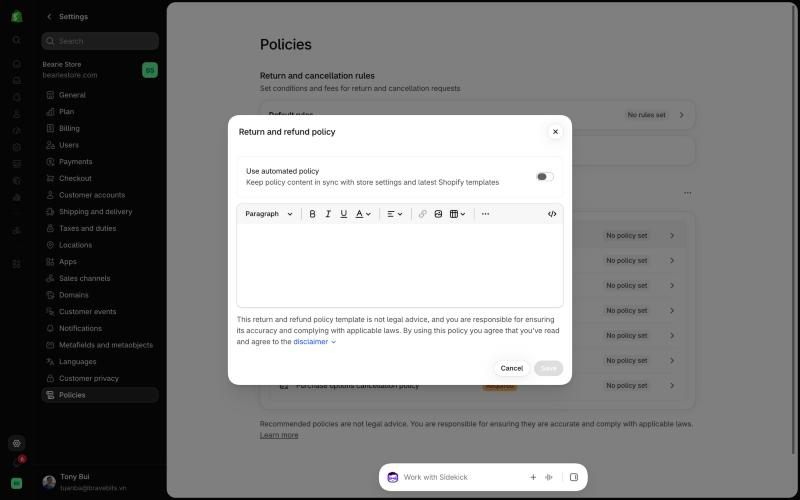
Here is what the Help Center says happens when you use it:
- Turning it on replaces the policy text with Shopify's template, including custom translations in languages that have a template.
- Turning it off keeps the current text but stops the automatic updates. From then on you maintain it by hand.
- Insert template is not offered for policies that support automation, so the return policy has no separate template button.
- Sidekick cannot edit a policy while automation is on. If you use Shopify Sidekick to draft store text, write your extras elsewhere.
- Past versions are archived. You can export them from the Written policies menu with Get past policies, and Shopify keeps them for 2 years.
Common mistake: expecting old orders to follow new rules
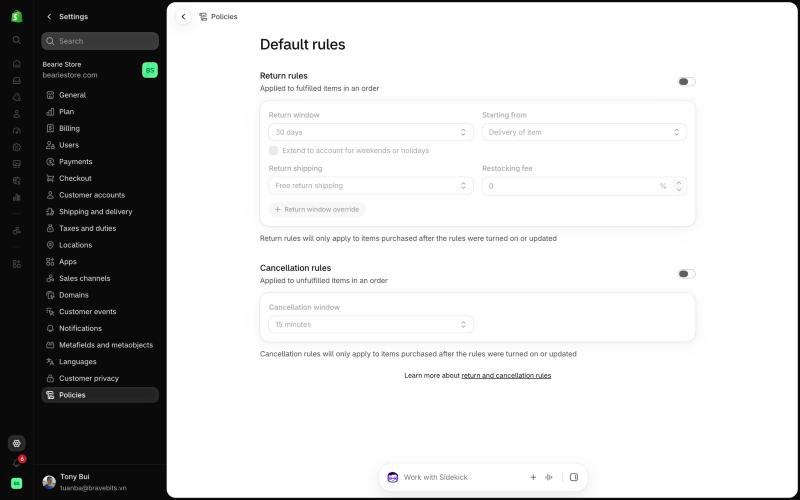
Return rules apply only to items purchased after you turn them on or update them. Our demo store shows that note right under the rules. If you shorten a window on 1 November, an order placed on 30 October still gets the old window, so tell your support team which date each rule set started.
How to set up your return policy from return rules
Set the rules first, then switch on the automated text. On a new store both are empty: our demo store showed No rules set under Default rules and No policy set for every written policy.
- Open the Policies page. In your Shopify admin, go to Settings > Policies. Return and cancellation rules sit at the top, written policies below.
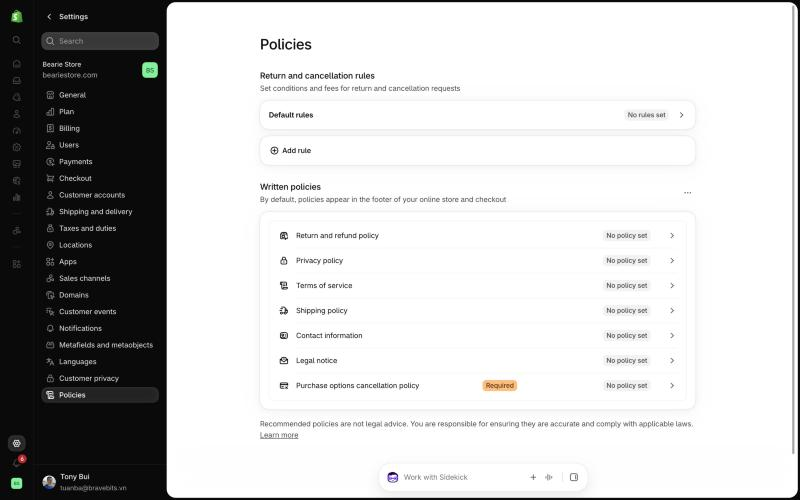
- Turn on return rules. Click Default rules and switch on Return rules. Pick a return window and choose whether it starts from each item's delivery or from the last item delivered.
- Set return shipping and the restocking fee. Choose free return shipping, a flat fee per return, or a label the customer buys. Add a restocking fee as a percentage if you charge one.
- Add overrides and final sale items. Use Return window override for products or collections that need a different window, and mark final sale products or collections.
- Set cancellation rules. Switch on Cancellation rules and choose how long after ordering a customer can still cancel.
- Copy your current policy text. If you already have a written return policy, paste it and any translations into a document before the next step.
- Switch on the automated policy. Back on Policies, open Return and refund policy, turn on Use automated policy and click Save.
- Check the live page. Open
yourstore.com/policies/refund-policyand read it as a shopper would. Confirm the window and fees match what you set.
If you sell to the EU: the 14-day settings
EU Directive 2023/2673 took effect on 19 June 2026. It requires stores to give customers an electronic way to use their 14-day right of withdrawal, counted from delivery of the last item. Shopify's Help Center recommends this setup:
- Turn on self-serve return and cancel requests.
- Set the cancellation window to Until item is fulfilled.
- Set the return window to at least 14 days, starting from delivery of the last item, with the weekend and holiday extension on.
- Refund within 14 days of a cancellation request.
Shopify notes that these tools do not make a store compliant on their own and suggests a legal review. Treat this as a starting point, not legal advice.
Every return rule option, and what it means for shoppers
These are the options in Shopify's return rules, taken from the return rules documentation and checked against the admin on 20 October 2026.
| Setting | Options | What to watch |
|---|---|---|
| Return window | 14, 30 or 90 days, Unlimited, or a custom number of days | Optional setting moves the last day to the next business day if it lands on a weekend or holiday. |
| Starting from | Each item's delivery, or delivery of the last item | Exchanged or added items get their own window from their own delivery date. |
| Return window override | Longer or shorter window for products, collections or variants | If several overrides apply, the shortest wins. Final sale still beats any override. |
| Return shipping | Free, flat fee once per return, or customer buys own label | You can edit the fee on a single return. |
| Restocking fee | Percentage of the return | Not deducted from the refund automatically. You subtract it when you create the refund. |
| Final sale items | Products or collections | Multiple products or multiple collections, not both. Bundles cannot be final sale. |
| Cancellation window | No cancellations, Until item is fulfilled, 15 minutes, 1 hour or 24 hours | Cancellation requests must be turned on in cancellation rules. |
2 dates are worth knowing. From 23 October 2026, tax applies to return shipping fees on orders shipped to US addresses when you use Shopify Tax or Tax Platform, where the fee is taxable. And per-market return rules are in early access for a limited number of merchants, so unless Shopify has enabled them for you, one default rule set covers every market.
What to add before you call your policy done
Return rules cover the window, fees and final sale. Shoppers usually ask about more than that. Before you rely on the generated text, check that your store answers each of these somewhere a customer can find it:
- Why an item is final sale. A product label alone reads like a trap. One sentence on the reason (hygiene, custom made, clearance) prevents the support ticket.
- Exchanges. Say whether a customer can swap a size or colour, and whether the new item ships before the old one comes back.
- Damaged or wrong items. Say who pays return shipping when the mistake is yours.
- Refund timing and method. Say how many days after you receive the item you issue the refund, and whether it goes to the original payment or store credit.
- How to start a return. Link to the customer account page if you use self-serve returns, or give the email address.
Write these on a returns or FAQ page rather than editing the automated text, because switching automation off stops it from syncing with your rules. Our guide to building a Shopify FAQ page covers the layout. If abuse is a worry, read our notes on return fraud before you loosen the window.
Show return terms where shoppers decide
Shoppers make the buying decision on the product page and at checkout, not on /policies/refund-policy. So repeat the 3 terms that change a buying decision, the window, who pays return shipping and what is final sale, close to the Add to cart button. Our guide to product page customization shows the ways to add a block there.
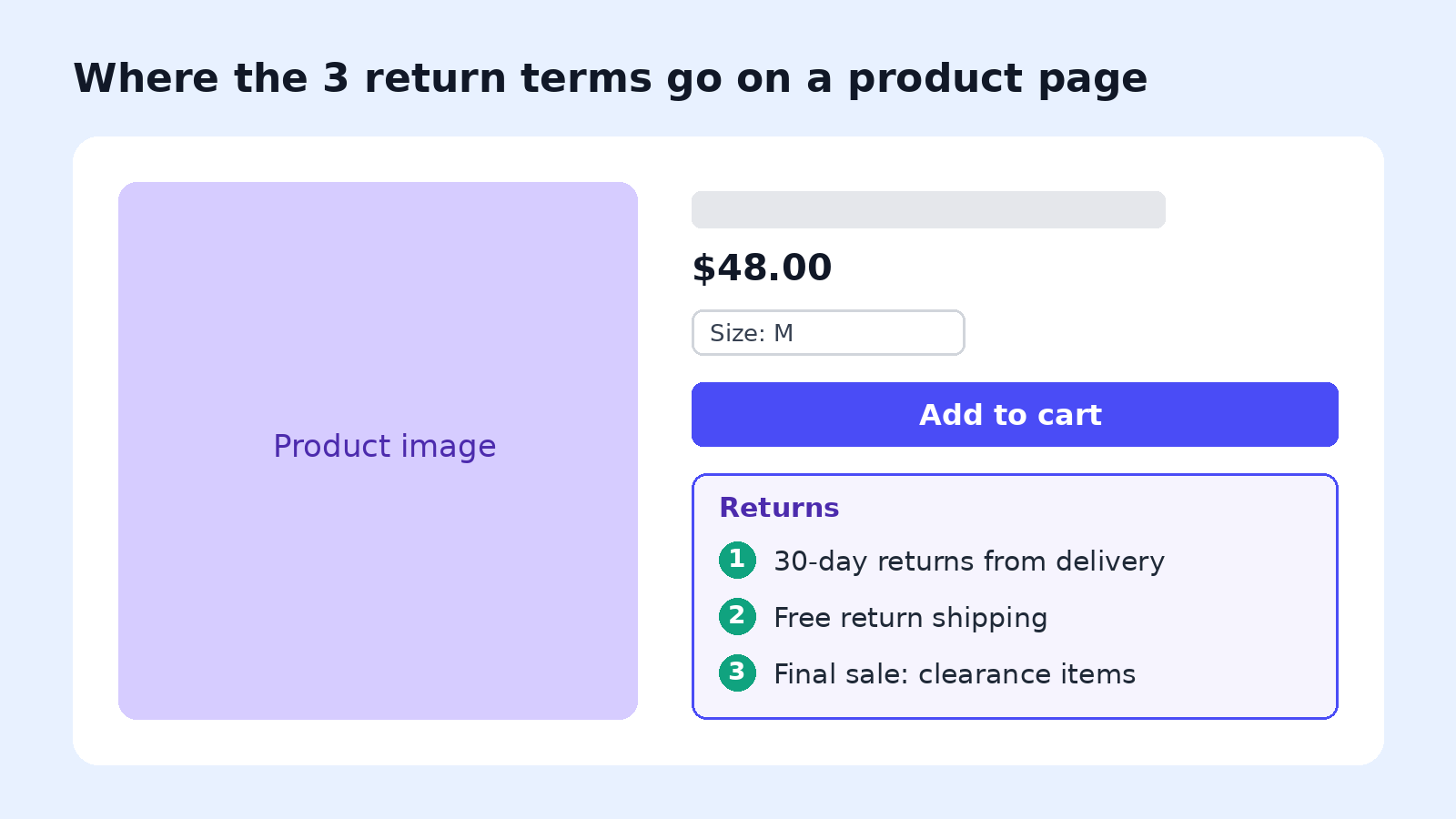
Keep those terms as real text, not inside an image. Text is what search engines and AI assistants can read, which is the idea behind making product pages readable by AI.
Clear information before purchase also cuts returns. Gunner Kennels added 3D models and AR so buyers could check crate sizing. As Macey Benton, VP of marketing at Gunner Kennels, told Shopify: "Buyers can now use their device to place the crate right next to their dogs to confirm sizing," which the company credits with a 5% drop in its return rate.
With PageFly, a Shopify page builder, you can add a short returns block or an accordion with these terms to your product pages, and build a full returns or FAQ page from a PageFly template without code. See 19 product page examples for where top stores place shipping and returns notes. The written policy pages under /policies/ are managed by Shopify, so keep the legal text there and the shopper-friendly summary on your own pages.
Before peak season, check the returns block alongside the rest of your Black Friday app stack. PageFly has a free plan, and the pricing page lists what each paid plan adds.
After you ship the change, track the effect on your conversion rate. PageFly's CRO tools include A/B testing, so you can compare a page with the returns note against one without it.
Shopify Return Policy FAQ
It is the return and refund policy your store publishes at /policies/refund-policy, together with the return rules in Settings > Policies that set the return window, return shipping fee, restocking fee and final sale items. Shopify links the policy in the checkout footer.
Go to Settings > Policies, open Return and refund policy, turn on Use automated policy and click Save. Set your return rules first, because the automated text takes its return terms from them.
It replaces the policy text with Shopify's template, including custom translations in languages that have a template. Copy your current wording first. Past versions are archived and can be exported for 2 years.
No. Return rules apply only to items purchased after you turn them on or update them. Orders placed before the change keep the old terms.
No. Shopify shows the restocking fee to the customer when they request a return, but you deduct it yourself when you create the refund.