36 Black Friday apps for Shopify, sorted by the job each one does before, during and after the sale, with the week to set it up.
Shopify merchants sold $14.6 billion over Black Friday Cyber Monday 2025, up 27% on the year before, according to Shopify's own BFCM 2025 results. Black Friday 2026 falls on 27 November, and Cyber Monday on 30 November. That leaves about 6 weeks from mid-October.
Most holiday app lists sort apps by category. That helps you shop, but it does not tell you when to install, or which apps move your conversion rate. This guide sorts the 2026 stack by the job each app does across the season, and gives each group a start date. Every listing was checked live on the Shopify App Store on 13 October 2026.
Key takeaways
- One job, one start date. Each app below has a single job and a week it should start working. If you cannot name both, skip the install.
- October is for building and capturing. Pages, search, translation, reviews and list growth need weeks of traffic before the sale.
- Offers and urgency go live in November. Set them up early, test them, then switch them on for the sale window.
- Freeze installs about 10 days out. New apps added in sale week are the hardest to debug under peak traffic.
- After the sale is a job, not a wind-down. Loyalty, referrals and order tracking turn one-time holiday buyers into repeat customers.
On this page
- What is a Shopify holiday app stack?
- Before the sale: build pages that get found
- Before the sale: capture shoppers early
- During the sale: raise order value with offers
- During the sale: make the deal window visible
- During the sale: give first-time buyers proof
- After the sale: keep holiday buyers coming back
- When to set up each app for BFCM 2026
- How the stack fits on a PageFly holiday page
What is a Shopify holiday app stack?
A Shopify holiday app stack is the small set of apps you run for the BFCM season, each covering one step a shopper takes: find you, trust you, take the deal, buy more, and come back. The goal is coverage of every step with the fewest apps that still do the job well.
This matters because every app adds settings to check, scripts to load and a support inbox to chase on sale day. Two apps doing the same job double that work. A stack with gaps leaks shoppers at the step nobody covered, often at checkout.
36 apps cover 6 jobs across the holiday timeline
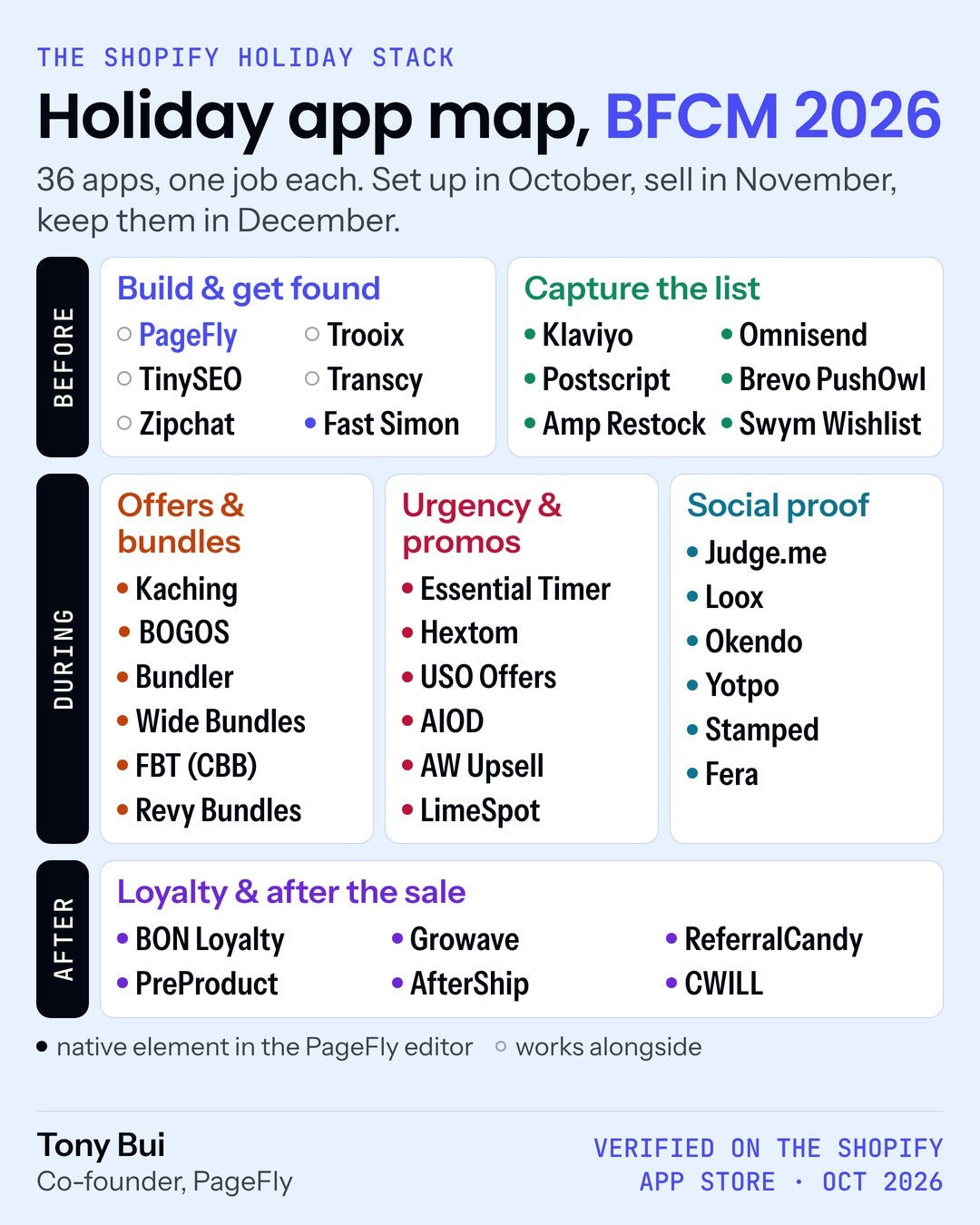
Seven apps on this map are PageFly partners. We mark them in each table so you can weigh that. Install links open the official Shopify App Store listing, where you can check current pricing and reviews yourself.
Before the sale: build pages that get found
Holiday shoppers arrive from ads, email, search and, more and more, AI assistants that cite pages they can read. Adobe reported that AI traffic to US retail sites rose 670% on Cyber Monday 2025 (Adobe, December 2025). Some even check out inside the assistant, through agentic commerce. The rest land on a page. That page has to load fast, read in their language and answer their question.
| App | The one job it does | Ready-made PageFly element | Install |
|---|---|---|---|
| PageFly | Holiday landing pages + A/B tests | It is the builder | See PageFly |
| Trooix PageFly partner | Describe a store feature, AI builds it | No | App Store listing |
| TinySEO PageFly partner | SEO, speed and image compression | No element; compresses images from inside the PageFly editor | App Store listing |
| Transcy PageFly partner | Translation + local currency | No element; listing says it works with PageFly | App Store listing |
| Zipchat PageFly partner | AI chat that answers and sells 24/7 | No | App Store listing |
| Fast Simon | AI search and filters | Yes | App Store listing |
- Start with the page. A dedicated offer page beats sending sale traffic to your homepage. See our Black Friday landing page templates for 7 tested starting points, or compare landing page apps.
- Fix search before traffic peaks. Shoppers who search know what they want. Shopify's free Search & Discovery app covers the basics; Fast Simon adds AI ranking on top.
- Compress images in October. Heavy holiday banners are the usual reason a sale page slows down. Our image optimization guide shows what to fix first, and our Shopify banner size guide covers the sizes.
- Selling abroad? 16% of BFCM 2025 orders on Shopify were cross-border. Set up translation and local currency now, alongside Shopify Markets.
Start date: now to mid-October. Search engines and AI assistants need time to see a new page before it can rank or get cited. Our Shopify SEO guide covers the basics.
Before the sale: capture shoppers early
A subscriber you win in October can hear about your offer on Black Friday without you paying for that click again. That is why capture belongs before the sale, not during it.
| App | The one job it does | Ready-made PageFly element | Install |
|---|---|---|---|
| Klaviyo | Email, SMS, WhatsApp | Yes | App Store listing |
| Omnisend | Email, SMS, popups | Yes | App Store listing |
| Postscript | SMS campaigns | Yes | App Store listing |
| Brevo PushOwl | Web push, email, SMS | Yes | App Store listing |
| Amp Back in Stock | Restock alerts, waitlists | Yes | App Store listing |
| Swym Wishlist Plus | Wishlists shoppers come back to | Yes | App Store listing |
- Give people a reason to sign up early. Early access works. "Last year, we gave early access to our community and a higher discount that nobody else could get," said Dimitri O of Loop Earplugs, speaking to Shopify.
- Put the sign-up form on its own page. A focused VIP page gives paid traffic one thing to do, as our Google Ads landing page guide explains. Our email capture page guide covers the layout.
- Turn sold-out into a waitlist. Back-in-stock alerts and wishlists keep demand you would otherwise lose when a bestseller runs out. A coming soon page does the same for launches.
- Pick one email tool. Klaviyo, Omnisend and Shopify Email overlap. Our Shopify Email review compares the native option with the alternatives.
Start date: October. Write the welcome flow and the BFCM announcement emails now, then schedule them.
Need a VIP early-access page before you start collecting emails? Start from a BFCM template and change the copy.
During the sale: raise order value with offers
Shopify reported an average cart of $114.70 over BFCM 2025. Bundles, quantity breaks and gifts with purchase are how you move your own number up without cutting price on everything.
| App | The one job it does | Ready-made PageFly element | Install |
|---|---|---|---|
| Kaching Bundles PageFly partner | Quantity breaks, bundles, gifts | Yes | App Store listing |
| BOGOS PageFly partner | Free gift with purchase, BOGO | Yes | App Store listing |
| Bundler | Bundle offers, volume discounts | Yes | App Store listing |
| Wide Bundles | Quantity break offers | Yes | App Store listing |
| Frequently Bought Together | AI bought-together bundles | Yes | App Store listing |
| Unlimited Bundles | Bundles with discounts | Yes | App Store listing |
- Pick one offer mechanic per product. A quantity break and a bundle and a free gift on the same item confuse shoppers and stack discounts you did not plan for. Our sales landing page guide shows how to lead with one offer.
- Test discount combinations before November. Shopify Scripts stopped running on 30 June 2026, per the Shopify developer changelog. If last year's offers relied on Scripts, rebuild them in your discount app and place a real test order.
- Bundle for gifting. Our product bundle guide covers the 6 bundle types and where to place them.
Start date: build in early November, switch on for the sale window. Keep the offer page simple: one offer, one button, as in our Shopify landing page guide.
During the sale: make the deal window visible
Urgency apps show a deal window that already exists. A countdown that ends when your sale ends is useful information. A timer that resets on every visit is a fake, and shoppers notice.
| App | The one job it does | Ready-made PageFly element | Install |
|---|---|---|---|
| Essential Countdown | Countdown timers and bars | Yes | App Store listing |
| Hextom Upsell Sales Boost | 30+ conversion tools | Yes | App Store listing |
| USO Special Offers | 9 discount types in one app | Yes | App Store listing |
| AIOD Discounts | Automatic discounts, BOGO | Yes | App Store listing |
| Upsell & Cross Sell AW | AI upsells in cart | Yes | App Store listing |
| LimeSpot | AI bundles and recommendations | Yes | App Store listing |
- Set the timer to your real end time. If your sale ends at midnight on 30 November, check that the timer uses your store's time zone, not the app's default.
- Remind, don't pressure. "[W]e may even remind people that it's about to end, for example, '24 hours left' or 'ends tonight,'" said Joey Cofone, CEO and co-founder of Baronfig, in the same Shopify piece.
- Put upsells in the cart, not in a popup storm. One relevant add-on in the cart beats three popups. A cart drawer gives that add-on a natural place.
- Compare upsell options. Our upsell app roundup goes deeper on this one job.
Start date: configure in early November, turn on the morning the sale starts, turn off when it ends.
During the sale: give first-time buyers proof
BFCM brings shoppers who have never bought from you. Reviews, photos and ratings answer the question they will not ask: is this store real, and is the product good?
| App | The one job it does | Ready-made PageFly element | Install |
|---|---|---|---|
| Judge.me | Review requests, email/SMS/push | Yes | App Store listing |
| Loox | Photo and video reviews | Yes | App Store listing |
| Okendo | Reviews + loyalty | Yes | App Store listing |
| Yotpo Reviews | Ratings and reviews | Yes | App Store listing |
| Stamped | Reviews + loyalty | Yes | App Store listing |
| Fera | Verified photo/video reviews | Yes | App Store listing |
- Collect reviews in October. Review requests go out after delivery. Orders placed in October are the reviews that show on your sale page.
- Use one review app. Running two splits your reviews and slows your pages. Pick the one whose widgets fit your theme.
- Show proof next to the offer. A star rating under the price does more than a review wall at the bottom of the page, especially on a mobile landing page.
Start date: now. Review volume is the one thing you cannot build in sale week.
Want reviews, bundles and a countdown on one sale page without code? See how the AI Page Builder drafts the page for you.
After the sale: keep holiday buyers coming back
"This period is an opportunity to help customers replenish their supplies at a better price," said Michael Wallack, president and owner of Wallack's, in Shopify's BFCM campaigns guide. Whether you agree or not, the buyers you win in November are only worth the ad spend if some of them come back.
| App | The one job it does | Ready-made PageFly element | Install |
|---|---|---|---|
| BON Loyalty PageFly partner | Points, rewards, referrals | Yes | App Store listing |
| Growave | Loyalty, wishlist, referrals | Yes | App Store listing |
| ReferralCandy | Referral + affiliate programs | Yes | App Store listing |
| PreProduct | Pre-orders when stock runs out | Yes | App Store listing |
| AfterShip | Branded order tracking | Yes | App Store listing |
| CWILL Tracking | Order tracking, fewer WISMO tickets | Yes | App Store listing |
- Give holiday buyers a reason to return. Points they can spend in January bring people back after the rush. Our customer loyalty guide covers the program types.
- Cut "where is my order?" tickets. A branded tracking page answers the question before it reaches your inbox, when carriers are slowest.
- Sell through stockouts. When a bestseller sells out on Black Friday, pre-orders keep the sale. Read our Shopify pre-order guide for the payment rules first.
Start date: set up in November, so the first holiday order already earns points and gets a tracking page.
When to set up each app for BFCM 2026
Here is the whole stack on one calendar. It sits alongside our week-by-week Shopify BFCM checklist, which covers the store-wide tasks around it.
| When | App groups | What to do |
|---|---|---|
| Now to 31 October | Build and get found · Capture · Social proof | Install, configure and publish. Build the holiday page. Start list growth and review requests. |
| 1 to 15 November | Offers and bundles · Urgency · Loyalty and tracking | Build offers, timers and points rules. Place real test orders. A/B test the offer page. |
| 16 to 26 November | All | Freeze new installs. Check page speed after every change. Rehearse the switch-on. |
| 27 to 30 November | Offers · Urgency | Switch on, watch orders, fix only what breaks. |
| December | Loyalty · Tracking · Capture | Thank buyers, send points reminders, reopen waitlists, take pre-orders. |
Run the October block in this order:
- Audit what you already run. List every app installed today and its one job. Remove the duplicates first.
- Fill the gaps by job. Use the 6 groups above. One app per job is enough for most stores.
- Install on a duplicate theme. Check each app on a theme copy before it touches your live store.
- Measure speed after each install. If a page slows down, you know which app did it.
- Write down each app's start date. Put it in your calendar with the switch-on and switch-off steps.
Shopify discounts also support a rollout: per the Shopify Help Center, you can "use a rollout to schedule when a discount is activated or deactivated." Scheduling native discounts means one less switch to flip by hand at midnight.
How the stack fits on a PageFly holiday page
PageFly, a Shopify page builder, is where many of these apps meet the shopper: on the holiday landing page itself. Of the 36 apps on the map, 31 are on PageFly's list of integrated apps with a ready-made element in the editor. You drag the app's widget into a section instead of pasting code. Apps without an element still work on your store; you place them the way their own docs describe.
Add an app widget to your holiday page
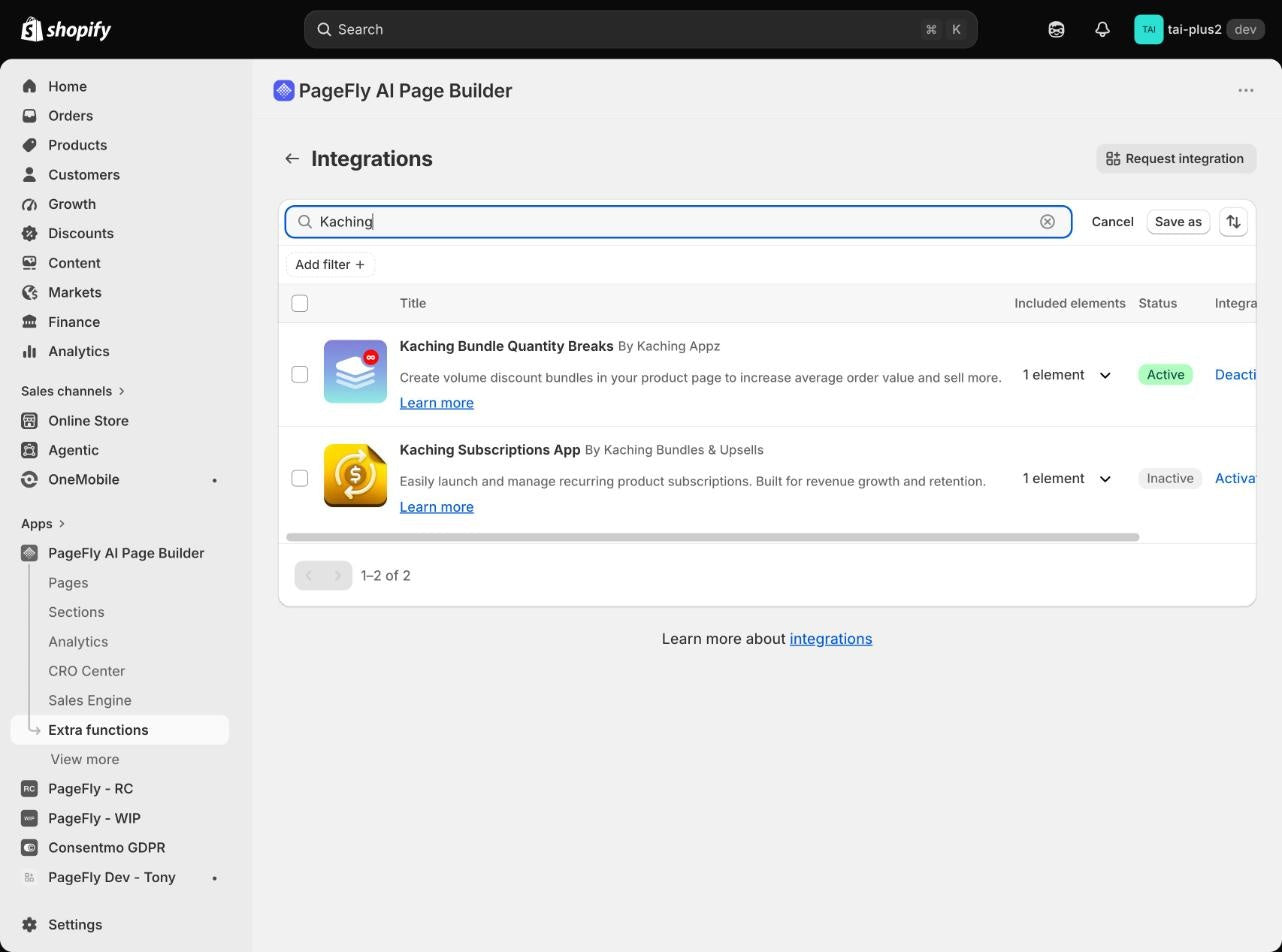
The steps below follow Judge.me's own guide to adding its widgets in PageFly (updated April 2026). We ran the same flow with Kaching Bundles on a PageFly test store; the screenshots below are from that run.
- Install the app on your store. Set it up in the app first, so the widget has data to show.
- Turn on the integration. In PageFly, go to Extra functions, click Manage next to Integrations, find the app and click Activate.
- Open your holiday page in the editor. New to this? Our landing page tutorial covers the first build.
- Click the "Add third-party elements" icon in the left menu (the third icon from the top) and select the app.
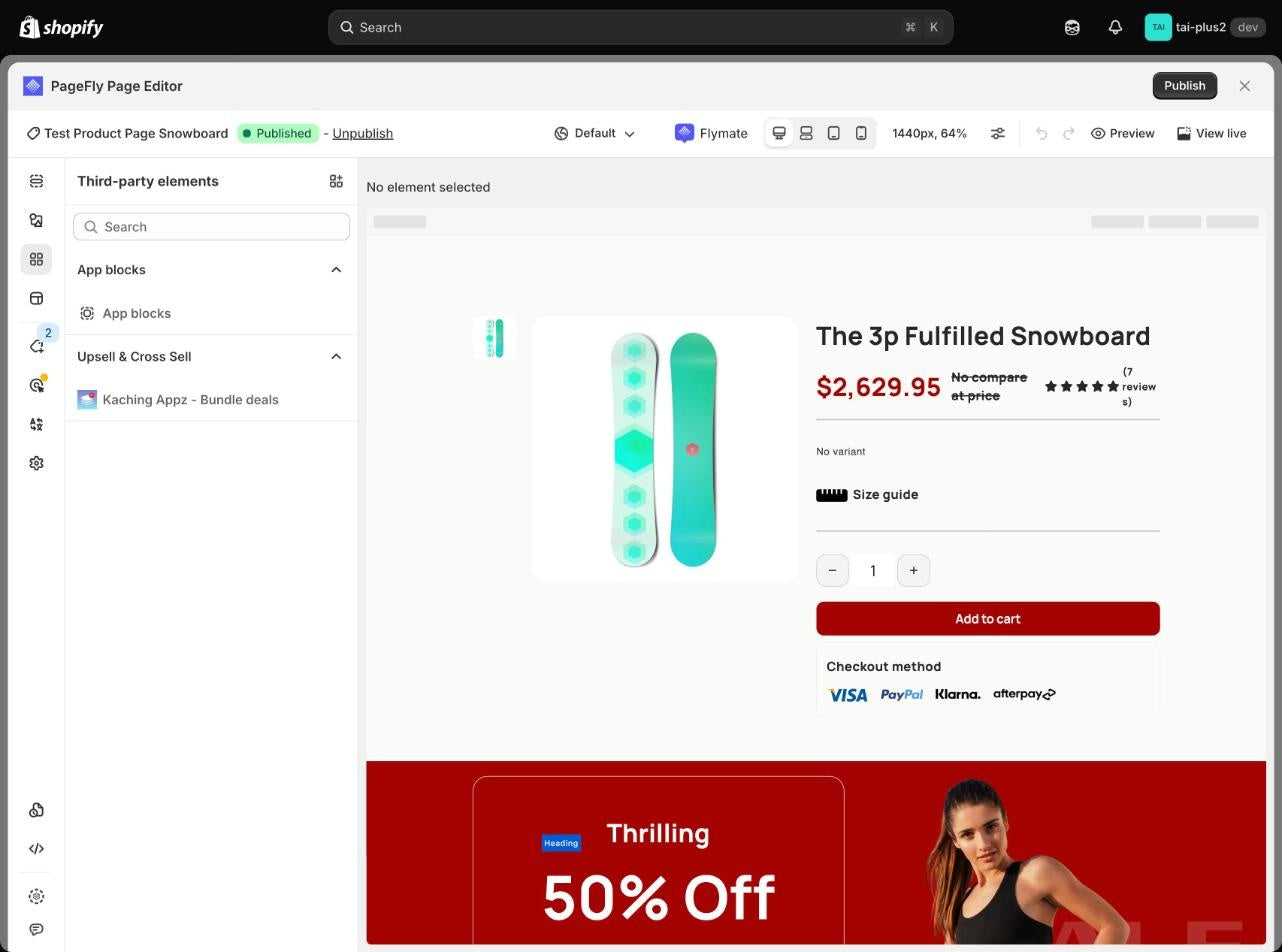
- Drag the block into place, for example a star rating under the price, then save and preview on mobile.
Test the offer page before the sale, not during it
BFCM traffic is too short and too unusual to learn from in real time. Run your test in the first half of November instead. PageFly's A/B testing lets you split traffic between two versions of the same page, for example "20% off" against "free gift over $75". Ship the winner as your sale page. Our Shopify A/B testing guide explains how this sits next to Shopify's native rollouts.
See where shoppers stop scrolling
PageFly's heatmaps show where visitors click and how far they scroll on a page. Use them in October on your early-access page: if most visitors never reach the review widget, move it up. Heatmaps, A/B testing and AI Page Checkup sit together in the CRO Center.
Be honest about scope. PageFly builds and tests the page. The apps above still run the offer logic, the emails and the loyalty points. If your theme's product page already does the job, you do not need a new page for every app. Add the widget to a theme section instead.
Save the whole stack on one page
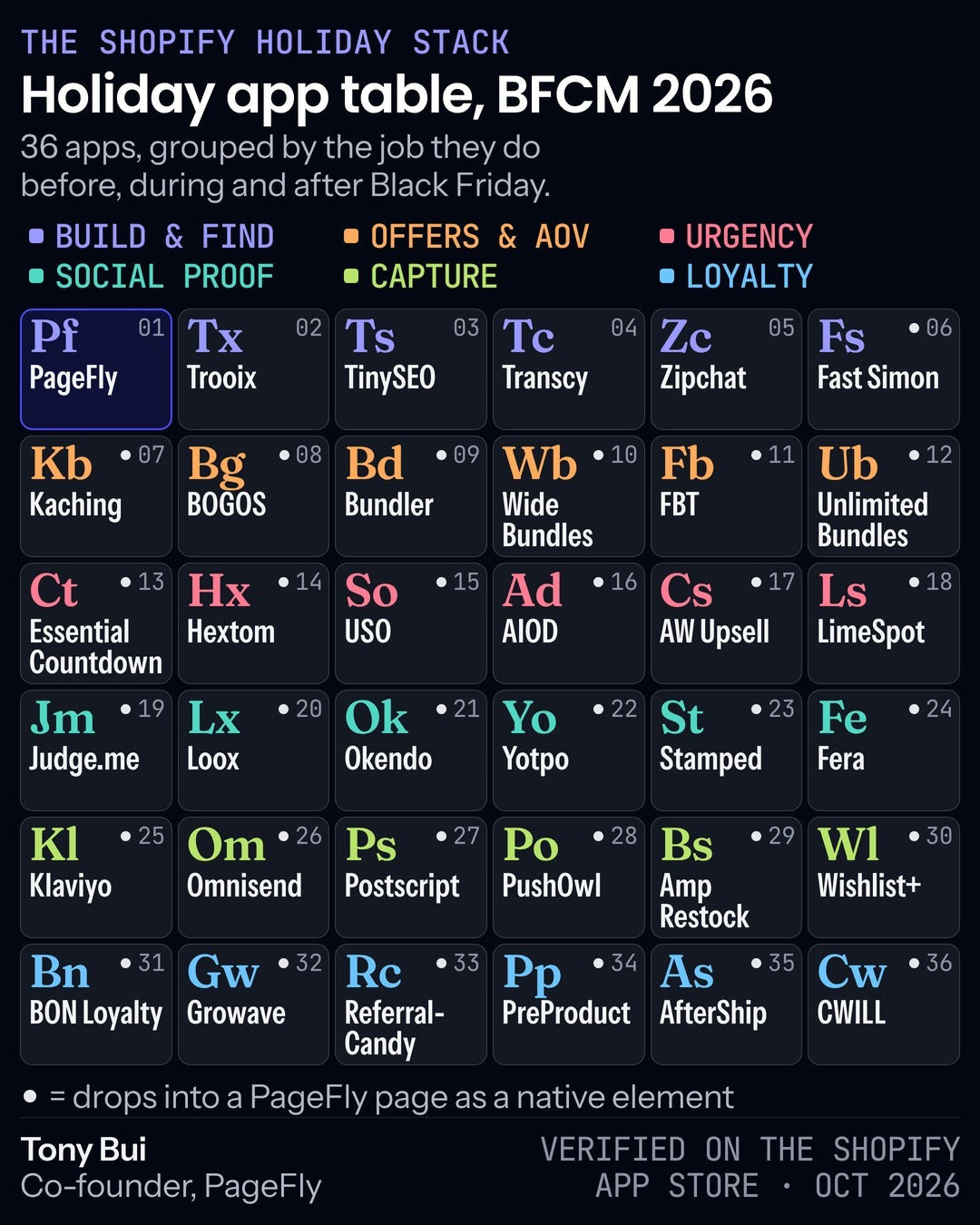
You do not need 36 apps. You need one app per job, set up before its start date, and a sale page that shows the right ones in the right place. Check the PageFly pricing page to see which plans include A/B testing and heatmaps.
Build your BFCM offer page from a tested template, then drop in your review, bundle and countdown apps.
Shopify Bfcm Apps FAQ
There is no single best app. Cover six jobs with one app each: holiday pages and search, list capture, offers and bundles, urgency, reviews, and loyalty or order tracking. The 36 apps in this guide are sorted by those jobs.
Install page, search, capture and review apps in October, set up offers, timers and loyalty rules in the first half of November, and stop installing new apps about 10 days before Black Friday on 27 November.
Most stores need one app per job, so around 5 or 6. Two apps doing the same job add settings, scripts and support tickets without adding sales.
Shopify Scripts stopped running on 30 June 2026, so offers built on Scripts must be rebuilt in a discount app or with native discounts. Place a real test order before November to confirm discounts combine the way you expect.
Yes. 31 of the 36 apps in this guide are on PageFly's list of integrated apps with a ready-made element. Activate the app under Extra functions, Integrations, then drag its block in from the Add third-party elements menu.
Test before the sale instead. BFCM traffic is short and unusual, so run the test in early November and ship the winning version as your sale page.