

Shopify Theme Detector
Paste any store URL to get the exact theme name, its price — and the fastest way to get the same look on your store.
Checks 200+ official themes and thousands of custom builds · No sign-up needed
What Is a Shopify Theme Detector?
A Shopify theme detector is a free tool that tells you which theme any Shopify store is running. You paste the store's URL, it reads the store's public code, and about five seconds later you have the theme's name, whether it is free or paid, what it costs, and a link to buy it.
That last part is the whole point. Knowing a name is trivia. Knowing whether you can install the same thing this afternoon, or whether it was built from scratch for one company, is a decision, and it is usually worth a few thousand dollars either way.
People use it for three jobs, in roughly this order: working out what the competition paid for, sanity-checking a theme before buying it, and finding out whether the store they have been trying to copy for two weeks was ever copyable.
We built this one at PageFly, where we work on Shopify conversion for 230,000+ merchants. It checks against a database of 10,000+ themes, which covers the entire Shopify Theme Store, 1,260 listings as of 10 September 2026, and thousands of third-party and private designs on top of that.
💡 Read more: Top 40+ Best Shopify Themes (Free + Paid) For New Merchants
The short version
- Paste a URL, get a theme name in about 5 seconds. No extension, no login, no sign-up.
- The name a store shows is not always the theme it runs. Merchants can rename their theme to anything — Asceno's is called
[ASCENO 2024] Prestige. The fields that cannot be renamed areschema_nameandtheme_store_id. theme_store_id: nullmeans you cannot buy it. That single field separates "install the same theme today" from "budget for a developer".- Three outcomes: official theme (buy it), customized official theme (buy the base, rebuild the extras), custom build (not for sale at any price).
- If detection fails, four manual methods still work in 2026 — page source, theme asset paths, the
/adminredirect, and simply asking. Inspecting the checkout page no longer works; Shopify's checkout stopped using theme files. - Most stores are on a free theme. Dawn (9.1%) and Horizon (5.7%) are the two most-used themes anyone can install, both $0.
Why Theme Choice Impacts Your Conversion Rate
Your Shopify theme is not just a design decision — it directly affects your conversion rate, add-to-cart rate, and revenue per visitor. Theme detection helps you understand what top-performing stores use and why their theme choices drive sales. If you're still building your store, picking the right Shopify website builder matters just as much as the theme you choose.
"We couldn't display our products in our online store without PageFly. It has contributed to our growth tremendously. The homepage we built became the most visited part of our store."
— Toshi Sekiya, Founder of Syosaku-Japan (kitchenware brand that doubled its conversion rate after rebuilding key pages on top of its Shopify theme)
Here is where the theme, not your copy, decides the outcome:
| Factor | Impact on Conversions |
| Page speed | A theme decides how much CSS and JavaScript loads before a shopper can act. Leaner themes render the add-to-cart button sooner — measure your own with Shopify's built-in speed report, not with a vendor's claim. |
| Mobile experience | Most storefront traffic arrives on a phone. Whether the theme keeps price, variant picker and add-to-cart above the fold on a 390px screen is a layout decision the theme makes for you. |
| Trust signals | Some themes have native slots for reviews, badges and shipping promises near the buy button; others force you into an app or custom code to put them there. |
| CTA placement | Sticky add-to-cart and above-the-fold buy buttons are theme features, not settings. If your theme lacks them, no amount of copy tuning adds them. |
| Checkout flow | Cart drawer vs. full cart page, and whether express-checkout buttons appear on the product page, are both set by the theme. |
Why this makes detection useful: every item above is decided by the theme, before you write a line of copy. So when you find a store that converts the way you want, knowing its theme tells you which of those decisions you can copy for $0, which cost a theme license, and which need a developer.
How to Find What Theme a Shopify Store Is Using
Using PageFly's Shopify theme detector takes less than 30 seconds. Follow these three steps:
Step 1: Copy the Store URL
Navigate to the Shopify store you want to analyze. Copy the full URL from your browser's address bar.
Either of these works:
- Root domain: allbirds.com
- Full URL: https://www.gymshark.com/collections/all
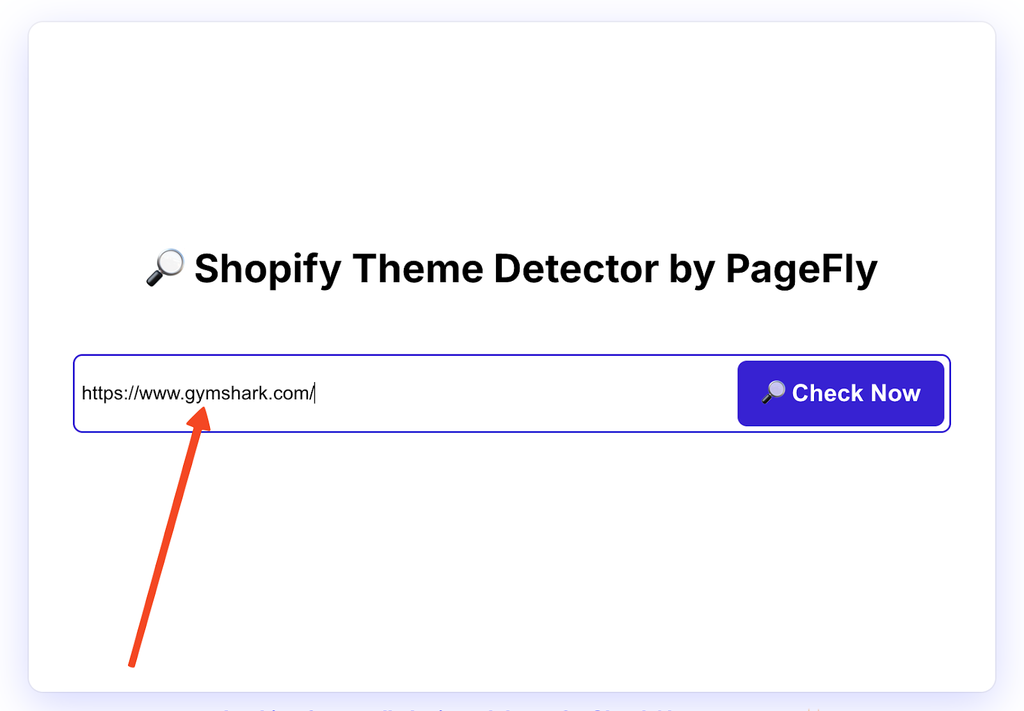
Step 2: Paste and Detect
Paste it into the box at the top of this page and click Detect theme.
The tool reads the store's front-end code, pulls out the theme fingerprint, and checks it against a database of 10,000+ themes covering the whole Shopify Theme Store plus thousands of third-party designs.
Step 3: View Your Results
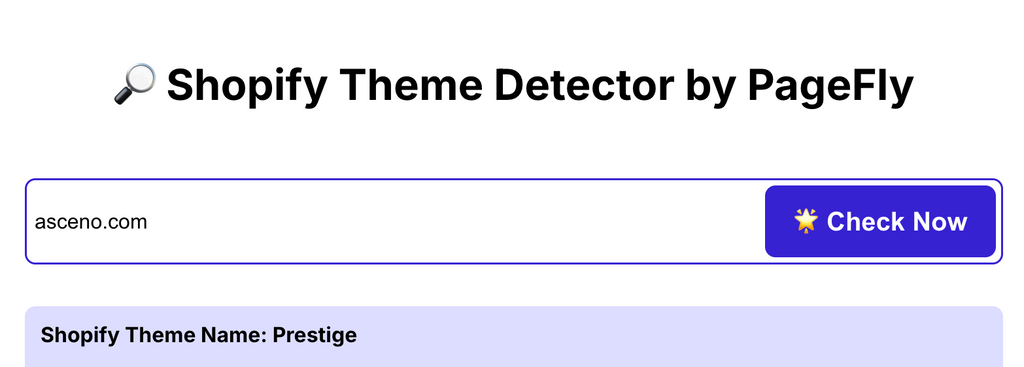
Within seconds, the detector reveals the theme, whether it is official or custom, its price, and a link to the listing. Here is a real result — we ran asceno.com through the detector on this page on 10 September 2026:
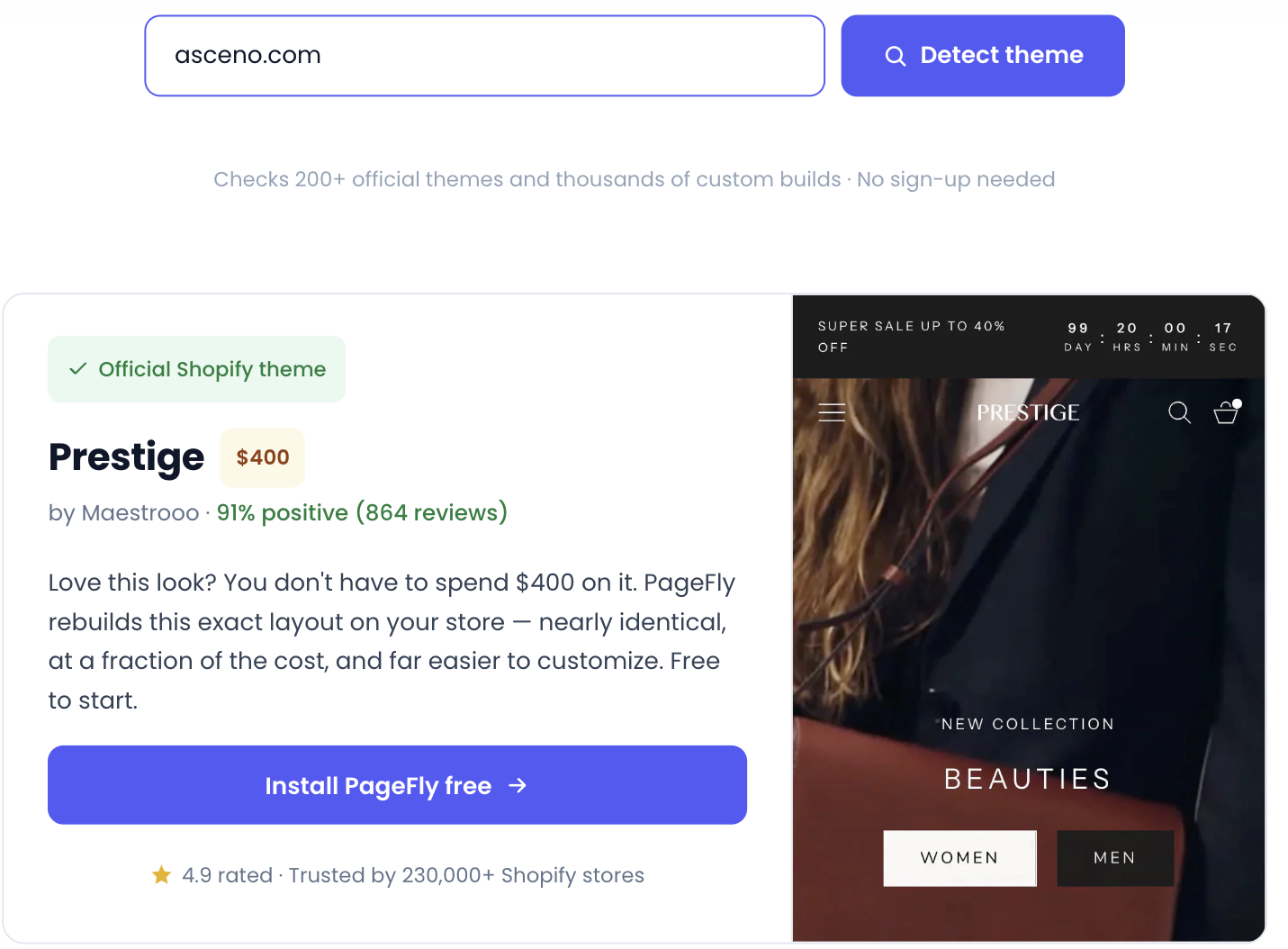
Step 3 — a real detection run on asceno.com, tested first-hand by PageFly on 10 Sep 2026. The $400 and the 91% / 864 reviews match the Shopify Theme Store listing exactly.
What each field means:
| Result | What You'll See |
| Theme name | Exact theme (e.g., "Dawn," "Impulse," "Prestige") |
| Theme source | Official Shopify theme, customized theme, or custom-built |
| Direct link | Link to preview or purchase the theme |
| Price | Free or premium cost (if applicable) |
What Your Shopify Theme Detection Results Mean
Every detection lands on one of three answers. They are not degrees of the same thing. Each one puts a different price on copying what you just looked at, so read which one you got before you plan anything.
Result 1: Official Shopify Theme
The store is running the theme as sold, with no code changes the detector can see. This is the easy result: whatever you liked, you can have.
You get the exact theme name, a link to its listing, and the price. Free, or somewhere between $100 and $500 one-off for a paid theme.
| Do this | Why |
| Open the demo | Two minutes now saves a refund request later |
| Check the feature list | Themes differ on capability, not just looks |
| Read the reviews | Support quality shows up there, and nowhere else |
| Install it | One click, then make it yours |
Result 2: Customized Official Theme
Someone bought a theme, then had a developer go into the code. The detector still names the base theme, and the base is the part you can buy. Everything on top of it was paid for separately.
What usually got added:
- Sections the theme editor does not offer
- Page layouts and navigation built from scratch
- Mega menus, custom filters, animation
- Type and styling past what the settings allow
| Do this | Why |
| Buy the base first | You are already most of the way there |
| Hire out the rest | Budget $500 to $5,000+, depending on how much you copy |
| Or rebuild the pages that sell | Do the product and landing pages in PageFly and leave the theme alone |
| Or learn Liquid | Cheapest option, slowest option |
The useful thing to notice: most of what reads as "custom" on a product page is layout and section order, not engineering. That part you can do yourself.
👉 See how PageFly works if you want to build sections on top of any theme.
Result 3: Fully Custom-Built Theme
The design was made for that one store. It is not in the Theme Store, not on a marketplace, and not for sale at any price.
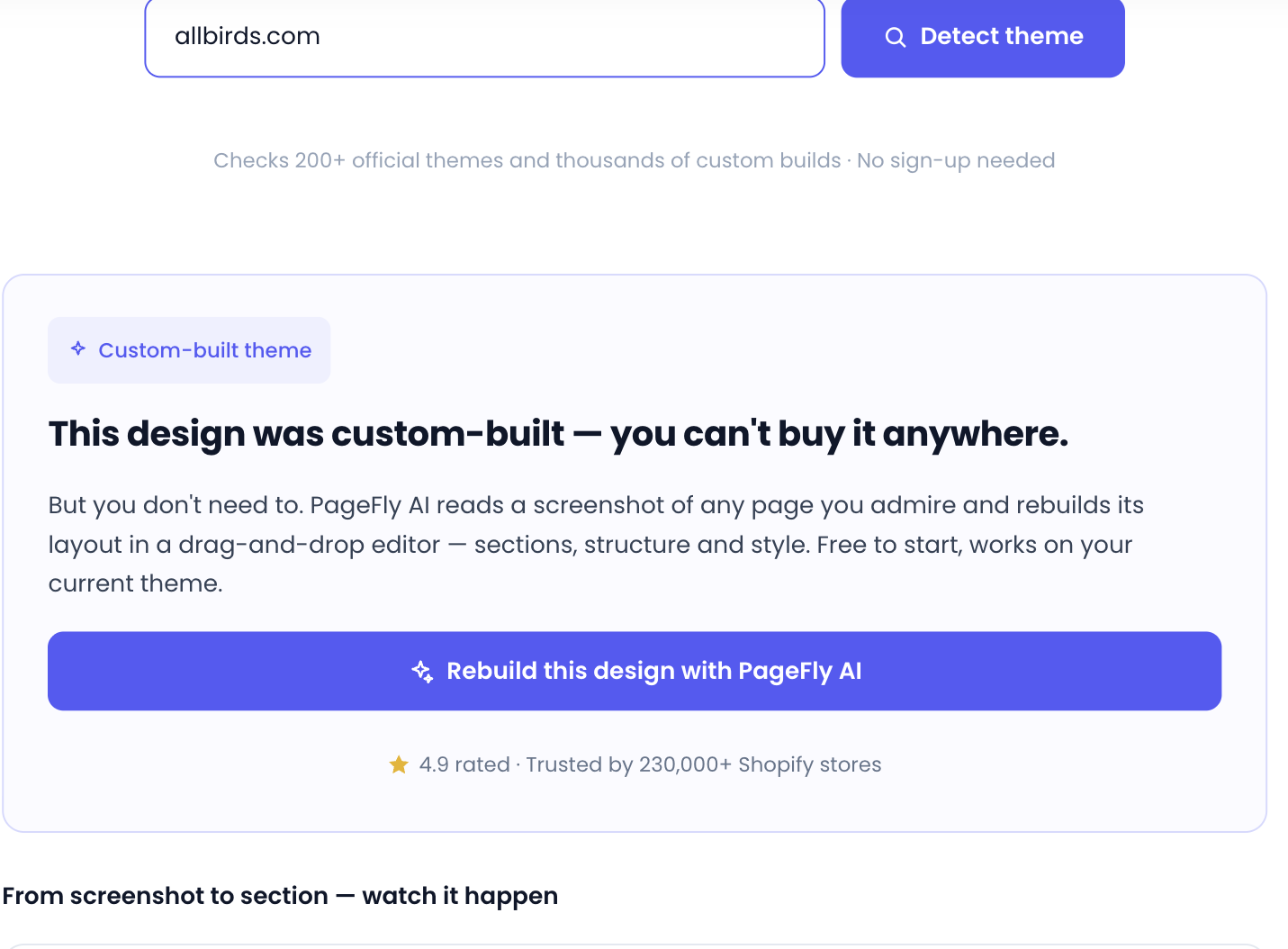
A real custom-theme result: allbirds.com, run on 10 Sep 2026. Tested first-hand by PageFly.
Who ends up here: large retailers, and stores that need something the platform does not do.
A custom result is not a dead end, it just moves the question. You cannot buy the theme, but you can rebuild the two or three layouts you actually admired — an AI page builder will read a screenshot of a page and lay out its structure for you, which is a different job from cloning a theme and a much smaller one.
What they have in common is developers on staff, or a budget that rents them.
| Option | Honest answer |
| Buy the same theme | There is nothing to buy |
| Commission a rebuild | $5,000 to $50,000+, and months |
| Copy the thinking instead | Screenshot the layout, the CTA placement, where trust signals sit |
| Go hybrid | A good paid theme, then rebuild only the pages that carry revenue |
Hybrid is what most stores should pick, and not as a consolation prize. The pages that decide a sale are the product page and the landing page, and those are the two you can rebuild without touching the theme.
If you want to see what that looks like before committing to anything, the PageFly template library is the fastest way to judge it: pick a layout close to the store you were trying to copy, and you will know within a few minutes whether the gap was really the theme.
If you would rather build from nothing than adapt something, read up on vibe coding for Shopify first.
👉 Run the numbers on a custom build before you fall in love with one.
Quick Reference: Results at a Glance
| Result Type | Can You Buy It? | Effort to Replicate | Typical Cost |
| Official theme | Yes | Low: install, then adjust settings | $0–$500 |
| Customized official | Base theme only | Medium: buy the base, rebuild the extras | $100–$5,000 |
| Fully custom | No | High: developers, and months of them | $5,000–$50,000+ |
Not sure what to do with the result you got?
- Explore Best Shopify Themes guide if you're starting on a budget
- Compare the paid Shopify themes if you need filtering or sticky add-to-cart your free theme lacks
- Rebuild just the pages that carry revenue in PageFly, on whatever theme you are already running (pricing starts free)
Shopify Theme Examples – See the Detector in Action
Wondering what themes successful Shopify stores actually use? We ran three top-performing stores through PageFly's Shopify theme detector to show you real results, and explain why each theme choice drives conversions for that brand.
Examples re-verified first-hand on 10 September 2026 — we re-ran each store through the detector and cross-checked the raw Shopify.theme object in its page source. The values below are what those stores returned that day.
Example 1: Allbirds — Sustainable Footwear
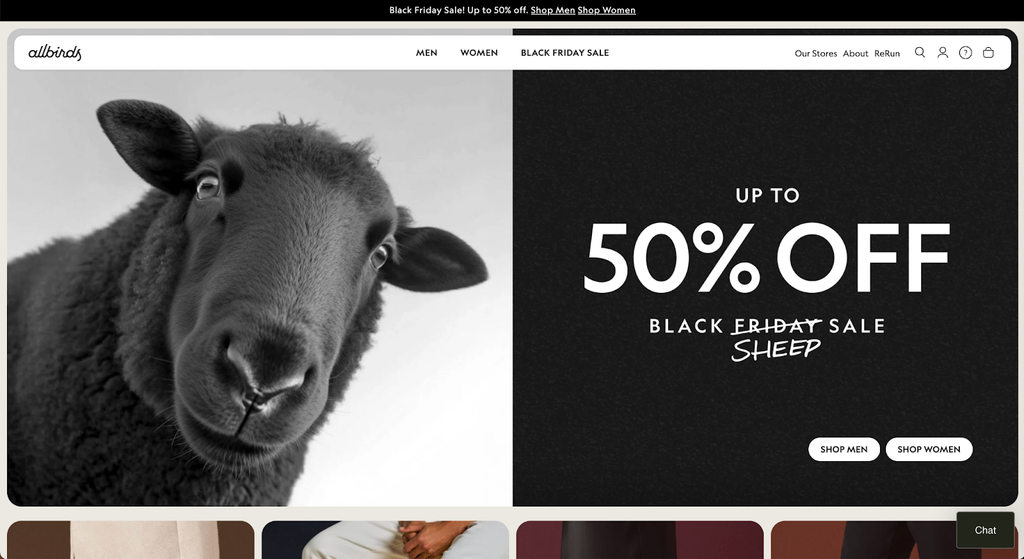
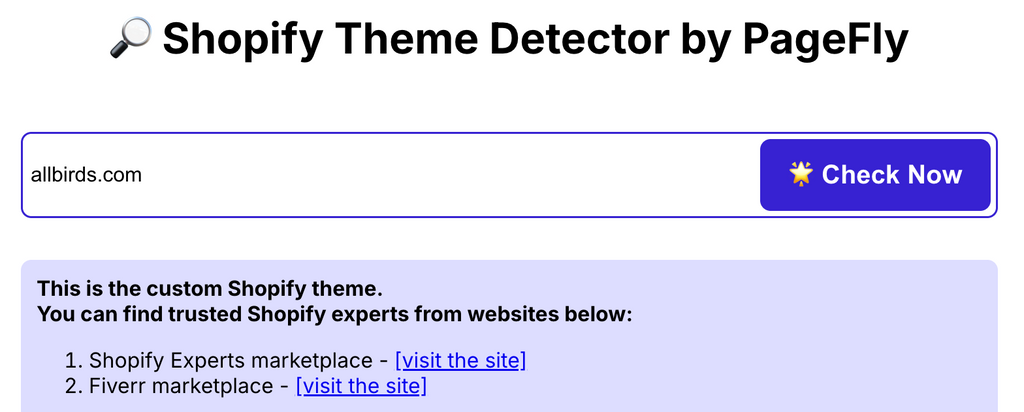
| Detection Result | Details |
| Store URL | allbirds.com |
| Detected Theme | Custom-built theme |
| Result Type | Fully bespoke, not available for purchase |
| What the page source says | schema_name: "allbirds-theme" · theme_store_id: null · theme named DNAM Theme July 2026 (read 10 Sep 2026) |
| Industry | Sustainable footwear / DTC fashion |
Allbirds sells shoes made of wool and eucalyptus, and the store is built to get out of the way of that story. The design does almost nothing, on purpose.
What that buys them:
- Layouts with one thing to look at, so the eye goes to the shoe and then to the button
- Materials copy sitting inside the product page rather than parked on an About page nobody opens
- A nav with barely anything in it, which works because they sell a dozen shoes, not a thousand
- Pages that load fast, which is the only sustainability claim a shopper can actually feel
Steal this if you have a short product line and something real to say about it. You do not need a bespoke build to get here. Dawn and Craft are both free and both start from the same place: white space and a big photo.
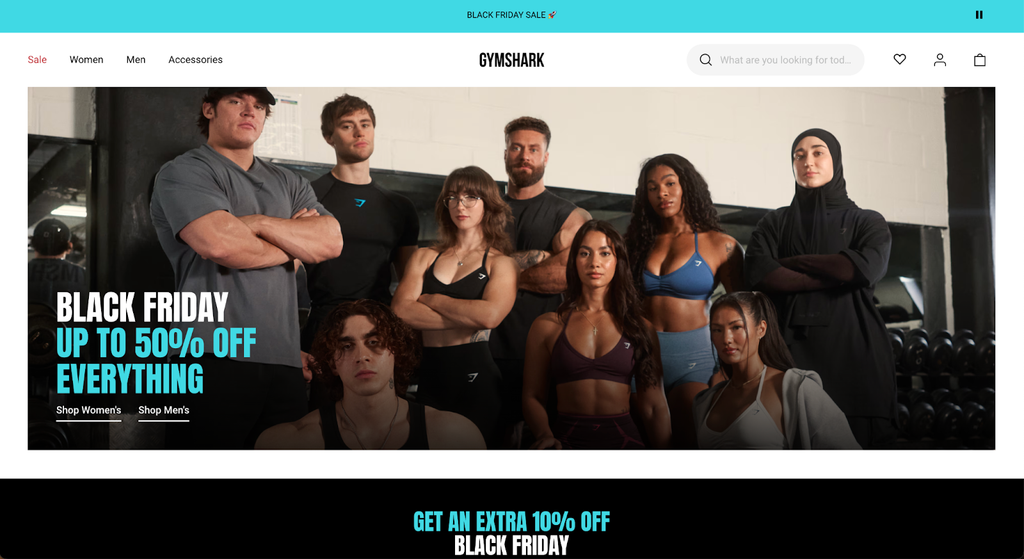
Example 2: Gymshark — Fitness & Athletic Apparel
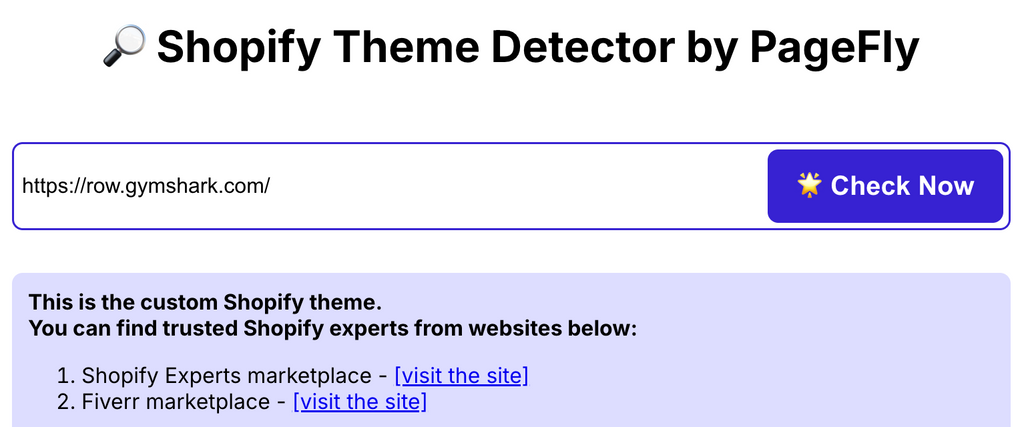
| Detection Result | Details |
| Store URL | gymshark.com |
| Detected Theme | Custom-built theme |
| Result Type | Fully bespoke, not available for purchase |
| What the page source says | schema_name: "GS2" · theme_store_id: null · theme named Hydra 1.15.0 / Store 1.39.0 (read 10 Sep 2026) |
| Industry | Fitness apparel / Athletic wear |
Gymshark has the opposite problem to Allbirds: a very large catalog and an audience that arrives from Instagram, on a phone, already half sold. The store is built to move that person to a size and a color quickly.
What that buys them:
- Loud, high-contrast imagery that survives being seen for two seconds
- Filtering that holds up past a thousand products, which is where most themes quietly give up
- Athlete sections built into the theme, so social proof is a layout, not a plugin
- A phone-first build, because that is where the traffic lands
Steal this if you sell a lot of variants to people arriving from social. Filtering is the feature to shop for, and you can buy it: Impulse at $500 and Symmetry at $420 both ship with it.
Filtering only works on a catalog that is organized underneath, which is a separate job. Our guide to the Shopify catalog covers that part.
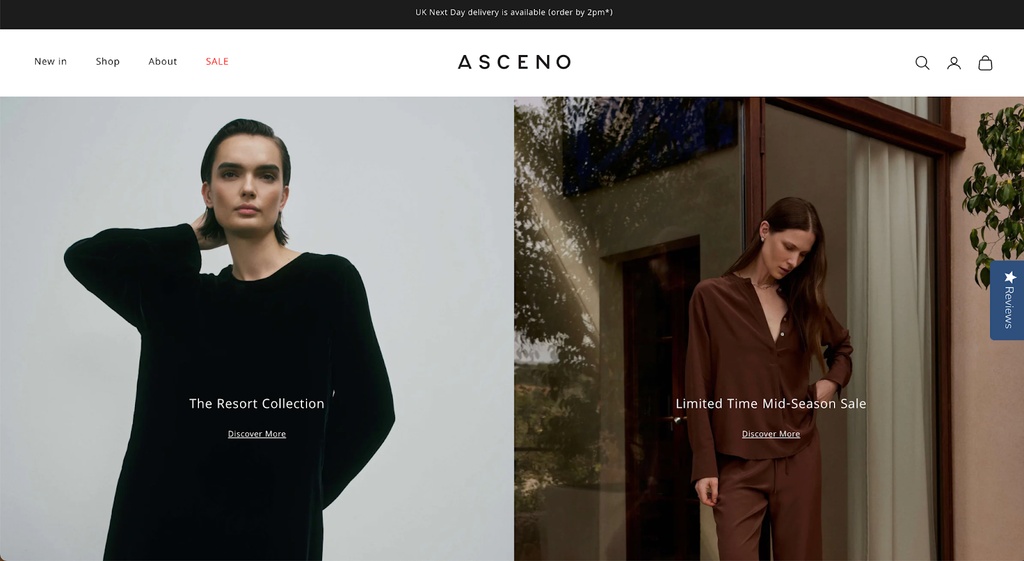
Example 3: Asceno — Luxury Sleepwear & Resort Wear
| Detection Result | Details |
| Store URL | asceno.com |
| Detected Theme | Prestige by Maestrooo |
| Result Type | Official Shopify theme (paid) |
| Price | $400 USD (Shopify Theme Store, checked 10 Sep 2026 — 91% positive, 864 reviews) |
| What the page source says | schema_name: "Prestige" · theme_store_id: 855 · theme named [ASCENO 2024] Prestige (read 10 Sep 2026) |
| Industry | Luxury fashion / Sleepwear & resort wear |
Asceno is the useful one of the three, because it is the one you can copy.
Asceno positions itself as a luxury lifestyle brand, not just a sleepwear company. Its silk pyjamas, linen pieces and swimwear command premium prices, and the Prestige theme's editorial layout carries that positioning without custom development.
What Prestige gives them:
- Editorial-style layouts give the brand room to build the confidence a $200–$500 purchase needs
- Large-format imagery slots let silk texture and craftsmanship do the selling
- Generous whitespace and restrained typography match the price point
- Minimal navigation suits a curated, deliberately small catalog
- Native lookbook sections blend resort and loungewear ranges in one browse path
What you can learn: a luxury brand does not need a custom theme. Asceno runs a $400 off-the-shelf theme — the same one anyone can buy today, and that is the most useful thing detection can tell you. The interesting part is that its theme is named [ASCENO 2024] Prestige, not "Prestige". More on why that matters below.
What These Examples Reveal
| Store | Theme Type | Budget Required | Key Lesson |
| Allbirds | Custom-built | $10,000–$50,000+ | Minimal design reduces friction and increases CR, not complex development |
| Gymshark | Custom-built | $20,000–$100,000+ | High-SKU brands need advanced filtering and mobile-first design for ATC rate |
| Asceno | Paid theme | $400 | Premium themes can achieve luxury positioning and high CR without custom dev |
The pattern: two of the three run custom themes, and that is exactly why you should check before you copy. Spend three weeks trying to recreate the Allbirds homepage on a free theme and you are fighting a bespoke build. Asceno is the opposite lesson: the look you admire is on sale for $400. Detection is what tells you which of those two situations you are in, in about five seconds. For the bespoke ones, the practical route is a solid base theme plus a page builder for the sections that matter, rather than a ground-up rebuild.
Shopify Theme ID, Theme Name and schema_name: How to Read What a Detector Tells You
This is the part almost nothing on the internet explains, and it is where most theme research goes wrong. The theme name a Shopify store publishes is a free-text field the merchant can type anything into. The theme's real identity lives in two other fields next to it. Learn to read those two and you will never again spend an afternoon hunting for a theme that was never for sale.
Every public Shopify storefront exposes a small object called Shopify.theme in its page source. Here is a real one, copied from asceno.com on 10 September 2026:
Shopify.theme = { "name": "[ASCENO 2024] Prestige", "id": 126836244598, "schema_name": "Prestige", "schema_version": "9.3.0", "theme_store_id": 855, "role": "main"}What each field actually means
| Field | What it is | Can you trust it? |
name | The label the merchant gave this theme in their own admin. | No. It is free text. Asceno's says [ASCENO 2024] Prestige; Allbirds' says [DNAM Theme July 2026]; Gymshark's says Hydra 1.15.0 | Store 1.39.0. None of those is a theme you can search for. |
id | The internal ID of that theme inside that one store. | Useless to you. It is not a Theme Store ID and it is different in every store. |
schema_name | The name the theme's own developer compiled into it. | Yes — this is the field to read. Asceno's says Prestige, which is the actual theme. |
schema_version | The theme's version, e.g. 9.3.0. | Yes. Useful for spotting a store running an old release. |
theme_store_id | The theme's ID in the Shopify Theme Store, or null. | Yes, and this is the money field. A number means the theme is (or was) sold in the Theme Store. null means it was never sold there: custom, private, or a developer's own build. |
The one-field test: can I buy this theme?
Read theme_store_id and stop. Here are the four stores we checked on 10 September 2026:
| Store | name (what the merchant typed) | schema_name (the truth) | theme_store_id | Can you buy it? |
| asceno.com | [ASCENO 2024] Prestige | Prestige (9.3.0) | 855 | Yes — $400 |
| beariestore.com | Bearie Store eCommerce eBooks and News | Label (3.6.0) | 773 | Yes |
| allbirds.com | [DNAM Theme July 2026] | allbirds-theme (1.231.12) | null | No — bespoke |
| gymshark.com | Hydra 1.15.0 | Store 1.39.0 | GS2 (1.33.0) | null | No — bespoke |
Notice that not one of the four name values would have found the right theme in a search box, and two of the four would have sent you looking for a theme that does not exist. That is the single most common failure in theme research, and one field fixes it.
How to turn a theme_store_id into a theme you can actually open
Plenty of people search for a way to look a theme up by its ID. There isn't a URL for it — we tested this. themes.shopify.com/themes/855 returns a 404, even though 855 is genuinely Prestige's Theme Store ID. Theme Store URLs are built from the theme's slug, not its number:
- Read
schema_namefrom the page source — that is the theme's real name. - Go to
themes.shopify.com/themes/plus that name in lowercase.Prestige→ themes.shopify.com/themes/prestige. - Confirm you have the right listing: the Theme Store page carries the same ID in its own markup (
data-monorail-click-tracking-theme-id-value="855"), so if that number matches thetheme_store_idyou read, it is the same theme. - Read the live price off that page before you budget. Prices move — three of the themes in our own table above had changed since Q1.
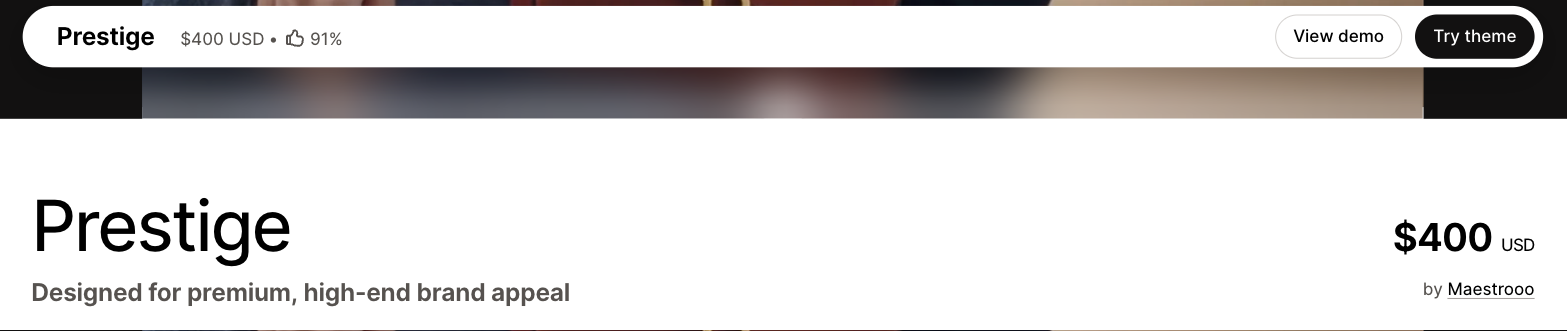
Step 4 — the Prestige listing on 10 Sep 2026: $400 USD, 91%, by Maestrooo. Screenshot taken first-hand by PageFly; this is the page that settles a price argument.
One number that is not a theme ID
Shopify serves theme assets from paths that look like this:
/cdn/shop/t/450/assets/custom-fields.cssThe 450 in there is tempting, and it is not a theme ID. It is a counter for how many themes that particular store has had installed. Asceno's assets sit under /cdn/shop/t/450/; PageFly's demo store, running a completely different theme, sits under /cdn/shop/t/48/. Two different themes, two different numbers, and neither number means anything outside its own store. If you have been trying to look up a theme by that digit, that is why nothing came back.
Why Shopify Merchants Use Theme Detection
Nobody runs a theme detector out of idle curiosity for long. The four uses below are the ones that actually change a decision, and each one turns a guess into something you can check.
1. Competitor Research and Market Intelligence
Detect a rival's theme and you learn more than what they like the look of. You learn what they were willing to spend, and where they decided the money mattered. A store on a $400 theme with a heavily reworked product page has told you exactly where it thinks its conversions come from.
| Signal | What It Tells You |
| Paid theme ($100–$500) | They paid for features, not looks: filtering, sticky cart, more sections |
| Free theme (Dawn, Sense) | Either early and careful with cash, or confident that simple sells |
| Custom-built theme | They had a developer and a reason. Both cost money |
| Same theme as several rivals | That theme already handles your category's awkward parts |
Run 10 to 20 competitors before you pick your own theme. Patterns show up fast. If the strongest stores in your niche keep landing on the same theme, that theme probably solves something you have not hit yet. If nobody uses the one you are eyeing, you have either found an edge or you are about to learn why everyone else passed.
The whole sweep takes an afternoon. It settles a decision you would otherwise make on taste.
2. Competitive Analysis with Actionable Context
Gallery posts and "best Shopify stores" lists show you the finish line. They almost never tell you how far away it is.
Here is how that guessing usually goes wrong. You find a store that converts, study the layout, and spend three weeks rebuilding it, only to find out it was a $50,000 custom job. Or you buy the theme, launch it, and realize the store you copied had a developer rework half of it.
Detection settles it in about five seconds. What you are looking at is one of three things:
- A theme you can buy today
- A bought theme plus developer work
- A bespoke build that was never for sale
Now your research is a plan instead of a mood board.
Pattern-matching is where it pays. Save five to ten stores you would trade places with, run each one, and look at what repeats:
| If You Find... | Your Next Step |
| Several stores on the same official theme | Buy that one. The category has already voted |
| A mix of stock and customized | Start from the base theme and rebuild only the pages that sell |
| All custom builds | Reset the budget, or reset the ambition |
👉 See 40+ Best Shopify Store Examples if you want a shortlist to run through the detector.
3. Theme Evaluation Before Purchase
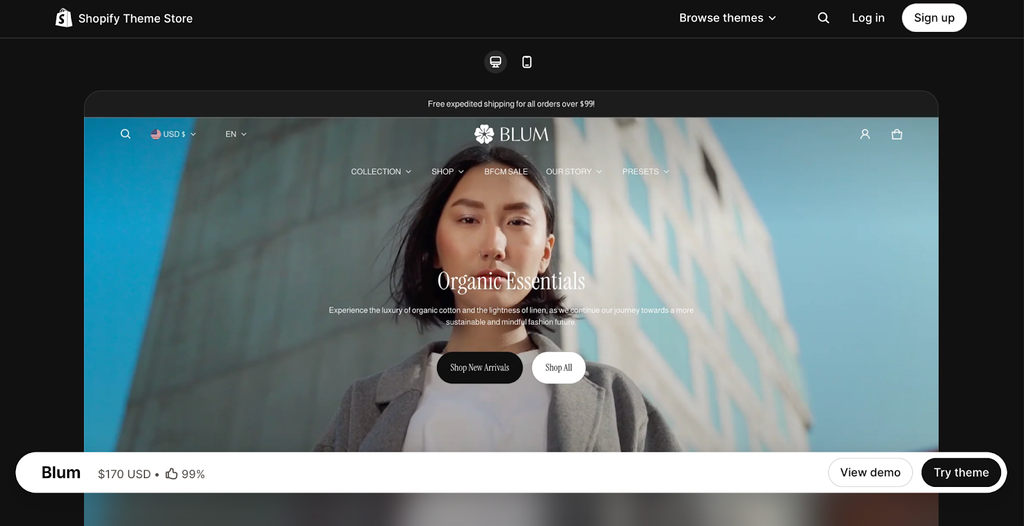
The Blum theme on a real store rather than in its demo. Source: Blum Shopify Theme.
A Theme Store demo is a showroom. Everything in it was picked to flatter the theme: the photos are the right shape, the copy is the right length, the catalog is small and tidy. Your store is none of those things.
| The demo has | You have |
| Studio product photography | Whatever you shot last quarter |
| Copy trimmed to fit the layout | Descriptions that run long or stop short |
| A palette built around the theme | Brand colors that may fight it |
| Twelve tidy products | Five hundred SKUs |
So before you spend $100 to $500, find three to five real stores running the theme and check:
- Photography: does it survive images that look like yours?
- Scale: does filtering still work at your catalog size?
- Range: how differently can two stores wear the same theme?
- Phone: open it on yours and try to buy something
Skip that step and the theme price turns out to be the cheap part. You lose the weeks spent fighting a layout that cannot do what you need, and you pay again when you move.
👉 Browse the Best Shopify Themes for 2026 by industry and budget.
4. Clearer Communication When Hiring Developers
Developers quote what they can picture. A vague brief gets a padded quote, because padding is the only defense against "something like this store."
| What you say | What they hear |
| "I want something like this store" | Anything. Also: scope creep |
| "Make it modern and clean" | A hundred different directions |
| "I like this competitor's design" | Which part? On what budget? |
Detection hands you the vocabulary that fixes it:
| Instead of | Say this |
| "I want a store like Allbirds" | "Allbirds is custom, so we cannot buy it. Start me on Prestige and rebuild their hero and product grid." |
| "Something modern for fashion" | "Impulse, with the collection filters reworked and a mega menu like this store's." |
| "Just make it look professional" | "Craft as the base, and these three changes, taken from stores I detected running it." |
You will not get a percentage out of this. You will get a shorter conversation, and a brief that names a theme and a section is a brief someone can actually price:
- Quotes that hold, because the scope was written down
- Fewer rounds spent agreeing on what "clean" means
- A shared vocabulary for what counts as working
→ Skim the best Shopify themes guide first, so you can name a base theme instead of describing a mood.
Quick Reference: When to Use Theme Detection
| Your Goal | How Theme Detection Helps | Time Investment |
| Know your market | Audit 10-20 competitor themes for conversion patterns | 30 minutes |
| Find proven performers | Validate whether high-converting layouts are purchasable | 5 minutes per store |
| Avoid expensive mistakes | See themes on real stores before buying | 15 minutes |
| Get accurate dev quotes | Provide precise references and scope | 10 minutes |
Most Popular Shopify Themes in 2026 — Original Data
Two things are worth separating here, because most articles blur them. The first is what our own tool sees: 47,382 theme detections run through PageFly's Shopify theme detector. The second is what the whole platform looks like, measured by a third party that crawls every live store. They do not agree, and the gap itself is informative.
Read the dates: the PageFly detection sample below is a Q1 2026 snapshot (January–March 2026) and has not been re-sampled since. The independent platform-wide figures further down were read on 10 September 2026. Where the two disagree, trust the September figures for "what is common today" and the Q1 sample only for "what people were looking up".
Top 9 Shopify Themes by Detection Volume
| Rank | Theme | Market Share | Price | Publisher |
| 1 | Dawn | 22.8% | Free | Shopify |
| 2 | Impulse | 7.9% | $500 | Archetype |
| 3 | Prestige | 5.8% | $400 | Maestrooo |
| 4 | Craft | 5.1% | Free | Shopify |
| 5 | Refresh | 3.7% | Free | Shopify |
| 6 | Sense | 3.2% | Free | Shopify |
| 7 | Impact | 3.0% | $400 | Maestrooo |
| 8 | Symmetry | 2.6% | $420 | Clean Canvas |
| 9 | Horizon | 1.8% | Free | Shopify |
Share column = PageFly detection sample, Q1 2026. Price column = Shopify Theme Store list price, re-checked 10 September 2026 (three of them had moved since Q1: Impulse $380→$500, Prestige $380→$400, Symmetry $380→$420 — a reminder to check the live listing before you budget). Remaining ~44%: legacy free themes no longer sold (Debut, Brooklyn — still detected on older stores), other themes, and custom builds.
A note on legacy themes: Earlier free themes like Debut and Brooklyn still appear on many established stores, but Shopify has retired them from the Theme Store — new merchants can no longer install them, so they're left out of the ranking above. If your detector returns "Debut" or "Brooklyn," that store is running an older Online Store 1.0 theme that Shopify now replaces with Dawn or Horizon for new stores.
What the whole platform looks like (independent, read 10 Sep 2026)
Store Leads crawls live Shopify stores rather than sampling a tool's users, and it tracks over 4,000 distinct theme names. Its State of Shopify 2026 report, read on 10 September 2026, ranks them like this:
| Theme name detected | Live stores | Share of all Shopify | Buyable in the Theme Store? |
| trademark | 477,434 | 15.8% | No — no such listing |
| Dawn | 276,677 | 9.1% | Yes — free |
| Horizon | 173,651 | 5.7% | Yes — free |
| Savor | 144,108 | — | Yes — free |
| Rise | 122,996 | — | Yes — free |
| Tinker | 117,022 | — | Yes — free |
| Debut | 116,896 | — | No — retired |
The row worth staring at is the first one. The most-detected theme name on Shopify is trademark, and there is no trademark theme for sale: themes.shopify.com/themes/trademark returns a 404 (we checked on 10 September 2026). That is the whole lesson of this article in one line — a detected theme name is not a shopping list. Before you go hunting for a theme a detector named, check whether it is a listing you can actually buy.
Two other takeaways from that table: Dawn and Horizon are the two most-used themes you can actually install, and both are free. And Debut is still on ~117,000 live stores even though Shopify stopped selling it, so a "Debut" result tells you the store is old, not that you can copy it.
Key Findings
Free Themes Dominate the Market
52% of the stores in our Q1 2026 sample ran free themes. (Sample figure, not a platform census — see the independent table above for the platform-wide picture.)
Despite 1,236 paid listings in the Theme Store (Sept 2026), most merchants stay on a free theme. In our Q1 sample Dawn accounted for nearly a quarter of detections; platform-wide in September it sits at 9.1%, still the most-used buyable theme. Horizon — Shopify's newer default free theme — has climbed to 5.7% of all live stores, which makes it the fastest-moving theme in the ecosystem. Our Shopify Horizon theme review looks at what is driving that.
| Theme Tier | Market Share | Avg. Store Count |
| Free themes | 52% | ~24,600 stores |
| Paid themes ($100–$500) | 30% | ~14,200 stores |
| Custom-built themes | 18% | ~8,500 stores |
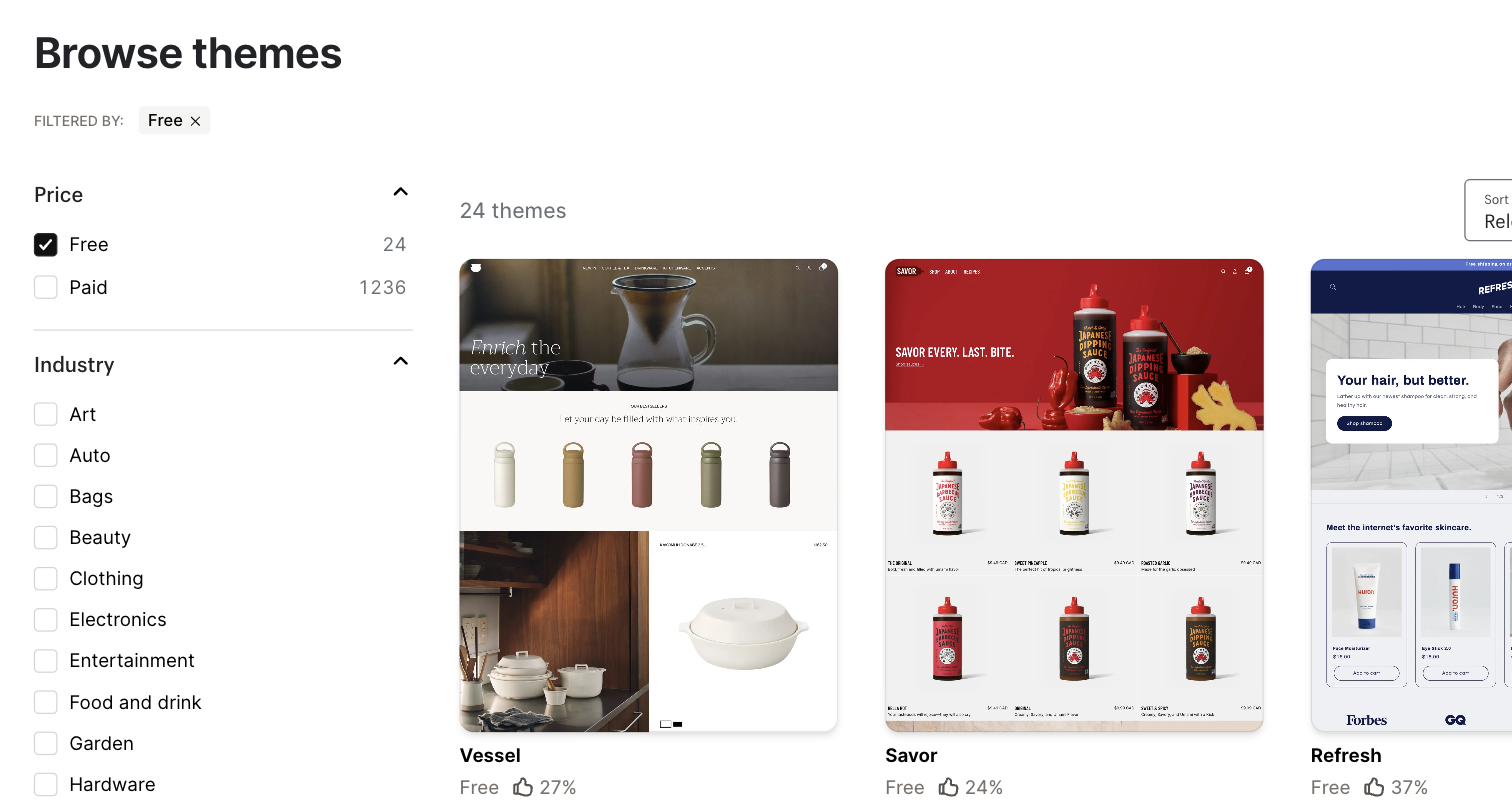
The Shopify Theme Store's own price filter, 10 Sep 2026: 24 free, 1,236 paid. Screenshot taken first-hand by PageFly — this is where the counts in this article come from.
Four reasons it keeps happening:
- New merchants prioritize cash flow over upfront design costs
- Dawn's Online Store 2.0 architecture handles most customization needs
- CRO platforms like PageFly enable conversion-optimized layouts without theme upgrades
- Shopify's investment in free theme quality has closed the gap with premium options
What you actually give up: free themes are not worse-looking, they are narrower. The things paid themes tend to add are structural — multi-facet collection filtering, sticky add-to-cart, quick-view, mega menus, more section types. If your catalog is small and your pages are simple, a free theme costs you nothing. If shoppers need to filter 500 SKUs, that is the wall you hit first.
The Paid-Theme Power Law
The paid end of the market is far more concentrated than the free end. In our Q1 sample, Impulse and Prestige together took about 47% of all paid-theme detections — two themes, half the money.
| Rank | Theme | Share of paid detections (Q1 2026 sample) |
| #1 | Impulse | 27% |
| #2 | Prestige | 20% |
They win on the same four things, and they are worth using as a shopping list when you compare any paid theme:
- Filtering that survives a large catalog
- A homepage you can rearrange without a developer
- Mobile performance that holds up
- A publisher who still ships updates
They are not the only good ones. Sunrise ($240, by Rawsterne) sits at 93% positive on the Theme Store and suits brighter, product-led brands.
→ Compare the paid Shopify themes side by side.
Custom Themes: Who Actually Uses Them?
18% of the stores in our Q1 sample ran a custom build. The interesting part is who they were.
| Store segment | On a custom theme |
| Under 2 years old | 6% |
| 2 to 5 years old | 14% |
| Over 5 years old | 31% |
| Estimated $1M+ revenue | 47% |
Custom themes are what stores buy after they work, not what makes them work. At $10,000 to $50,000+, the spend only makes sense once you already know what your customers respond to. Reading it backwards, and building bespoke to get there, is the expensive mistake this whole page is meant to help you avoid.
Trend Watch: What's Changing in 2026
Set the Q1 sample against what came before it and a few things are clearly moving:
| Trend | Movement | What It Means |
| Dawn's growth | ↑ 3 pts YoY | Default theme status accelerates adoption |
| Legacy themes retiring | Removed from Theme Store | Older free themes (Debut, Brooklyn) are no longer sold — migration to OS 2.0 themes continues |
| Horizon's emergence | 1.8% in our Q1 sample → 5.7% of all live Shopify stores by 10 Sep 2026 (Store Leads) | Now the third most-detected theme name platform-wide, and the fastest mover of any theme you can install |
| Premium consolidation | Impulse + Prestige ≈ 47% of paid market | Winners pulling away from the pack |
| Craft's rise | ↑ 2 pts in 6 months | Shopify's free "premium-look" theme gaining fast with DTC brands |
| Custom theme growth | ↑ 1.5 pts YoY | More brands investing in bespoke builds for conversion optimization |
What we will be watching (and you can check us): Horizon passed Savor into third place platform-wide by September 2026. If Shopify keeps it as the default for new stores, the number to watch is whether Horizon overtakes Dawn — Dawn 9.1% vs Horizon 5.7% on 10 September 2026, both from Store Leads. Debut's ~117,000 remaining stores are the other clock: that number only goes down.
How We Collected This Data
How the Q1 2026 sample was built:
- Sample size: 47,382 unique Shopify store URLs
- Collection period: January–March 2026
- Source: Anonymized scans through PageFly's Shopify theme detector
- Categorization: Themes matched against Shopify Theme Store database + custom theme fingerprinting
- Exclusions: Duplicate URLs, non-Shopify stores, password-protected stores
Three things it cannot tell you:
- Data reflects stores scanned through our tool, which may skew toward merchants actively researching themes
- Custom theme detection groups heavily modified official themes with fully bespoke builds
- Historical comparisons use consistent methodology but sample composition varies quarter-to-quarter
Updates: the PageFly detection sample above is a Q1 2026 snapshot and has not been re-sampled since — we have labelled it that way rather than leave a stale date implying otherwise. The independent platform-wide table is re-read when we update this page; it was last read on 10 September 2026. Bookmark the page and check those two dates before you quote a number from it.
Why Shopify Theme Detection Might Not Work
Most stores give up their theme without a fight. Five situations do not, and they fail for different reasons, so the fix is different each time. Work down the list.
Issue 1: The Store Isn't Built on Shopify
The detector only analyzes Shopify stores. Sites on other platforms return no result.
None of these are Shopify, so there is no Shopify theme to find:
- WooCommerce (WordPress)
- BigCommerce
- Magento / Adobe Commerce
- Wix or Squarespace eCommerce
- Custom-built platforms
Four ways to settle it, weakest first:
| Method | Steps |
| Check the footer | Look for "Powered by Shopify". Weak signal in 2026 — we searched the source of allbirds.com, gymshark.com and asceno.com on 10 Sep 2026 and the phrase appeared zero times on all three, though all three are Shopify stores. Established brands remove it. Absence proves nothing. |
| Try the admin URL ← most reliable | Add /admin to the domain. A Shopify store returns a 301 redirect to <store-handle>.myshopify.com/admin, which confirms Shopify and reveals the store's real internal handle. Verified 10 Sep 2026: asceno.com/admin → asceno-london.myshopify.com/admin, allbirds.com/admin → weareallbirds.myshopify.com/admin. You never sign in — the redirect itself is the answer. |
| View page source | Press Ctrl+U / Cmd+U and search for "shopify" or "cdn.shopify.com" |
| Use a platform checker | Try BuiltWith or Wappalyzer |
If the store isn't on Shopify, similar platform-specific detectors exist for WooCommerce and other platforms.
Issue 2: The Store Is Password-Protected
A locked store shows one page: a password form. The theme code you want lives on the homepage, product pages and collection pages, and none of those load until someone lets you in. Stores sit like this before launch, during a rebuild, or when they are members-only.
You can tell in a second. There is a "Enter store using password" prompt, no products anywhere, and the URL resolves but never gets past that one form.
| Situation | What to do |
| It is your own store | Turn the password off, run the check, turn it back on |
| You have the password | Log in first, then read the page source |
| You have neither | Wait for launch, or just ask the owner |
Issue 3: Headless Commerce Setup
Some stores keep Shopify for orders, inventory and checkout, but build the shopfront themselves in React or Next.js. There is no Liquid theme in the picture, so there is nothing for a detector to name. It is not a failed detection; the thing you are looking for does not exist.
| Layer | Normal Shopify | Headless |
| Orders, products, checkout | Shopify | Shopify, via the Storefront API |
| What the shopper sees | A Liquid theme | Custom code: React, Next.js, Vue |
| Theme to detect? | ✓ Yes | ✗ None exists |
The usual frameworks are Hydrogen (Shopify's own React framework), Next.js Commerce, Remix, and Vue Storefront.
You can usually spot one before you even check the source: pages swap instantly with no reload, the URL sometimes does not change when you click, the source is full of React instead of Liquid, and there are no cdn.shopify.com asset paths.
New in 2026, and relevant if you are studying headless stores: Shopify's Storefront MCP lets AI shopping agents such as ChatGPT and Perplexity browse and buy from a headless storefront directly. Being invisible to a theme detector no longer means being invisible to shoppers. Our guide to Shopify AI agents covers what that changes.
Either way, a headless store is bespoke by definition. Study the layout decisions, but price the work as development, not as a theme purchase.
Issue 4: Heavily Modified Theme Code
Occasionally a developer takes an official theme and rewrites so much of it that the fingerprint is gone. Not customization in the normal sense: most template files replaced, standard asset names changed or deleted, whole components rebuilt.
The detector will call it custom, and for your purposes it is right. Even if you dug out the original base theme, it would not help you. Nothing you can see on that store came from it.
Issue 5: Technical Blocks
Sometimes the store is fine and the request is the problem.
| What is happening | What you see | Fix |
| Cloudflare challenge | A CAPTCHA or JS check the detector cannot clear | Open the store in your own browser first to confirm it loads |
| Rate limiting | You ran a batch too quickly and got cut off | Wait ten minutes and pick up where you stopped |
Alternative Detection Methods (re-tested September 2026)
When automated detection fails, these are the manual fallbacks. We re-ran every one of them on real stores on 10 September 2026 before publishing this list, because manual methods rot quietly — one of the four that used to be recommended everywhere, including in an earlier version of this article, no longer works at all. Each method below is marked with what we actually observed.
Method 1: View Page Source — ✅ still the best manual method
Works on any publicly reachable Shopify store, and it is the only method that gives you theme_store_id.
Five steps, about thirty seconds:
- Open the store in your browser
- Right-click → "View Page Source" (or press Ctrl+U / Cmd+U)
- Press Ctrl+F / Cmd+F to search inside the source
- Search for
Shopify.theme - Read
schema_name(the real theme) andtheme_store_id(whether you can buy it) — notname, which the merchant can type anything into
A real result, read from asceno.com on 10 Sep 2026:
Shopify.theme = {"name":"[ASCENO 2024] Prestige","id":126836244598, "schema_name":"Prestige","schema_version":"9.3.0", "theme_store_id":855,"role":"main"}Once you have the schema_name, searching it in the Shopify Theme Store is the last step — here is that search on 10 Sep 2026:
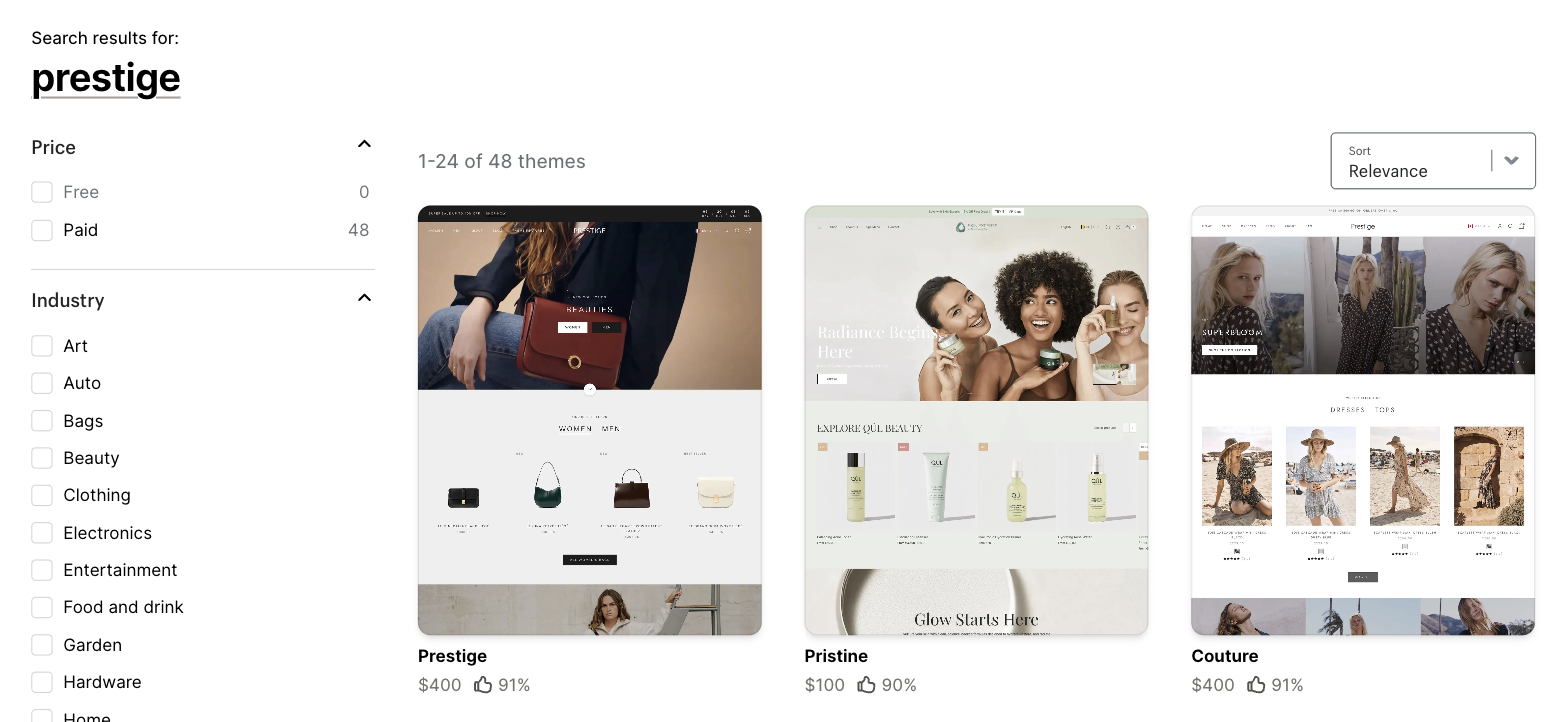
Step 5 — searching the Theme Store for the schema_name you just read. Screenshot taken first-hand by PageFly, 10 Sep 2026.
Faster variant: instead of reading source, open the browser console (F12 → Console), type Shopify.theme and press Enter. You get the same object, already formatted. It works on any Shopify storefront and takes about three seconds.
Verified on allbirds.com, gymshark.com, asceno.com and beariestore.com — all four exposed the object. See the field-by-field breakdown in the section above.
Method 2: Check Theme Asset Paths — ⚠️ works, but not the way most guides describe
Older guides (this article included, until this update) told you to look for a file called theme.css?v=dawn-1.0. We could not find that pattern on a single store we tested. Modern Shopify serves theme assets from a path shaped like this instead:
/cdn/shop/t/450/assets/custom-fields.css/cdn/shop/t/48/assets/cart-drawer.min.jsOne keystroke, then read the address bar:
- Open Developer Tools (F12 or right-click → "Inspect")
- Go to the Network tab and refresh the page
- Filter by
CSSorJSand look for paths containing/cdn/shop/t/ - Read the filenames, not the number — asset filenames are a theme fingerprint (Prestige ships
custom-fields-widgets.js; the Label theme ships.min.jsvariants)
Do not read the number as a theme ID. The 450 and 48 above are per-store install counters, not theme identifiers. Method 1 is strictly better if the page source is available; use this one when you want to see which theme files a store has customized.
Method 3: The /admin redirect — ✅ new, and the fastest platform check
This one takes one keystroke and answers two questions at once: is this Shopify, and what is the store's real handle?
Do it in this order:
- Type the store's domain followed by
/adminin your address bar - Watch where it lands. A Shopify store redirects to
<handle>.myshopify.com/adminand then to a login screen - Read the handle out of that URL — that is the store's internal Shopify name
- Stop there. You do not sign in, and you could not if you tried; the redirect is the whole signal
Verified 10 Sep 2026: asceno.com/admin → 301 → asceno-london.myshopify.com/admin. allbirds.com/admin → 301 → weareallbirds.myshopify.com/admin. A non-Shopify site gives you a 404, its own login page, or nothing.
This is also the method to reach for when the "Powered by Shopify" footer text has been removed, which on larger brands it almost always has.
Method 4: Ask, or look for the credit — ✅ still works
In rough order of how likely they are to work:
- Contact the store owner and ask (many are happy to share)
- Check the store's blog or About page — some list their stack
- Look for agency credits in the footer ("Built by …")
- Search the store's name plus "Shopify theme" to find case studies or build write-ups
❌ Retired: inspecting the checkout page
Every guide to this topic, including earlier versions of this page — told you that Shopify's checkout kept theme references, so you could add a product to the cart, go to checkout, and read the theme from there. That method is dead, and it is worth knowing why so you stop trying it.
Shopify has been retiring checkout.liquid, the theme file the checkout used to run on. Per Shopify's own developer documentation, checkout.liquid is unsupported for the Information, Shipping and Payment steps; the Thank you and Order status pages sunset on 28 August 2025 for Shopify Plus stores, with script tags following on 26 August 2026 for everyone else. The checkout now renders from Checkout Extensibility, not from your theme.
We confirmed it end to end on 10 September 2026: we added a product to a cart on a live Shopify store, followed it to the real checkout URL (/checkouts/cn/…), and searched the resulting page. Zero occurrences of Shopify.theme, theme_store_id, schema_name, or any /cdn/shop/t/ asset path. There is nothing left there to read.
If you have a bookmarked workflow that ends at the checkout page, replace that step with Method 1 or Method 3 above.
Quick Troubleshooting Checklist
| Check | If No... |
| ✓ Is the URL correct? | Fix typos, ensure HTTPS |
| ✓ Is the store publicly accessible? | Wait for launch or request access |
| ✓ Is it actually a Shopify store? | Add /admin to the domain (Method 3 above): a Shopify store redirects to *.myshopify.com |
| ✓ Is the store loading normally in your browser? | Check for geo-blocks or errors |
| ✓ Did you wait for results? | Some complex stores take 10-15 seconds |
Still Can't Detect a Theme?
Three things left to try, in order:
- Read the source yourself. Method 1 above works on plenty of stores the detector cannot reach.
- Give up on the name and copy the thinking. Screenshot where the CTA sits, what the trust signals are, how the page is stacked, then find a theme that starts closer to it in our best Shopify themes guide.
- Send it to us. Email happytohelp@pagefly.io with the URL and we will look at it ourselves.
→ Back to the detector at the top of this page to try another store.
Shopify Theme Checker, Theme Finder & "What Theme Is This?" — One Tool, Many Names
Three different searches, one job. A Shopify theme checker, a Shopify theme finder, and typing "what Shopify theme is this?" all mean the same thing: hand over a store URL, get back the theme it runs. The detector at the top of this page does all three, so whichever wording you used, you are in the right place.
Is this a Shopify theme checker?
Yes. Checking means confirming whether a store runs a real Theme Store theme or a custom build, and which one. Paste the URL, wait about five seconds, read the answer. Nothing to install and nothing to log into.
Use it as a Shopify theme finder
Finding is the harder half, and it is where a bare theme name lets you down. The detector returns the theme, whether it is free or paid, what it costs right now, and a link to its listing, so you can go and get the same one instead of starting another search.
"What Shopify theme is this?" How to answer it in 5 seconds
You do not need to read code. Copy the store's URL, paste it into the box at the top of this page, read the result. If the store is locked or headless and nothing comes back, Method 1 further down does the same job by hand.
Shopify Theme Detection: PageFly vs. Manual Methods
There are three ways to identify what theme a Shopify store uses. Here's how they compare, and why most merchants choose automated detection.
Quick Comparison
| Method | Time | Gives you | Skill needed | Fails when |
| PageFly detector | ~5 seconds | Name, type, price, listing link | None | The store is locked, headless, or blocking |
| Page source | 2–5 minutes | schema_name, version, theme_store_id | Can use Ctrl+F | The store is locked or headless |
| Browser extension | ~15 seconds | Theme guess, plus the app stack | Install, grant permissions | The theme is newer than the extension |
They are not really competing. The detector answers the question fastest, the page source answers it most precisely, and an extension answers a different question: what else is running on that store.
Method 1: PageFly's Automated Theme Detector
The detector fetches the store's front end, pulls the theme fingerprint out of the HTML and asset paths, and matches it against a database of 10,000+ themes. Then it does the part that saves you the real time: it looks up whether that theme is on sale, what it costs today, and where to buy it.
That last step is why the output is more useful than a name. A name sends you to Google. A name plus theme_store_id plus a live price tells you whether to open your wallet or your budget spreadsheet.
| What you get | Why it matters |
| Under five seconds | You can run twenty competitors in the time it takes to read one source file |
| No skill, no install | Works in any browser, on a phone, without permissions |
| The whole Theme Store | 1,260 listings as of Sept 2026, plus 10,000+ third-party themes |
| Official, customized or custom | The three answers that change what you do next |
| A link and a price | The two things a name alone will not give you |
It comes up empty on password-protected stores, headless builds, and anything sitting behind aggressive bot protection. For those, drop to Method 2.
→ Try the detector at the top of this page.
Method 2: Manual Source Code Inspection
Slower, but it is the ground truth. You are reading the store's own declaration of what it runs, so there is no database to be out of date.
| Step | Action |
| 1 | Open the store |
| 2 | Right-click → "View Page Source", or Ctrl+U / Cmd+U |
| 3 | Ctrl+F / Cmd+F to search inside the source |
| 4 | Search Shopify.theme |
| 5 | Read schema_name and theme_store_id. Ignore name |
| 6 | Search the Theme Store for the schema_name |
Here is a real object, read from beariestore.com on 10 Sep 2026:
Shopify.theme = {"name":"Bearie Store eCommerce eBooks and News", "schema_name":"Label","schema_version":"3.6.0", "theme_store_id":773,"role":"main"}The theme is Label. It is not "Bearie Store eCommerce eBooks and News". That is the store's nickname for it.
What you gain over the detector: the version number and the asset structure, which tell you how current and how modified the build is. What you give up: two to five minutes per store, a tolerance for scrolling through minified HTML, and any help finding the listing afterwards. It also comes up blank on the same locked and headless stores, so it is a sharper tool, not a stronger one.
Worth learning anyway. Once you have read three of these you will understand how Shopify themes are put together, which makes every later conversation with a developer shorter. If minified source is new to you, start here.
Method 3: Browser Extensions
An extension sits in your toolbar and reads every page you visit, so you never type a URL anywhere. Wappalyzer, BuiltWith and a handful of Shopify-specific add-ons all work this way.
What is actually on the Chrome Web Store — we searched it on 10 September 2026, because listings in this category get renamed and delisted often:
| Extension (as listed Sept 2026) | Rating | Focus |
| Wappalyzer — Technology profiler | Listed | General tech detection across every platform, not Shopify-specific |
| BuiltWith Technology Profiler | Listed | Broad stack analysis; good for "is this Shopify at all" |
| Shopify Spy & Dropshipping — Koala Inspector | 4.7 · Featured | Shopify-specific. Note the rename — older articles link to a "Koala Inspector" listing that no longer resolves; this is the current one |
| Shopify Inspector: Shopify App & Theme Detector | 5.0 · Featured | Theme and installed apps in one click |
| Shopify Store Inspector — Theme, App & Pixel Detector | 5.0 | Theme, apps and tracking pixels |
If you want a store's apps as well as its theme, an extension is the right tool — that is the one job extensions do that this page's detector does not. The detector above answers the theme question; the two "Inspector" extensions above also list installed apps and pixels.
What they are good at:
| Benefit | Details |
| One-click access | Click icon to see results while browsing |
| Passive detection | Some show info automatically on Shopify sites |
| Additional insights | Many detect apps, analytics, and other technologies |
| Always available | Works on any site you visit |
And what you pay for that:
| Limitation | Impact |
| Requires installation | Browser permissions required |
| Accuracy varies widely | Many extensions use outdated databases |
| Privacy concerns | Some extensions track browsing activity |
| Database lag | New themes often not recognized for months |
| Performance impact | Extensions can slow page loading |
| Maintenance burden | Extensions may break with browser updates |
Where extensions get it wrong, and why: the failure is structural, not sloppiness. An extension reports a theme by matching what it reads against a bundled list of theme names. Two things break that:
- Renamed themes. An extension that surfaces the
namefield reports "[ASCENO 2024] Prestige" or "[DNAM Theme July 2026]" — technically what the store published, useless as an answer. Onlyschema_namegives the real theme. - List lag. A theme released after the extension's last update is not in its list, so a brand-new theme comes back as "unknown" or "custom" even when it is a $400 listing you could buy today.
Both are the same reason source-code reading (Method 1) beats every extension when accuracy matters: schema_name and theme_store_id come from the store itself, so there is no list to be out of date.
Best for: Users who want passive detection while browsing multiple stores, or need broader technology stack information beyond just themes.
Which One Should You Actually Use?
Start with the detector. It is faster, it needs nothing installed, and it hands you the price and the link, which is the part you were going to look up next anyway. Keep the page source for the cases the detector cannot reach, and for when you need to be certain rather than fast.
The gap only really shows up at volume. One store either way is a wash. Twenty stores is the difference between an afternoon and a coffee break, and a proper competitive sweep is fifty.
| If you are... | Use |
| Checking one store out of curiosity | The detector |
| Running a competitive sweep | The detector |
| Getting nothing back from the detector | Page source |
| Proving a theme is unbuyable to a client | Page source, and screenshot theme_store_id: null |
| Checking how old a store's theme build is | Page source, read schema_version |
| Trying to see the apps and pixels too | A browser extension |
| Unwilling to install anything | The detector or page source |
The Bottom Line
Use the detector first; keep Method 1 in your back pocket.
The detector at the top of this page gives you, in about five seconds and with nothing to install: the theme, whether it is official or custom, its current price, and a link to the listing. That covers the everyday question.
Reading Shopify.theme yourself (Method 1) is the one thing worth learning on top, for three situations the detector cannot cover for you:
- The store is password-protected or geo-blocked from where the detector runs, but loads for you
- You want
schema_versionto see how old a store's theme release is - You want to prove a theme is unbuyable before quoting a client —
theme_store_id: nullis the receipt
Everything after that is a research question, not a detection question: which theme suits your catalog, and what you can change without buying a new one.
Shopify Theme Detector FAQ
It works by reading the store's public source code, extracting the theme's fingerprint, and matching it against a database of known themes. Within seconds you get:
- Theme name (e.g. "Dawn", "Horizon", "Prestige", "Impulse")
- Theme type (official, customized, or custom-built)
- Price (free, or roughly $100-$500 one-off for a paid theme)
- A direct link to the Theme Store listing
PageFly's detector draws on a database of 10,000+ Shopify themes, covering the official Shopify Theme Store plus thousands of third-party designs. The Theme Store itself listed 1,260 theme and preset entries - 24 free and 1,236 paid - when we checked on 10 September 2026.
- Step 1: Copy the store URL (e.g. asceno.com)
- Step 2: Paste it into the detector above and click "Detect theme"
- Step 3: Read the result - theme name, type, price and purchase link
No signup, no payment, no technical knowledge required. If you would rather do it by hand, open the store's page source and search for Shopify.theme, then read the schema_name field.
- Cost: $0, always
- Account required: No
- Detection limits: Unlimited
- Hidden fees: None
We offer this tool free to help Shopify merchants make smarter theme decisions. PageFly is an AI-powered CRO platform trusted by 230,000+ Shopify merchants, and this detector exists to complement that work.
- Official Shopify theme: the exact theme from the Theme Store - you can buy the same one
- Customized official theme: the base theme is identified, but developers have modified it
- Custom-built theme: a bespoke design, not available for purchase at any price
For a custom-built result, the giveaway in the store's own source code is theme_store_id: null - that field is only ever a number when the theme is (or was) sold in the Shopify Theme Store.
Real examples we read on 10 September 2026:
- asceno.com calls its theme
ASCENO 2024 Prestige- the actual theme is Prestige - allbirds.com calls its theme
DNAM Theme July 2026- a bespoke build with no Theme Store listing - gymshark.com calls its theme
Hydra 1.15.0 / Store 1.39.0- also bespoke
The field that cannot be renamed is schema_name, which the theme's developer compiles into it. If a name looks invented, read schema_name instead - that is the theme you can actually search for.
themes.shopify.com/themes/855 returns a 404, even though 855 really is Prestige's Theme Store ID.Do it this way instead:
- Read
schema_namefrom the store's page source - that is the theme's real name - Open
themes.shopify.com/themes/plus that name in lowercase (Prestige becomes themes.shopify.com/themes/prestige) - Confirm the match: the Theme Store page carries the same ID in its own markup, as
data-monorail-click-tracking-theme-id-value
One warning: the number in an asset path like /cdn/shop/t/450/assets/... is not a theme ID. It counts how many themes that one store has installed, and it means nothing outside that store.
What the result tells you that a screenshot cannot:
- An official theme means you can install the identical foundation today, for $0-$500
- A customized official theme means you can buy the base, but their extras were built on top
- A custom build means the look you admire is not for sale - copying it means a developer, not a purchase
For a broader competitive audit, run 10-20 stores in your niche and look for the theme that keeps reappearing. If several strong performers cluster on one theme, that is a real signal about category fit.
Note that the older "Koala Inspector" listing many articles link to has been renamed, so an outdated link will not resolve.
Use both if you are doing competitor research: this page for an accurate theme read, an extension for the app stack.
- Not Shopify: the detector only works on Shopify stores. WooCommerce, BigCommerce and the rest are not supported.
- Password-protected: a locked store exposes no theme code.
- Headless setup: a Shopify backend with a custom React or Next.js frontend has no Shopify theme to find.
- Heavy modification: extensively rewritten code may no longer carry an identifiable fingerprint.
- Technical blocks: geo-restrictions or bot protection can prevent access.
If it fails: confirm the store is on Shopify by adding /admin to the domain (a Shopify store redirects to its myshopify.com admin login), then try reading Shopify.theme from the page source. Still stuck? Email happytohelp@pagefly.io with the URL.
Older guides told you to add a product to the cart, go to checkout, and read the theme from the checkout page's source. Shopify has retired checkout.liquid, the theme file the checkout used to run on: per Shopify's developer documentation it is unsupported for the Information, Shipping and Payment steps, the Thank you and Order status pages sunset on 28 August 2025 for Shopify Plus stores, and script tags follow on 26 August 2026 for everyone else. The checkout now renders from Checkout Extensibility rather than from your theme.
We confirmed it end to end on 10 September 2026: on a live Shopify checkout URL there were zero occurrences of Shopify.theme, theme_store_id, schema_name, or any theme asset path. Use the page source of a normal storefront page instead.
Two things merchants often learn late:
- A theme decides features, not just looks. Sticky add-to-cart, multi-facet collection filtering, mega menus and quick-view are theme capabilities. If your theme lacks one, no setting adds it.
- Themes are a one-off purchase, not a subscription. A paid theme is a lifetime license for that store.
Themes come from the Shopify Theme Store (24 free and 1,236 paid listings as of 10 September 2026), from third-party marketplaces, or from a developer building one from scratch.
Paid themes (roughly $100-$500 one-off): prices verified in the Theme Store on 10 September 2026 - Impulse $500, Symmetry $420, Prestige $400, Impact $400, Sunrise $240. They add structural features: multi-facet filtering, sticky add-to-cart, mega menus, more section types, and publisher support.
The honest difference: free themes are not worse-looking, they are narrower. If your catalog is small and your pages are simple, a free theme costs you nothing. If shoppers need to filter 500 SKUs, that is the wall you hit first.
Which should you choose?
- Just starting out - start free; Dawn and Horizon are both solid
- Simple catalog - a free theme is genuinely enough
- 100+ products - a paid theme's filtering will pay for itself
- Established brand ready to invest - buy for the features you can name, not for the look
Worth knowing: Dawn (9.1% of all Shopify stores) and Horizon (5.7%) are the two most-used themes anyone can install, and both are free - figures from Store Leads, read 10 September 2026.
- Official theme: yes - buy it from the Shopify Theme Store
- Customized official: base only - buy the base theme, then rebuild the extras
- Custom-built: not directly - you would commission similar development work
Legal lines:
- Buying the same official theme - completely legal
- Using a store as design inspiration - acceptable
- Copying their images, text or code - copyright infringement
- Cloning an entire site design - potential IP violation
The sensible approach: use detection to learn what foundation a competitor built on. If it is an official theme, start from the same base, then differentiate through your own branding, content and page structure.
Extensions have two structural weaknesses this avoids: they often report the merchant-editable theme name rather than the real schema_name, and they match against a bundled list that lags newly released themes.
Whatever tool you use, apply one test to its answer: does it tell you whether the theme is buyable? A theme name with no answer to that question cannot tell you whether you are five minutes or five thousand dollars away from the look you want.