





Key takeaways
- GEO (Generative Engine Optimization) is the practice of structuring your store so AI answer engines can find, trust and cite you when a shopper asks for a recommendation. It is the discovery half of AI shopping.
- If you sell on Shopify, a large part of the plumbing is already done for you. Eligible products are in Shopify Catalog by default, which syndicates your product details to ChatGPT, Copilot, the Shop app and others with no feed to build.
- That changes what GEO work actually means. Your lever is no longer "get into the index" — it is the quality of the product record Catalog is already publishing on your behalf.
- Shopify now grades that record for you. Listing insights in Sales channels > Agentic score five named signals per product, and a search preview tells you which queries you rank for and which you don't.
- Everything below is checkable in your own admin this week. Nothing here requires a developer, a feed, or a new app.
What is GEO (Generative Engine Optimization)?
GEO (Generative Engine Optimization) is the practice of structuring your website and product content so that AI answer engines — ChatGPT, Google AI Mode and Gemini, Microsoft Copilot, Perplexity — can retrieve it, trust it, and cite it when they generate an answer for a shopper. Where traditional SEO competes for one of ten blue links, GEO competes for a place among the handful of sources a model actually references in a single reply.
The term comes from a November 2023 research paper by academics at Princeton, Georgia Tech, the Allen Institute for AI, and IIT Delhi, which showed that targeted optimization could raise a page's visibility inside generative answers by up to 40%.
That definition is still correct. What has changed — and what makes most GEO advice written for the open web misleading for a Shopify merchant — is that you are no longer only optimizing pages an engine has to go and crawl. Since mid-2026 your products are also being handed to those engines directly, in a structured form, by Shopify itself.
Where GEO stops and Shopify Catalog starts
Three different jobs get bundled under "AI shopping", and only one of them is GEO
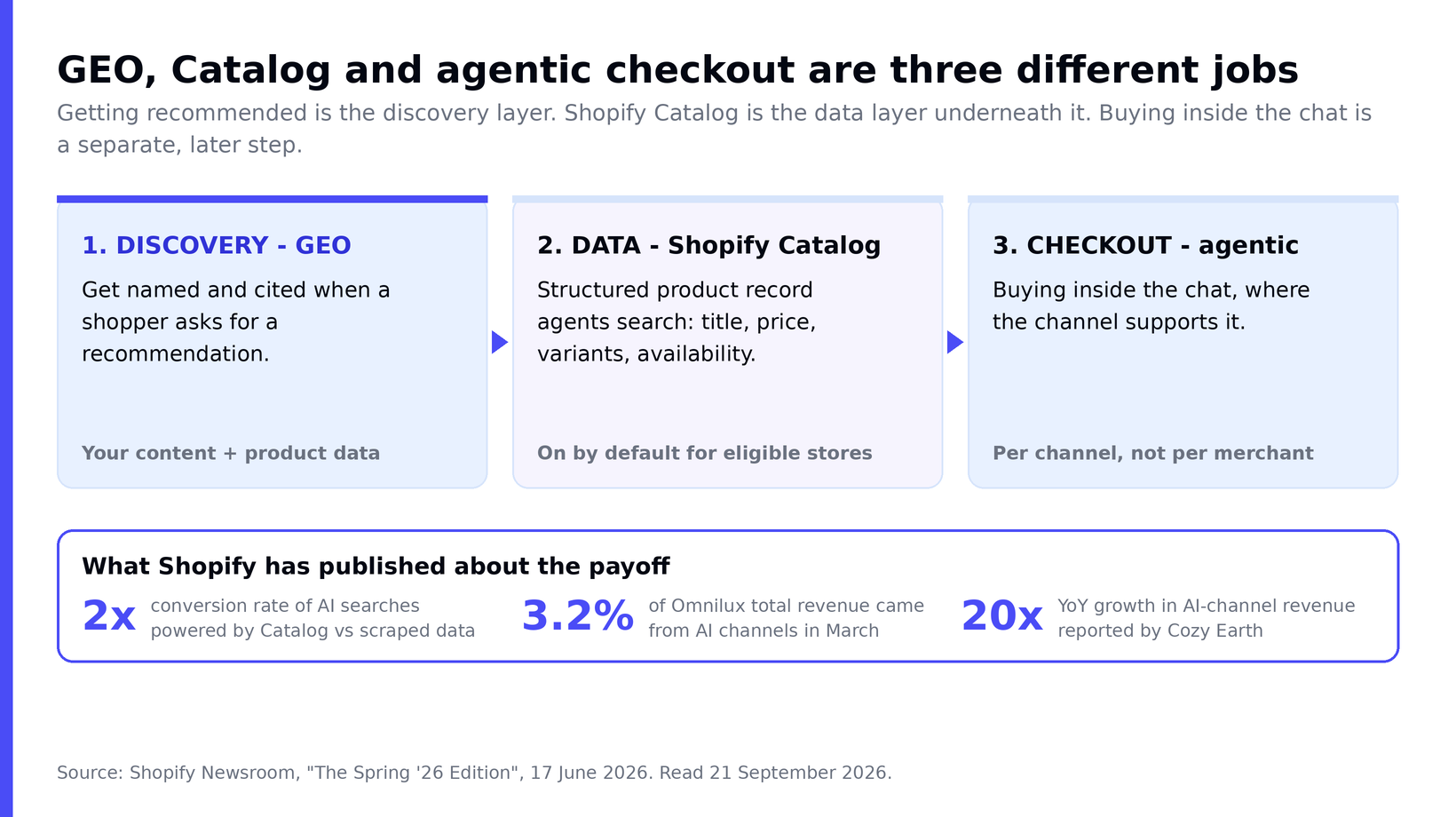
Discovery, data and checkout are three separate layers. GEO is the first one; Catalog is the second; whether a shopper can buy without leaving the chat is the third — and that one is decided per channel, not by you.
Shopify Catalog is a structured, global dataset of product information that agents can search. Shopify describes it as available "for any agent to read, not a closed list of partners", and merchants with eligible products are included by default. It syndicates your product details to ChatGPT, Copilot and the Shop app without any extra app or manual feed on your side.
Underneath it sits the Universal Commerce Protocol (UCP), co-developed by Shopify with Google as the shared standard for how agents and merchants transact. Catalog's data structure is based on UCP, and Shopify states that its merchants are UCP-enabled by default.
The third layer — whether the purchase completes inside the conversation or the shopper is sent to your store — is agentic commerce, and it works differently on every channel. GEO is how you get into the conversation. This guide is about that first layer, because if a model never names your store, the checkout question never comes up.
Why does GEO matter for Shopify merchants right now?
Because the structured-data channel measurably outperforms the scraped one, and because the merchants publishing real numbers are seeing it show up in revenue rather than just in sessions.
Three figures Shopify has published, all from its Spring '26 Edition announcement in June 2026:
- AI searches powered by Shopify Catalog convert at 2x the rate of those using scraped data.
- Red light therapy mask brand Omnilux saw AI channels drive 3.2% of total revenue in March.
- Luxury bedding brand Cozy Earth reported AI-channel revenue up 20x year over year.
Treat those honestly: they are Shopify's own published figures for named brands, not an independent study, and two of the three are single-merchant results. What they establish is direction and order of magnitude, not a benchmark you should expect to hit. The 2x figure is the most useful of the three, because it is a like-for-like comparison of the same channel with and without structured data — which is exactly the variable you control.
The strategic point is simpler than the numbers. This channel is still small for most stores, the work to compete in it is unglamorous product-data hygiene, and your competitors are mostly not doing it yet. For context on the wider shift, see our overview of AI in Shopify and the rise of AI shopping agents.
How is GEO different from traditional SEO?
GEO is not a replacement for SEO — it is built on top of it. Many AI systems still pull answers from web-search indexes, so your search ranking remains a direct input into whether a model recommends you. What differs is the shape of a win.
| Dimension | Traditional SEO | GEO |
|---|---|---|
| Goal | Rank in the top 10 links; earn the click | Get cited and recommended inside the answer |
| Result surface | Search results page (SERP) | A synthesized answer with a handful of cited sources |
| Winning unit | A ranking page | A quotable, self-contained fact — or a complete product record |
| Key signals | Backlinks, keywords, page experience | Structured product data, clarity, dated facts, third-party trust |
| Success metric | Clicks and rankings | Citations, AI-channel orders, agentic sessions |
| Where you edit it | Theme, content, meta tags | Your product records — plus your content |
That last row is the one most GEO guides miss for merchants. A blog post can be optimized for citation; a product cannot be "written for AI" in the same way, because what the agent reads is the structured record, not your page copy. Get the Shopify SEO fundamentals right first — there is no GEO shortcut around a slow, thin or unstructured store — then work the product data.
Shopify already grades your listings — read the scorecard first
Five named signals decide how complete your product record looks to an agent
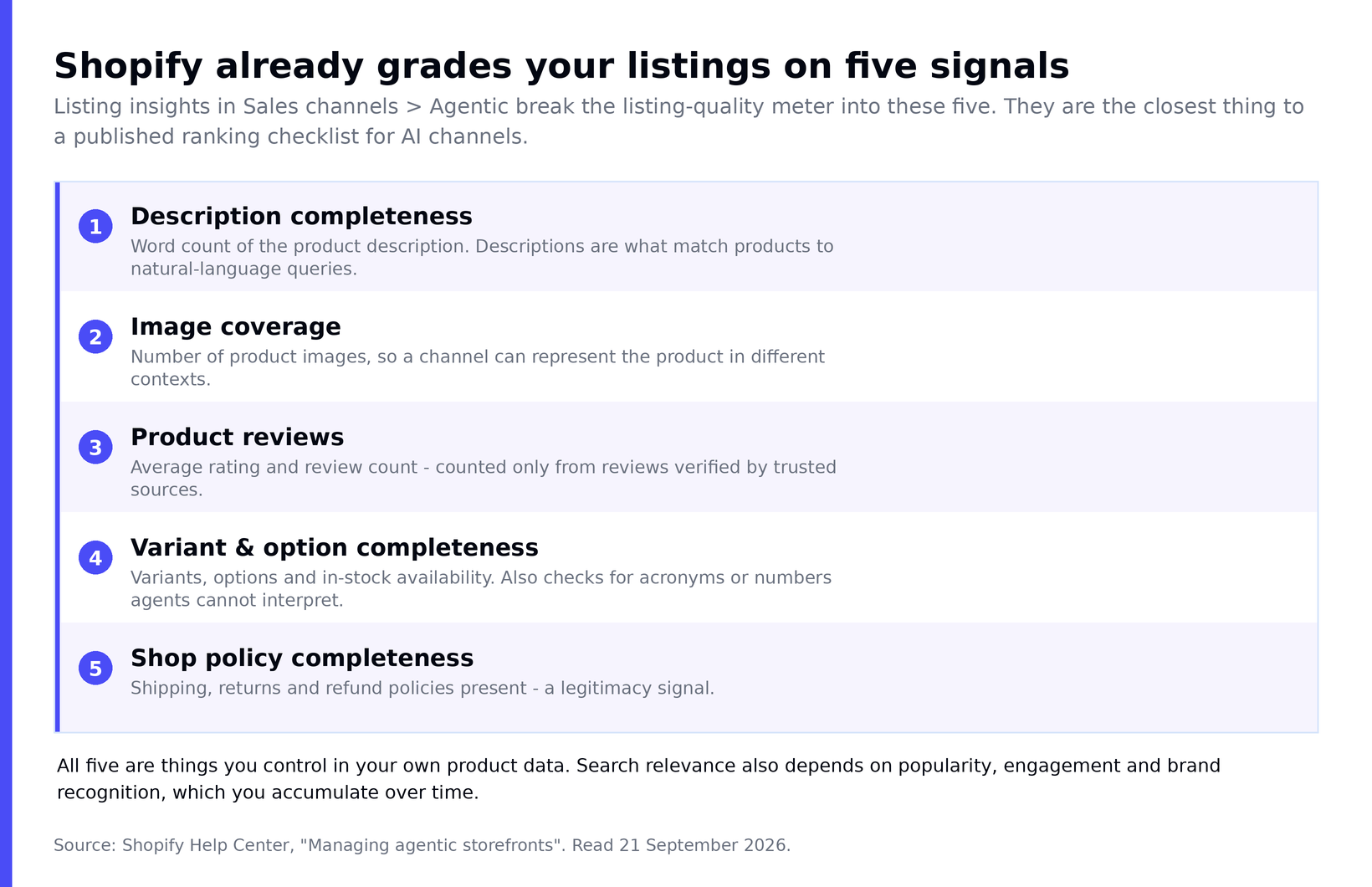
These five are published, not inferred. Each one is a field you already control in Shopify — which makes this the closest thing to an official ranking checklist that exists for AI channels.
Open Sales channels > Agentic in your admin, run a search, and expand any product. Shopify shows a Listing quality meter broken into Listing insights. According to Shopify's documentation, the five components are description completeness, image coverage, product reviews, variant and option completeness, and shop policy completeness.
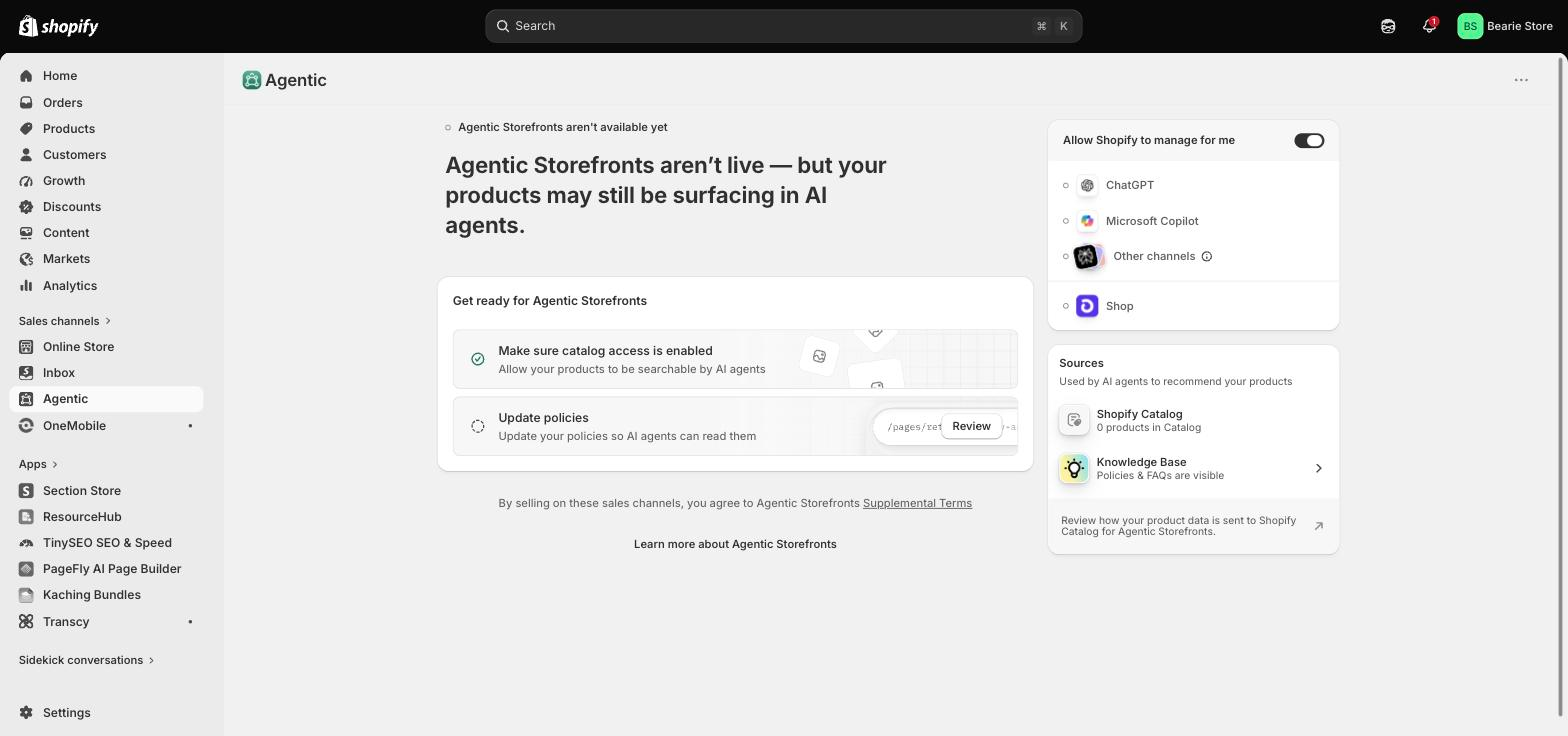
Two details in that documentation are worth reading carefully, because they change what you should do with the score. First, one of the checks on variants looks for "acronyms or numbers that are hard for agents to understand or recommend" — so an option named BLK-42-SLM is actively costing you, in a way no traditional SEO audit would flag. Second, product reviews are counted "only from reviews that are verified by trusted sources", so an unverified review widget contributes nothing here.
Shopify is also explicit about the limit: listing quality covers "what you can directly control with your products", while relevance also depends on popularity, engagement and brand recognition that accumulate over time. A perfect meter does not buy you a ranking. An incomplete one does reliably cost you a chance at it.
The Shopify GEO playbook: seven moves, in priority order
Ordered by leverage, not by how interesting they are. The first four map directly onto the five signals above, which is why they come first.
- Fix your worst descriptions before anything else. Description completeness is measured on word count, and Shopify names thin descriptions as a reason agents can't match a product to a natural-language query. Write what the product is, who it's for, materials, dimensions, fit, compatibility, care. Draft faster with an AI product description generator or Shopify Magic, then edit every line for accuracy.
- Rename any variant an agent can't read. Replace internal SKU shorthand with plain option names — size, color, material, style — and make sure in-stock availability is accurate. This is the cheapest of the five signals to fix and the one most stores fail.
- Add images that show detail, not just mood. Image coverage counts how many images a channel has to work with. Lifestyle shots alone leave an agent unable to represent the product in different contexts.
- Complete your shop policies. Shipping, returns and refund policies are scored as a legitimacy signal. It is a fifteen-minute job that most stores have half-finished.
- Choose the most accurate product category. Shopify maps products to its Standard Product Taxonomy and infers attributes like color, material, pattern and age group from there. A wrong category poisons every inference downstream.
- Put the most important facts early. Shopify's own guidance is that this matters "on surfaces where only part of your descriptions are shown" — which is most of them. The same discipline helps human buyers, and it is the core of good product page SEO.
- Then write the content layer. Comparison pages and buyer guides — "best X for Y" — match how people prompt, and they are the part of GEO that still works like classic SEO. This is where quotable, self-contained, dated facts earn citations.
What those first four moves look like on a single product
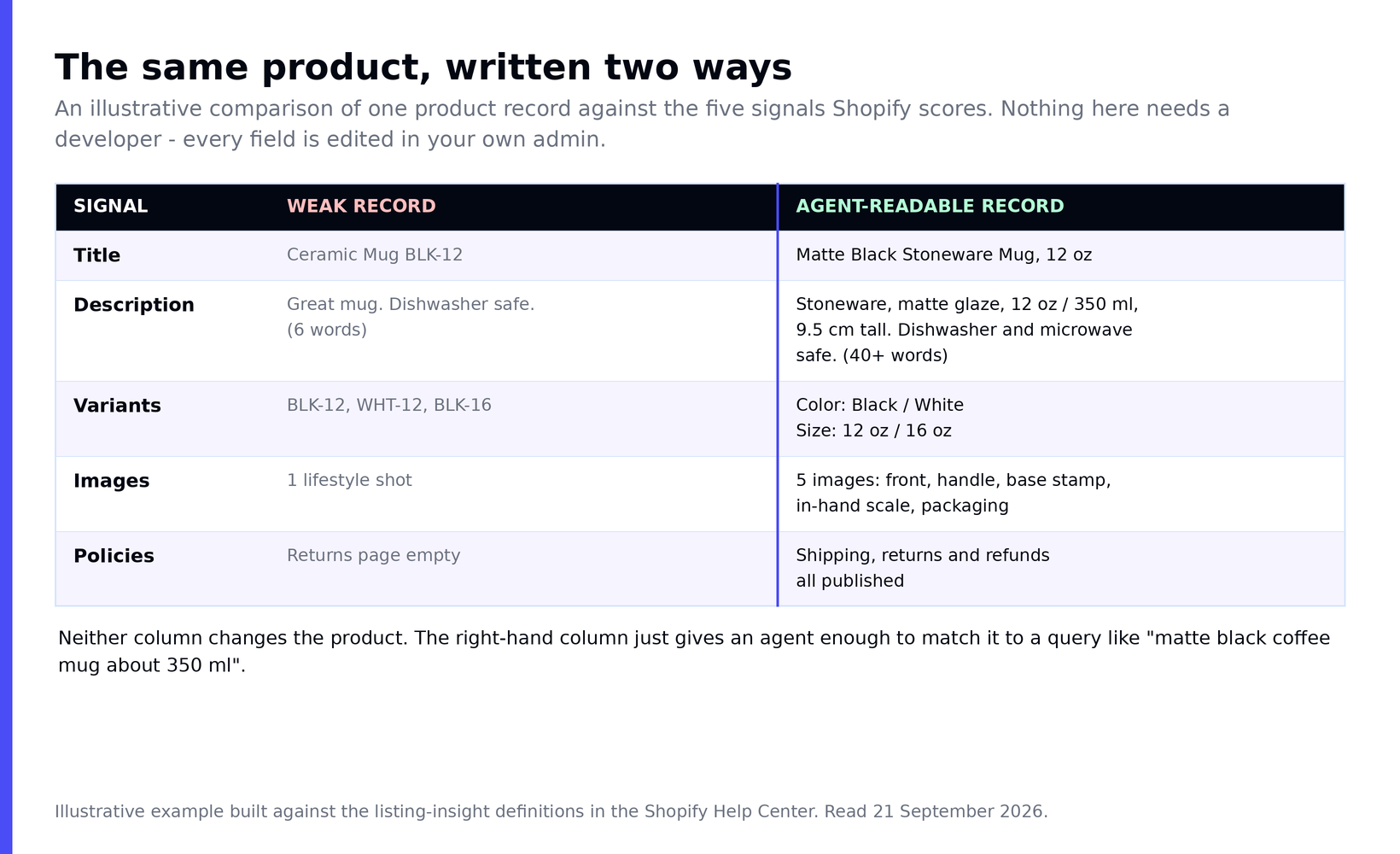
Nothing in the right-hand column changes the product or costs money — it is the same mug, described in a way an agent can actually match to a query.
Notice what is not on this list: building a feed. You don't need one. Shopify's position is explicit — eligible products are included without building a separate feed for each agent or channel.
How do you check whether any of it worked?
The loop now runs inside your admin, not inside a referrer report
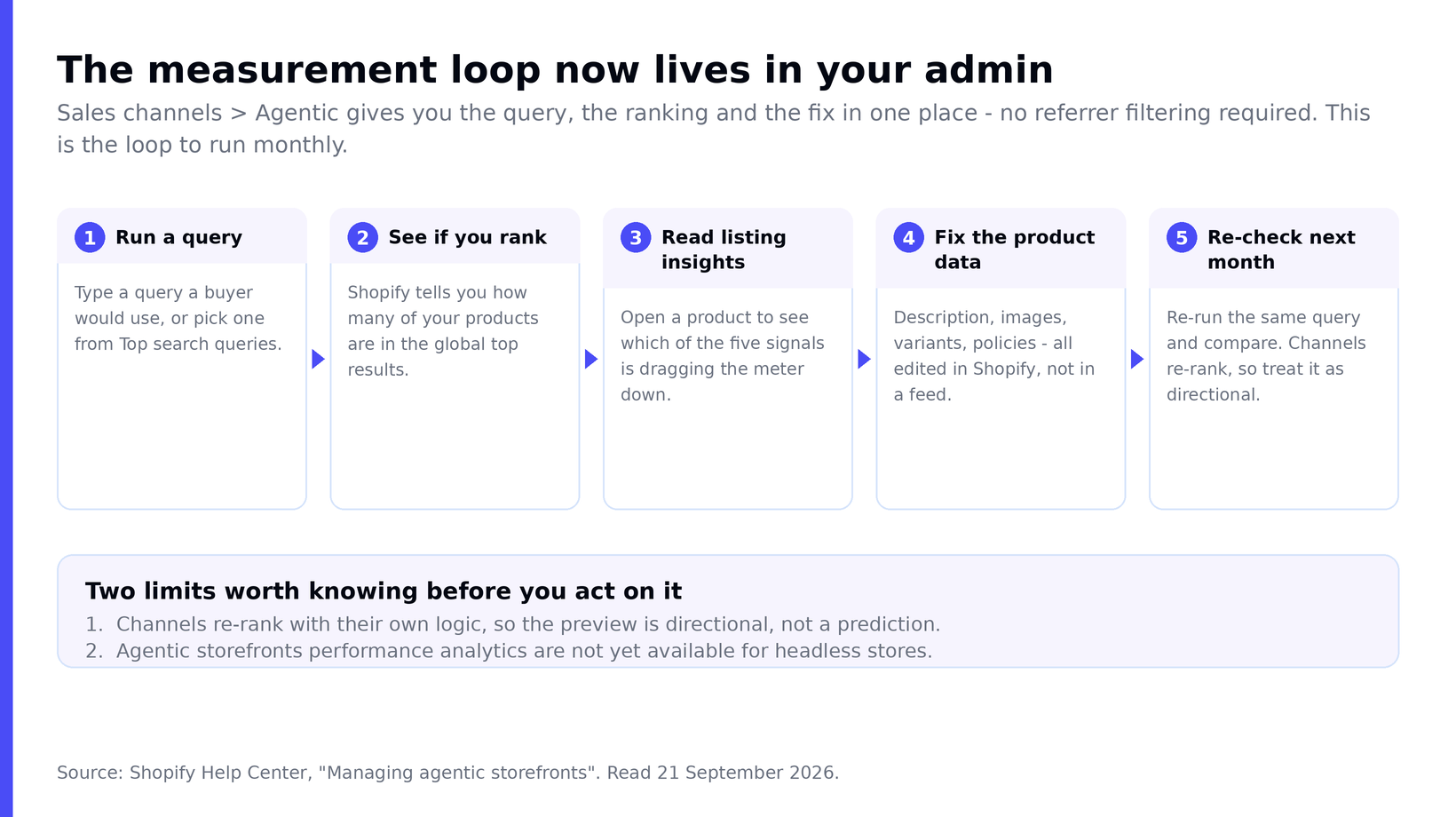
Run a query, see whether you rank, read the insights, fix the data, re-check next month. Five steps, one screen — and it replaces the manual referrer-filtering most GEO guides still recommend.
The search preview tool in Sales channels > Agentic lets you type a query the way a buyer would and see how your products might rank. Shopify describes it as displaying "the raw outputs of Shopify Catalog search". If any of your products land in the global top results you get a confirmation; if they don't, you can still review the products that were closest and read their listing insights to find out why.
Alongside it you get performance reporting per AI channel — sales, orders, online store sessions and conversion — covering ChatGPT, Copilot, AI Mode in Google Search, the Gemini app and Shop. Shop is worth calling out: it behaves as an agentic channel too, and every product published to your online store is discoverable there through Catalog.
Two limits to hold in mind. Shopify warns that channels "often re-rank results based on their own logic", so the preview is a directional signal rather than a prediction — use it to find gaps, not to declare victory. And agentic storefronts performance analytics are not yet available for headless stores, so if you run a custom storefront this reporting will not cover you.
Finally, keep prompt-testing by hand. Ask the engines the questions your buyers actually ask and note whether you're named, a competitor is, or nobody is. We compared the assistants themselves in Shopify Sidekick vs ChatGPT, and covered using ChatGPT for your Shopify store day to day.
How does PageFly fit into this?
Honestly: narrowly, and on the content layer rather than the product-data layer. Catalog reads your product records, not your page design, so no page builder — ours included — changes how your products are structured for an agent. Anyone telling you otherwise is overselling.
Where it does help is step 7 above, the comparison pages and buyer guides that still get discovered the classic way, and the landing pages that receive the shopper after an AI names you. Those pages need clean heading structure, fast load and content blocks a crawler can parse — which is what PageFly's visual editor is built to produce without touching code. Because the pages live at the app level, they also survive a theme change intact.
If you're weighing up your setup, our Shopify website builder comparison is the place to start, and the template library has comparison and buyer-guide layouts ready to adapt.
There is a second-order reason to care about that landing page. A shopper an AI sends you arrives cold and mid-decision — no browsing history, no session context, often inside a mobile in-app browser — so the page carries the entire conversion job the conversation used to share. Our CRO resources are the practical starting point for that half of the problem.
Do llms.txt and schema actually work yet?
This is where most GEO advice gets vague, so here is the state of each as of 21 September 2026.
| Tactic | Documented status | Verdict |
|---|---|---|
| Product / review / FAQ schema | Standard structured data; supports rich-result eligibility. No separate "AI markup" exists. | Do it. Most themes already emit product schema — verify, don't assume. |
| Shopify Catalog record quality | Documented, scored per product, and visible to you in the admin today. | Do it first. This is the highest-certainty lever available. |
| llms.txt | A proposed root Markdown file. Absent from Shopify's Catalog and agentic-storefronts documentation entirely. | Optional. Cheap, unproven, and not the mechanism Shopify actually ships. |
The honest summary: schema earns you eligibility on the crawl-based half of AI search, Catalog record quality decides the structured half, and llms.txt is a low-cost bet with no published evidence behind it. If you only have a morning, spend it on the five listing signals rather than on a file no engine has confirmed it reads.
Shopify GEO FAQ
Do I need to do anything to get into Shopify Catalog?
No. Merchants with eligible products are included by default, and there is no feed to build. Eligibility depends on requirements that can include supported markets, product policy rules and a price above zero. You can confirm and control your participation in Sales channels > Agentic.
Can I stop my products being shared with AI channels?
Yes. Turning off Allow Shopify to manage for me lets you manage Catalog access per channel, and turning off Catalog access entirely removes third-party agentic access from that point on. Shopify notes it can take up to seven days for your product data to stop being shared. Your products can still be discovered through ordinary web crawling and indexing afterwards.
Does GEO replace SEO for a Shopify store?
No. AI systems still lean on web-search indexes, so an un-rankable page remains an un-citable page. GEO is an additional layer over solid SEO, with a second front — your product records — that traditional SEO never touched.
How is GEO different from agentic commerce?
GEO is discovery: getting named and cited when a shopper asks. Agentic commerce is the transaction: whether the purchase completes inside the conversation. They are separate, and checkout behaviour is decided per channel rather than per merchant.
Why isn't my product showing up in an AI answer?
Catalog makes your data available; it does not guarantee placement. Each agent decides what to show, weighing the request, data quality, availability, price, shipping and trust signals. The lever you control is the completeness and accuracy of your own product record — which is exactly what listing insights score.
How often should I re-check?
Monthly is a sensible cadence for re-running your key queries and comparing. Product-data fixes are not instant, channels re-rank on their own logic, and week-to-week movement in this channel is mostly noise.
Where to start this week
One morning, in this order. Everything below happens in your own admin.
| # | Do this | Where | Time |
|---|---|---|---|
| 1 | Run the three queries you most want to win; note which products appear | Sales channels > Agentic, search preview | 15 min |
| 2 | Open your five worst-scoring products and read their listing insights | Same screen, expand each product | 20 min |
| 3 | Rename any SKU-style variant options to plain size / colour / material | Products > Variants | 30 min |
| 4 | Publish any missing shipping, returns or refund policy | Settings > Policies | 15 min |
| 5 | Rewrite the two thinnest descriptions with materials, size and fit | Products > Description | 40 min |
| 6 | Diarise a re-check of the same three queries | Next month | 2 min |
The merchants who build this position while the channel is still small are the ones AI will already be recommending when it isn't. If you want the transaction side of the story next, read what happened to Shopify's instant checkout, and how Shopify conversion rate work pays off once those buyers land on your store.
Sources, all read 21 September 2026:
- Shopify Newsroom, "Selling everything, everywhere, all at once: The Spring '26 Edition", 17 June 2026.
- Shopify Help Center, "Managing agentic storefronts".
- Shopify, "What Is Shopify Catalog and How Does It Work?", 16 June 2026.
Shopify Geo FAQ
No. Merchants with eligible products are included by default, and there is no feed to build. Eligibility depends on requirements that can include supported markets, product policy rules and a price above zero. You can confirm and control your participation in Sales channels > Agentic.
Yes. Turning off 'Allow Shopify to manage for me' lets you manage Catalog access per channel, and turning off Catalog access entirely removes third-party agentic access from that point on. Shopify notes it can take up to seven days for your product data to stop being shared. Your products can still be discovered through ordinary web crawling and indexing afterwards.
No. AI systems still lean on web-search indexes, so an un-rankable page remains an un-citable page. GEO is an additional layer over solid SEO, with a second front - your product records - that traditional SEO never touched.
GEO is discovery: getting named and cited when a shopper asks. Agentic commerce is the transaction: whether the purchase completes inside the conversation. They are separate, and checkout behaviour is decided per channel rather than per merchant.
Catalog makes your data available; it does not guarantee placement. Each agent decides what to show, weighing the request, data quality, availability, price, shipping and trust signals. The lever you control is the completeness and accuracy of your own product record - which is exactly what listing insights score.
Monthly is a sensible cadence for re-running your key queries and comparing. Product-data fixes are not instant, channels re-rank on their own logic, and week-to-week movement in this channel is mostly noise.